 Fellow Canadians: All inFlow plans are available in Canadian dollars




If you’ve stumbled on this article, you’re probably weighing which inventory system can actually keep up with a business like yours, where fast-moving common collectibles and irreplaceable pieces live under the same roof.
That’s a tricky thing to shop for. Most inventory software was built for businesses selling the same boxed product over and over. Collectibles don’t work that way, and the gaps sometimes don’t show up until after you’ve bought the software.
To be fully transparent, we want to mention that we do have some skin in the game. We make inventory software, and while we’d love for you to choose us, a bad fit helps nobody. So this guide is written to help you make the right decision for your business, no matter the software. Inside, you’ll find:
- The inventory problems collectibles sellers run into most, drawn from our conversations with card shops, coin dealers, memorabilia sellers, and pop culture retailers
- The features that matter for this market, and why each one earns its spot
- A seven-step process for comparing systems without getting lost in sales pitches
- A candid look at when inventory software is (and isn’t) worth it
It’s a good time to get this right. Mordor Intelligence projects the trading card game market will climb from roughly $15.11 billion in 2026 to $24.36 billion by 2031. On the live-selling side, Whatnot’s latest report put 2025 live-sales GMV above $8 billion, more than twice the prior year. More buyers and more channels are great for sales. They’re less great for a spreadsheet.
By the end of this guide, you’ll have a clear checklist of what your business needs, a list of pointed questions for every demo, and a much better sense of which systems can keep up with you.
Who this buyer’s guide is for
We wrote this for owners and operations leads at small to mid-sized collectibles businesses. That’s especially true if you’re buying inventory software for the first time:
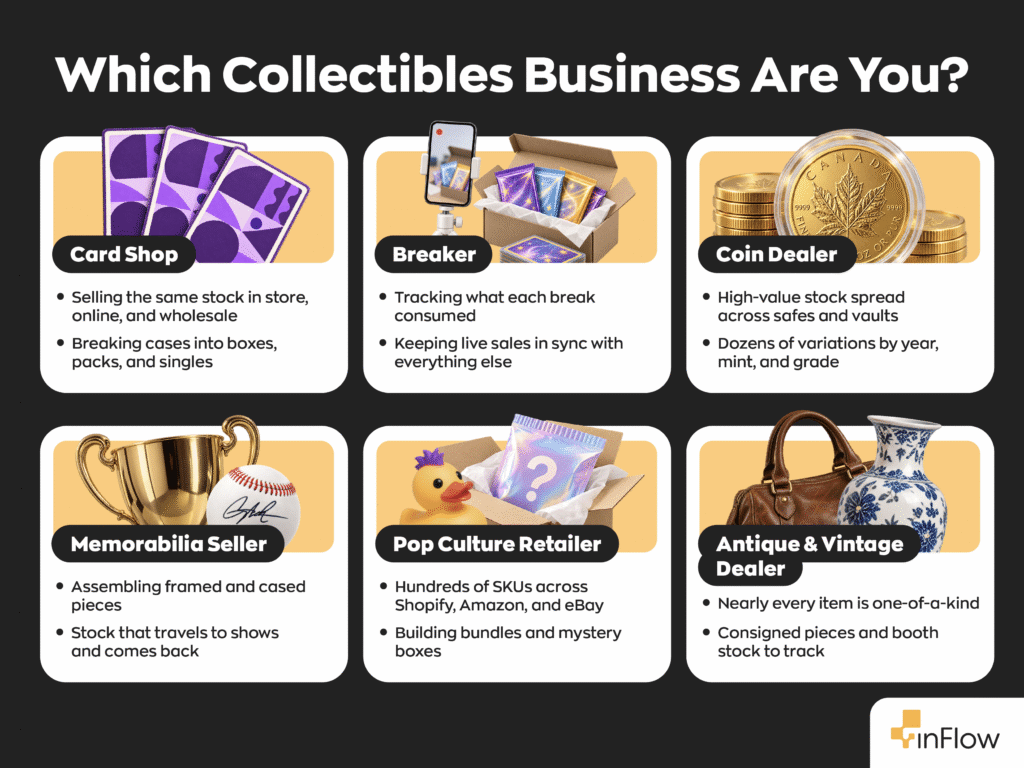
- Trading card shops, breakers, and distributors: Sports cards and TCGs like Pokémon, Magic: The Gathering, and One Piece, with sealed product, singles, live breaks, and repacks, and often a wholesale side too.
- Coin, bullion, and precious-metals dealers: Compact, high-value stock spread across safes and vaults, plus over-the-counter buying and assembled sets.
- Sports and entertainment memorabilia sellers: Signed jerseys, photos, and figures, some framed or cased in-house and many sold at conventions.
- Pop culture collectibles retailers: Funko, anime and action figures, imports, and comics, usually with a big catalog and five or more sales channels.
- Antique, vintage, and auction businesses: Mostly one-off pieces, frequently on consignment, sold at shows, malls, and auction events.
- Collectibles supply retailers: Sleeves, holders, capsules, albums, and storage for the collectors everyone else sells to.
Who this isn’t for: If your business is mostly tens of thousands of individual singles, each with its own condition and a price that moves daily, a dedicated singles and marketplace-pricing platform will likely serve you better. The same goes for pickers and estate resellers without a repeatable product list. When nearly everything you sell is a one-time find, setting each item up in inventory software costs more time than it saves.
Inventory challenges for collectibles businesses
Every collectibles segment has its own quirks, but the same handful of headaches keep coming up in our conversations. Here’s what they look like in practice.
One-of-a-kind items next to everyday stock
Walk into almost any collectibles shop, and you’ll find two inventories living side by side. One is made of irreplaceable pieces: a slabbed Charizard, a game-worn jersey, an 1893-S Morgan dollar, a Victorian mantel clock. Meanwhile, the other is made of things you’ll sell a hundred times: sealed booster boxes, silver rounds, the newest Funko wave, top loaders.
Those two inventories need opposite things. Irreplaceable pieces need to be tracked individually. Everyday stock needs reorder points so it never runs dry. Plenty of systems are great at one and clumsy at the other.
And the cost of getting it wrong is lopsided. For example, oversell a booster box, and you might delay order fulfillment by a week. Oversell the only copy of a signed photo, and you’ve got a refund, an unhappy customer, and possibly even a marketplace strike.
Breaking down cases and building repacks, sets, and bundles
In most industries, what comes in the door is what goes out. In collectibles, products change shape constantly:
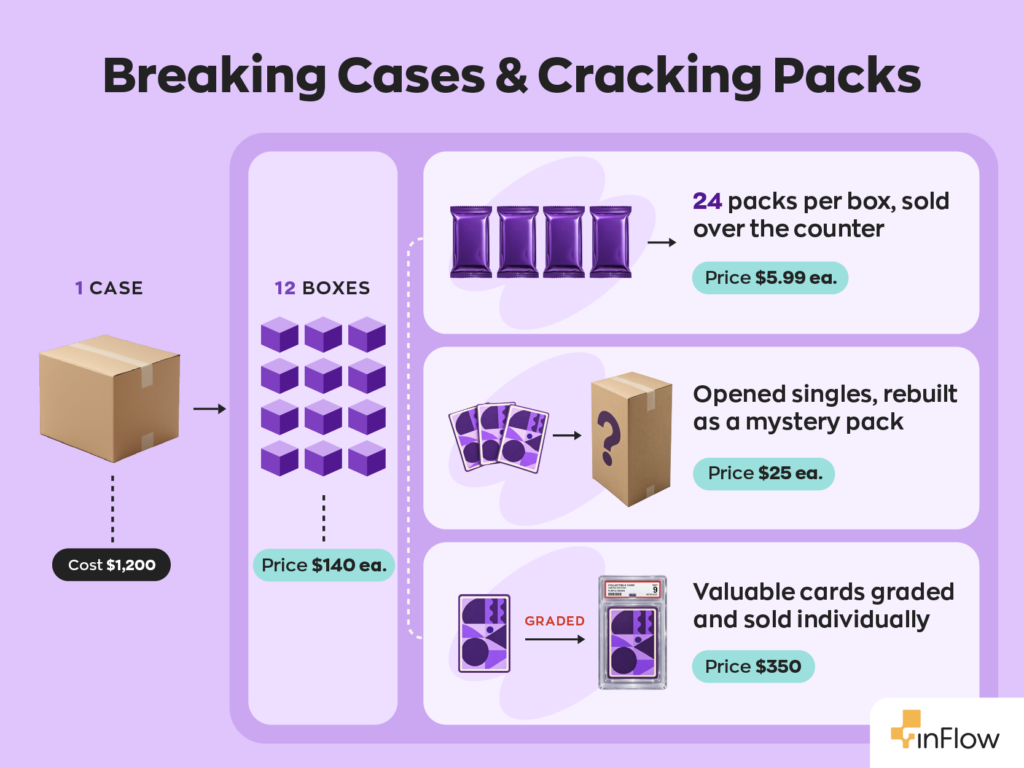
- A sealed case gets cracked into hobby boxes, the boxes into packs, and the packs into singles.
- Loose cards get sorted and sold as value-tiered repacks.
- Individual gold and silver coins become a boxed set.
- A signed jersey plus a frame, matting, and a nameplate becomes a finished display piece.
- A shelf of blind-box figures becomes a run of mystery boxes.
Each of those conversions changes your counts and your costs. If the software can’t follow the product through every form, the numbers get a little less trustworthy every time someone opens a case.
Endless variations of the same item
Ask a coin dealer how many versions of one coin they carry, and you might get a long pause. After all, year, mint mark, and grade multiply fast. One dealer we spoke with said a single coin could run to 20 to 30 variants, which had ballooned their catalog into thousands of individual records.
Similarly, cards have the same problem with sets, parallels, and print runs. Figures have store exclusives and chase versions. Even memorabilia has it: the same signed figure in blue, silver, and gold ink is three different products to a collector.
Treat each version as a totally separate item, and your catalog becomes impossible to browse. Lump them together, and you lose track of what you actually have.
Preventing overselling across multiple sales channels
Collectible sellers are some of the most multichannel businesses out there. A typical week might include walk-in sales, a Shopify or WooCommerce store, eBay, Amazon, Walmart, TCGplayer, a weekend show, and a few wholesale orders that arrive as text messages.
Live selling has piled on even more. Sports cards ranked as Whatnot’s top US category in its 2026 report, and coins, bullion, and figures now sell live too, across Whatnot, eBay Live, Fanatics Live, and TikTok.
Every one of those buyers is reaching for the same physical stock. When a card sells on a live stream at 9 p.m., your website needs to know about it before someone else clicks “buy.”
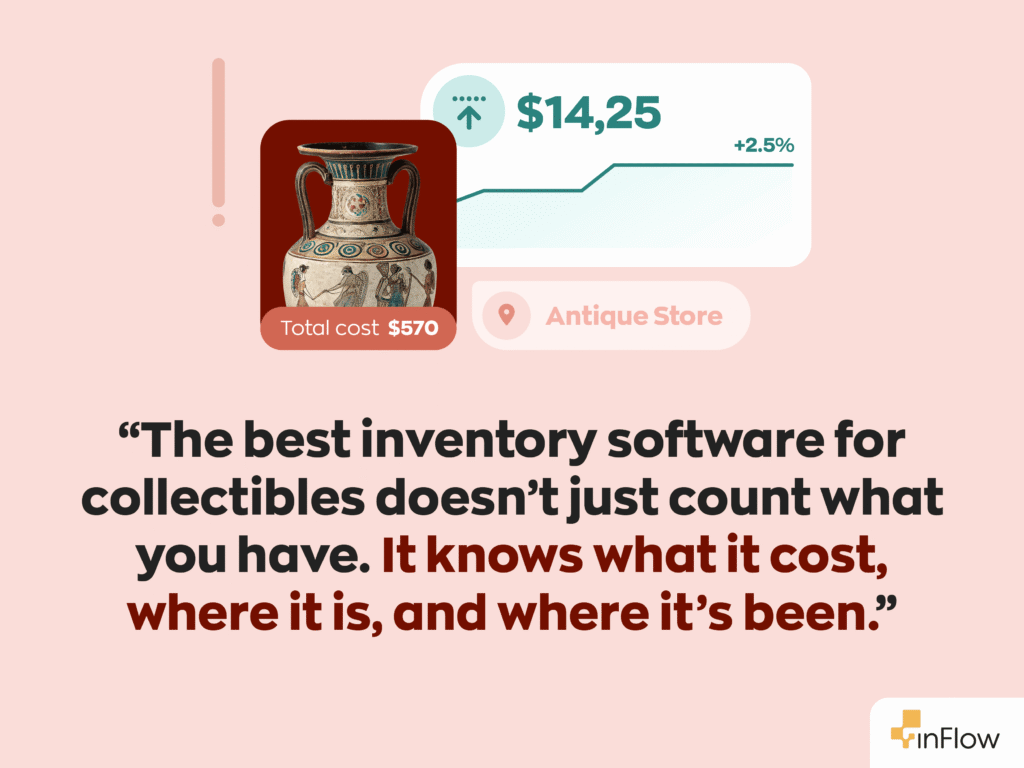
Knowing your true cost of goods sold
Very few industries source inventory from as many places as collectibles. Distributors, secondary markets, auction wins, estate buyouts, imports, and customers who walk in with a binder of old cards all feed the same shelves.
So two identical items can have very different costs. A silver eagle bought from a wholesaler and one bought from a customer’s coin jar aren’t the same line on your books. Add breaks, repacks, and sets into the mix, and it’s easy to lose the thread entirely.
One card distributor we spoke with was running around half a million dollars of inventory through spreadsheets every month. Their verdict? The spreadsheets were actively losing them money.
High-value inventory that’s easy to lose
Here’s a fun fact people working in the industry might not find that fun: collectibles are some of the easiest inventory in the world to misplace. That’s because they’re small, they’re valuable, and they’re spread across display cases, back-room shelves, overflow storage, safes, and vaults.
When an item isn’t where it’s supposed to be, you can’t tell whether it was misfiled or walked out the door. Businesses that get this right tend to get very specific. One collector we spoke with mapped storage all the way down to Room → Shelf → Row → Position → Depth. It sounds like a lot until you’re hunting for a single coin worth more than your monthly rent. Frequent scanned counts are the other half of the fix, and they’re the best defense against inventory shrinkage, particularly for coins and metals.
Inventory that leaves and comes back
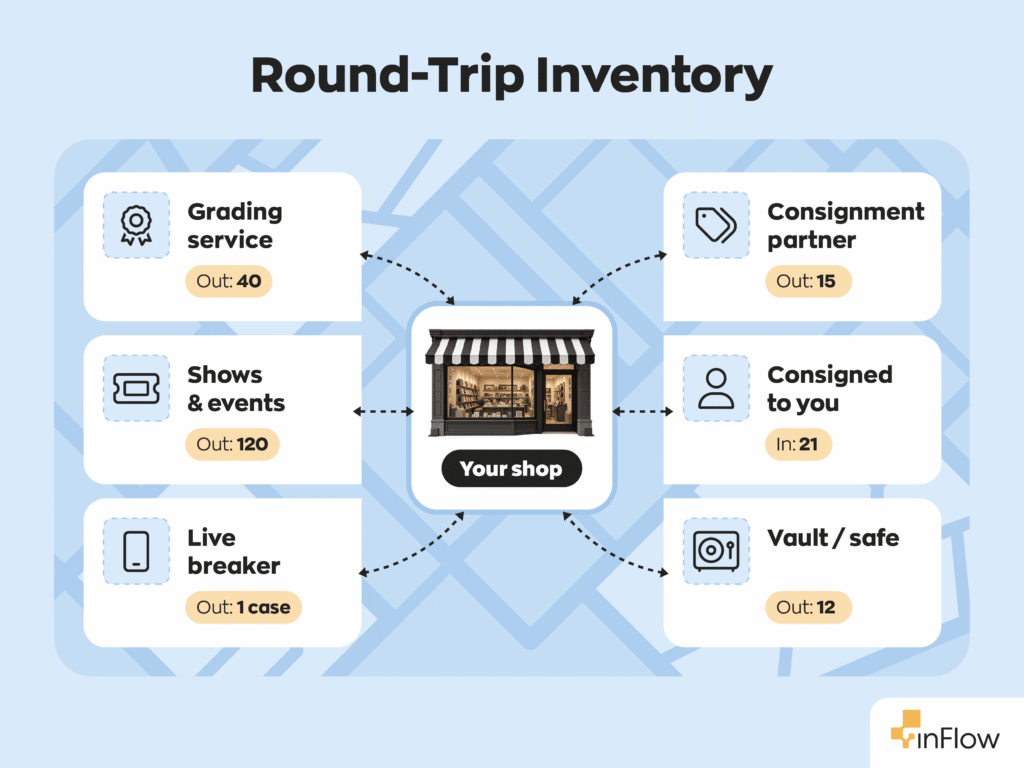
Some of your most valuable stock spends a surprising amount of time somewhere other than your store:
- At the grader: Raw cards, coins, and comics ship off for grading and authentication. What comes back is often a different, more valuable product than what left.
- On consignment: You may be selling items that belong to someone else, which is common for card shops, coin dealers, antique sellers, and auction houses. Or you may have your own stock sitting with a breaker or in an antique mall booth.
- At a show: Boxes go out to a card show, comic con, or auction weekend, and the unsold pieces need to come back and be counted.
- Through buybacks: Sometimes a big hit you sold from a break comes right back to you.
Each of these is a round trip. If your system only understands “in stock” and “sold,” anything in transit just vanishes from view.
Planning inventory around release days, pre-orders, and price swings
New card sets, coin issues, and figure drops don’t trickle in. They land all at once. Pre-orders open weeks early, distributor allocations shift, and release week can outsell the rest of the month combined. Meanwhile, prices on singles, graded pieces, and bullion can move overnight.
Order too little and customers buy their boxes somewhere else. Order too much and cash gets stuck in product that may be worth less by the time it sells. Good demand forecasting helps, but only if your sales history is clean enough to forecast from. And a stockout on release week costs far more than one in a slow month.
It also helps to think about your inventory in groups, because each group misbehaves in its own way:
- Sealed and new-release product (card boxes, figure releases, new coin issues)
- Challenge: Bought in one unit and sold in several; demand spikes around release
- Graded, authenticated, and one-of-a-kind items (slabs, certified coins, signed memorabilia, antiques)
- Challenge: Every unit is unique and high value, so one mix-up is costly
- Assembled and repacked products (repacks, mystery boxes, coin sets, framed pieces)
- Challenge: Built from other inventory, so cost has to follow the components
- Collector supplies (sleeves, holders, capsules, albums, storage boxes)
- Challenge: Low value, high volume, and easy to forget to reorder
Essential features every collectibles business needs
A generic retail system can technically hold your catalog. The features below are what separate “technically works” from “actually fits.” They’re listed roughly in order of how much they matter for collectibles.
Assembly, bundling, and breakdown
This one sits at the top for a reason. Almost every collectibles business converts products from one form to another, sometimes dozens of times a week. Breakers live on it. Coin dealers build sets with it. Memorabilia sellers can’t frame a jersey without it.
What to look for:
- Units of measure, so a case can come in as one unit and go out as boxes or packs (or a tube of coins can go out coin by coin)
- Bundles and kits for repacks, mystery boxes, and gift sets
- A bill of materials and assembly orders for built pieces like coin sets and framed displays
- Disassembly, for when a product needs to go back to its parts
- Costs that follow the product through every step
Skip this, and you’ll know how many repacks you sold but not whether any of them made money.
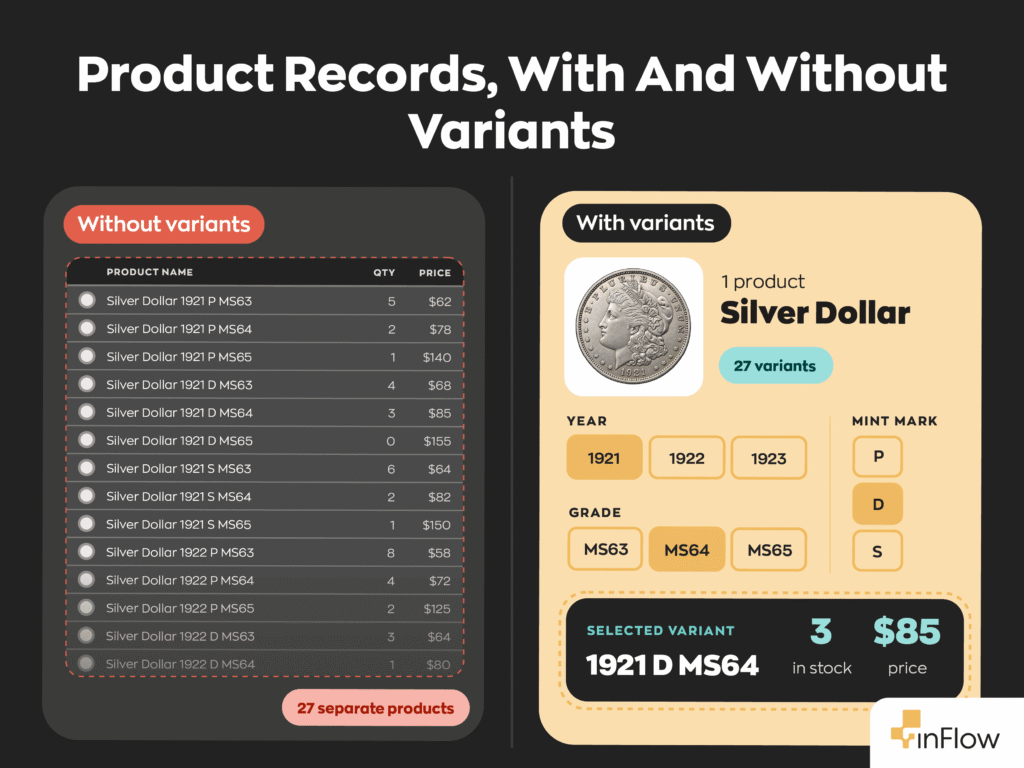
Product variants
Variants give every version of an item its own identity without turning your catalog into a phone book. For example, think one parent product for a particular coin, with each year and grade underneath it. Or one figure with its standard, exclusive, and chase versions grouped together.
What to look for:
- One parent product per item
- Options for year, mint, grade, edition, or signature color
- Stock, price, and SKU tracked separately for each version
- Variant sync with your online store, so shoppers see the same options you do
The payoff shows up every time someone on your team searches for a product and finds it on the first try.
Serial numbers, lot tracking, and custom fields
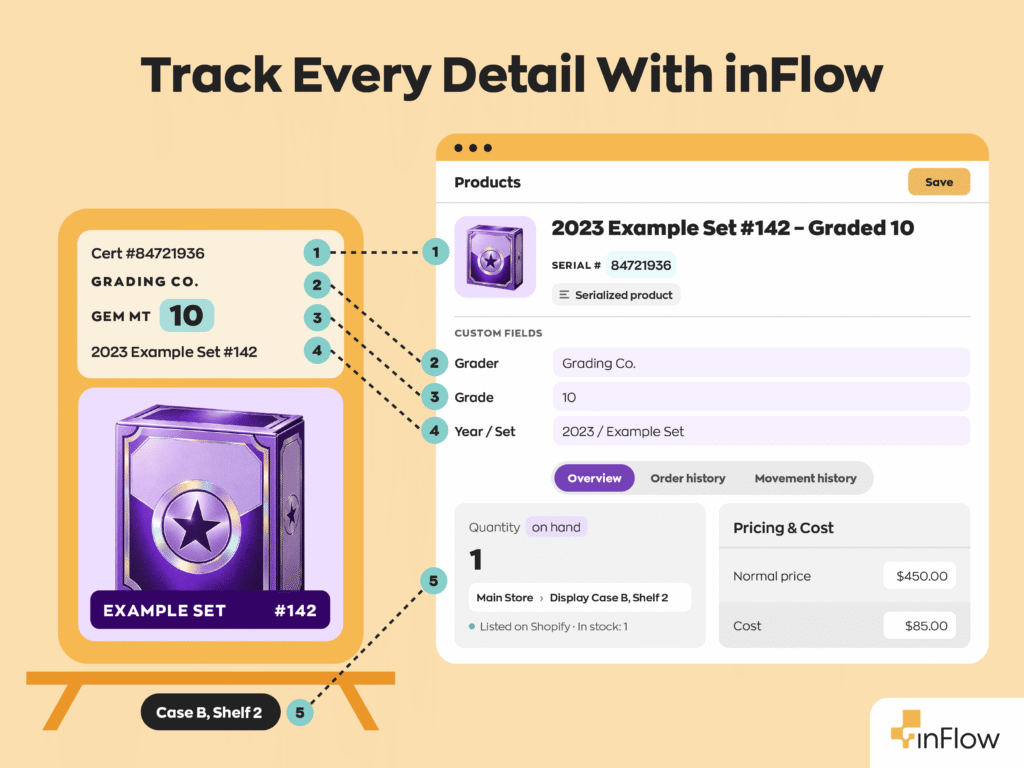
For your most valuable pieces, “we have three” isn’t enough information. You need to know which three, what grade each one received, and who authenticated them.
What to look for:
- Serial number tracking for unique pieces (grading certificate and COA numbers make natural serials)
- Lot or batch tracking for bulk buys, like a whole purchased collection or a lot of scrap silver
- Custom fields for grader, grade, year, set, and authenticator
- Product images
When a buyer disputes a sale or an insurer asks for records, this is the data you’ll be glad you kept.
Multichannel sales integrations
With so many channels drawing on one shelf, your inventory system has to be the referee. A sale anywhere should update availability everywhere, fast.
What to look for:
- Built-in connections to your storefront and POS
- Marketplace integrations
- Automatic stock updates across every connected channel
- An open API for anything that isn’t connected out of the box
Be very specific about live selling and TCG marketplaces. Ask each vendor to show you exactly how a Whatnot or TCGplayer order gets into their system. Direct integrations with those platforms are rare (we don’t have them either), so you’ll want to see the workaround before you commit.
For businesses selling unique items, sync speed isn’t a convenience. It’s your protection against selling the same grail twice.
Multi-location inventory tracking and stock transfers
Your inventory doesn’t live in one place, and some of the places it goes aren’t even yours. A good system treats every spot stock can sit as a location you can track, including the temporary ones.
What to look for:
- Permanent locations for your storefront, warehouse, and safe or vault
- Temporary locations for shows, graders, and consignment partners
- Sublocations down to the shelf or bin
- Transfers that record every trip out and every return
This is how “I think it’s in one of the vaults” becomes “Vault 2, shelf C, bin 4.”
Barcode scanning and mobile access
Typing SKUs by hand is slow, and it’s where most counting errors start. Conversely, scanning makes receiving, picking, and audits faster and far more accurate. If barcodes are new to you, our barcoding guide is a good starting point.
What to look for:
- Barcode generation and label printing inside the system, including bulk labels for repacks and assembled products
- Support for both phone cameras and dedicated scanners
- A true mobile app for receiving, picking, counting, and audits
A scan on the sales floor beats a note on a sticky pad that someone promises to enter later.
Cost tracking and reporting
Collectibles margins can look great on a single sale and terrible across a month. Reporting is how you see which one you’re actually running.
What to look for:
- Multiple costing method’s to choose from
- Several vendors and vendor prices on the same product
- Item-level cost entry for pieces bought from individuals
- COGS and profit reports by product, category, and sales channel
- An integration to your accounting software
These reports answer the questions that shape your business, like whether live breaks earn more than your storefront, or whether that show weekend was worth the booth fee.
Reorder management
Grails get the spotlight. Meanwhile, sleeves, top loaders, capsules, and steady-selling sealed product do the quiet work of keeping the lights on. Run out of any of them and you lose sales you’ll never even see.
What to look for:
- Reorder points and alerts when stock runs low
- Suggested reorder points based on your sales history and supplier lead times
- Purchase orders you can email straight to suppliers
- Partial receiving, for allocations that arrive in stages
Getting this right means release week becomes something you plan for instead of something you scramble through.
User access rights and permissions
The smaller and pricier your inventory, the more it matters who can move it and who can see what it cost.
What to look for:
- Permissions by role, like staff who can receive shipments but can’t see cost
- Restrictions by location, so only certain people can touch the vault
- A history of who moved what, and when
Clear permissions protect your margins and your staff. When every movement has a name attached, nobody gets wrongly blamed for a miscount.
B2B ordering for wholesale customers
Lots of collectibles businesses sell wholesale on the side, and a lot of those orders show up as a text that says “can you hold two cases for me?” That’s fine until two buyers get promised the same cases.
What to look for:
- A private portal where wholesale customers place their own orders
- Pricing tiers for specific customers
- Real-time stock levels, so buyers only order what exists
Your wholesale buyers get a better experience, and you stop digging through message threads to rebuild an order.
Inventory software evaluation: A step-by-step process
Knowing which features you need is half the job. The other half is testing whether a system delivers them under the conditions your business actually faces. These seven steps will get you there.
Step 1: Assess your current workflow and requirements
Start with a clear-eyed look at your own operation. Write down honest answers to these questions before you talk to a single vendor:
- Roughly what share of your inventory is unique items versus repeat stock?
- What do you assemble or break down, and how often?
- How many variations of the same item do you carry?
- Where does stock live, including safes or vaults?
- Which channels do you sell on today, and which are you planning to add?
- What’s your monthly order volume, and how much does it jump around releases?
- How often does stock leave for grading, consignment, or events?
- Do you buy from individuals?
- Do you know your true COGS right now? What is idle stock costing you in carrying costs?
Your answers become the scorecard for everything that follows.
Step 2: Define your must-haves, nice-to-haves, and deal-breakers
No system will be perfect, so decide in advance where you can give some wiggle room and where you can’t:
- Must-haves: You can’t run the business without these
- Nice-to-haves: These would help, but you can live without them for now
- Deal-breakers: Any one of these rules a system out, no matter how good the rest looks
What goes in each bucket depends on what you sell and where you sell it. If most of your inventory is one-of-a-kind, serial tracking is a must-have. If you build repacks, coin sets, or framed pieces, so are assembly features. And if Whatnot drives a big share of your sales, decide now whether entering those orders by hand is acceptable or a deal-breaker.
Step 3: Research and shortlist software options
With your scorecard ready, narrow the field to three or four candidates. Before you compare individual products, it helps to know which kind of tool you’re shopping for. Collectibles sellers usually end up choosing between:
- General inventory platforms that handle sealed product, assembled items, multiple locations, and wholesale alongside retail
- TCG-specific tools built around high-volume singles and marketplace pricing
- POS-first systems that are strong at the counter but lighter on purchasing, assembly, and multichannel sync
- Spreadsheets paired with marketplace tools, which work early on but break down as channels and volume grow
Once you know which category fits your mix, look for these good signs:
- Customers who look like you (retail, ecommerce, or collectibles)
- Integrations with the channels where most of your revenue comes from
- Mobile scanning that works well on a phone
- Support you can actually reach when something breaks
- Every one of your must-haves, and none of your deal-breakers
Step 4: Request demos that showcase your specific workflow
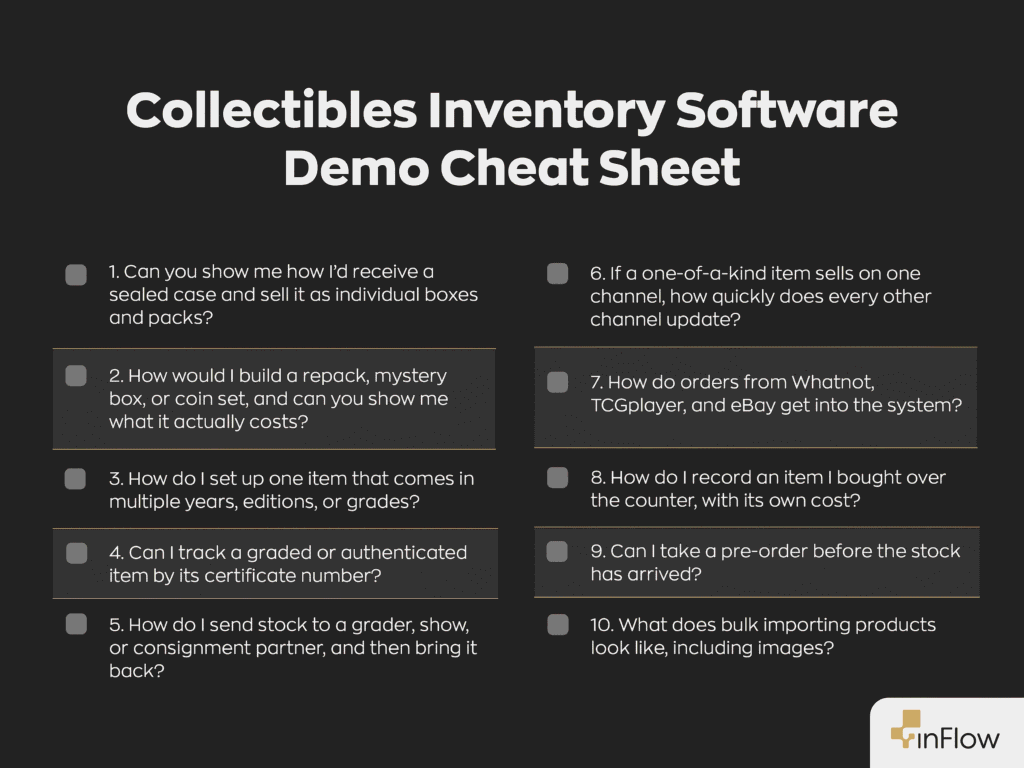
Here’s where you learn the most, as long as you drive the demo. Vendors are happy to show off their best features. Your job is to make them show you your specific workflow instead. Ask these questions:
- Can you show me how I’d receive a sealed case and sell it as individual boxes and packs?
- How would I build a repack, mystery box, or coin set, and can you show me what it actually costs?
- How do I set up one item that comes in multiple years, editions, or grades?
- Can I track a graded or authenticated item by its certificate number?
- How do I send stock to a grader, show, or consignment partner, and then bring it back?
- If a one-of-a-kind item sells on one channel, how quickly does every other channel update?
- How do orders from Whatnot, TCGplayer, and eBay get into the system?
- How do I record an item I bought over the counter, with its own cost?
- Can I take a pre-order before the stock has arrived?
- What does bulk importing products look like, including images?
If a rep answers with “we can probably do that” instead of showing it, write that down. It usually means the answer involves a workaround of some sort.
Step 5: Evaluate total cost of ownership and implementation
The sticker price is only where the real cost starts. Build a full picture that includes:
- Subscription fees (monthly or annual)
- Per-user pricing
- Onboarding and setup fees
- Time your team will spend in training
- Scanners, label printers, and mobile devices
- Integration costs
- Fees for third-party marketplace connectors
- Sales order caps, and what happens when release week blows past them
- Paid add-ons for serial tracking, extra locations, or assembly features
- Contract length and cancellation terms
- Ongoing support costs
Plans with order caps deserve a close look. A plan that fits an average month can get expensive fast when a hot set drops.
Step 6: Request references and case studies
A vendor’s own marketing will always look good. Their customers will tell you the rest. Ask for references in your specific segment, since a coin dealer and a card breaker will stress a system in very different ways. Then ask them:
- How long did it take them to get fully up and running?
- What was harder than they expected?
- What do they wish the software did that it doesn’t?
- How do they handle channels without a direct integration?
That last question often reveals more than a whole demo.
Step 7: Check publicly available reviews and testimonials
Before you sign, see what people say when the vendor isn’t in the room:
- Read reviews on Capterra and G2
- Search Reddit and hobby forums, where collectibles sellers tend to be blunt
- Compare options side by side on comparison pages
- Notice how each company handles criticism in its replies to negative reviews
Don’t just skim the star ratings. A five-star review from a business that sells nothing like you doesn’t tell you much. Search reviews for the workflows that matter most to you, like “consignment,” “variants,” “serial numbers,” or “Whatnot,” and pay close attention to what sellers with a similar mix say about them.
Implementation and rollout
Once you’ve made your pick, now comes the part that decides whether the software actually delivers. Rolling out in phases lets you fix problems while they’re small, instead of discovering them in the middle of release week.
The timeline below covers 12 weeks, and you should treat that as the shortest realistic version. If you run several locations or carry a large catalog, plan on 3 to 6 months.
Data migration best practices
A messy catalog imported into a new system is still a messy catalog. It’s just a faster one. A bit of cleanup beforehand saves weeks of fixes later:
- Create your locations, sublocations, and temporary locations (events, grading, consignment) before importing products
- Build a category structure that works across every segment you sell
- Decide how variants will be grouped before anything gets imported
- Standardize product names and SKUs
- Set units of measure for anything you break down
- Merge or remove duplicate records
- Do a full cycle count so your opening quantities and costs are real
- Test-import a small batch, images included, and check it closely
Get those foundations right and everything after goes faster.
Phase 1: Pilot program (Weeks 1-4)
- Go live at your main location with your highest-volume repeat stock
- Set up one assembly or breakdown workflow from start to finish
- Train a few power users who’ll become your go-to experts
- Run separate mobile scanning training for floor staff
Phase 2: Gradual expansion (Weeks 5-8)
- Bring in your other locations and the rest of your catalog, including unique items
- Connect sales channels one by one, biggest first
- Connect your accounting software
- Train the rest of the team
Phase 3: Optimization (Weeks 9-12)
- Adjust reorder points using real sales data
- Move supplier ordering onto purchase orders
- Open your B2B portal to wholesale customers
- Set up your consignment, event, and grading workflows
- Start a regular rhythm of cost and profit reporting
Training your team
People don’t resist new software because they’re stubborn. They resist it because the old way still feels faster. Training closes that gap:
- Teach by doing, with real products and real orders, not just reading material
- Tailor training to each role, since your buyer and your floor staff need different things
- Name a go-to person on each shift for quick questions
- Schedule follow-up sessions as you turn on new features
- Refresh everyone’s skills before big releases and show season
Most important of all, make the software part of the daily routine from day one. Start with the tasks your team does every day, like receiving, selling, and counting, and save the advanced setup for later. A simple system everyone uses daily will do more for you than a perfectly configured one that nobody opens.
How inFlow meets collectibles business needs
Card shops, coin dealers, memorabilia sellers, and pop culture retailers use inFlow to get off spreadsheets and onto one system for every channel. Here’s how inFlow handles each of the challenges above, including where it doesn’t.
Build, bundle, and break down products
Units of measure let you buy in one unit and sell in another. A card shop can receive a case and sell it as hobby boxes, and a bullion dealer can buy tubes and sell single coins. If you sell the same product at more than one level, like boxes and loose packs, set them up as separate products and use disassembly to break them down. One heads-up: units of measure can’t be used on serialized products, so they’re best for repeat stock like sealed product and bullion.
For anything you build, inFlow Manufacturing adds bundles and kits that assemble automatically when they sell, plus bills of materials, manufacture orders, and disassembly. A coin dealer can define a gift set as two specific silver coins, one gold coin, and a presentation box. Similarly, a memorabilia seller can do the same for a framed jersey built from the jersey, frame, matting, and nameplate. Pop culture shops can build mystery boxes from figures on the shelf. In each case, the cost of the finished piece comes from its components.
Product variants for every year, grade, and edition
inFlow organizes variants into product groups. Each group supports up to six variant options, and every variant keeps its own stock and price. Additionally, product groups come in from Shopify variants and WooCommerce variable products (this sync runs one way, into inFlow), and inFlow Showroom shows variants to wholesale buyers as simple dropdowns. Our variants help article covers setup step by step.
Serial numbers, lot tracking, and custom fields for unique items
Serial number tracking is available in inFlow (as an add-on on some plans), and grading certificate or COA numbers slot right in as serials. Lot and batch tracking, including custom fields at the lot level, covers bulk purchases like an entire collection or a lot of scrap metal. Every product can hold up to 10 custom fields and product images, which is plenty of room for grader, grade, year, and set.
A tip for one-offs: many sellers give each unique piece its own product record, then deactivate it after it sells. Deactivating (rather than deleting) keeps its full history for reporting.
Multichannel inventory sync with Shopify, Amazon, and more
inFlow integrates directly with Shopify (Shopify POS included), WooCommerce, Amazon, and Square. For eBay, Walmart, Etsy, BigCommerce, and others, inFlow works with Extensiv Integration Manager, a third-party app that requires its own paid account. It brings each order into inFlow once, so any refunds or order edits are handled in inFlow afterward.
To be upfront: inFlow doesn’t integrate directly with Whatnot, TCGplayer, Fanatics Live, or TikTok Shop. Orders from those platforms can be entered by hand, imported in bulk from a CSV export, or connected through inFlow’s open API or Zapier. Our integrations page has the complete list.
Real-time inventory visibility across multiple locations
Create as many locations and sublocations as your storage needs, down to the shelf, and move stock between them with transfers. The same setup handles stock that travels. Say a card shop sends a stack of raw cards off for grading. It can create an “At grader” location and transfer the cards there when the box ships. When the slabs come back, remove the raw cards and add each slab as its own serialized product. Show stock works the same way. Consigned pieces can sit in a dedicated consignment location, with a custom field noting each owner.
Built-in barcoding and mobile scanning
inFlow lets you create barcodes, print labels, and scan without any extra tools. The mobile app covers receiving, picking, counting, and building sales orders, using either a phone camera or a dedicated barcode scanner. A vault audit becomes a quick walk with a phone instead of an afternoon with a clipboard.
Accurate cost and profit reporting
Pick the costing method that suits you, including moving average or FIFO. You can record several vendors and prices per product, then track COGS and profit in inFlow’s reports. Direct connections to QuickBooks Online and Xero keep your accountant happy. If you import stock, landed costs round out the picture.
Recommended reorder points
Set reorder points for each location and get alerts as stock runs low. inFlow can also suggest reorder points based on your sales history and vendor lead times. Purchase orders go straight to suppliers by email.
Pre-orders are workable too. Take the sales orders as usual and leave them unfulfilled until the stock arrives. inFlow reserves the quantity, flags the shortfall, and lets you create a purchase order straight from the sales order. Avoid fulfilling orders into negative stock, since that can throw off cost calculations.
Robust user permissions
Role-based permissions control what each person can see and do. For example, a new hire can receive purchase orders without ever seeing what you paid. Location restrictions, available as an add-on on higher-tier plans, keep the vault limited to the people you trust with it. For fast check-outs, inFlow Stockroom offers a simple scan-out workflow that handles serial and lot numbers.
A B2B portal for wholesale customers
inFlow Showroom gives your wholesale buyers a private place to order, with live stock levels and pricing set for each customer. Pair it with inFlow Pay to collect payment without chasing invoices.
Final word
Good collectibles inventory software earns its keep in three ways. It keeps you from selling the same unique piece twice, it tells you what everything really cost, and it knows where your stock is, even when that’s with a grader three states away.
Before you choose, get honest about your inventory. How much of it is one-of-a-kind? How often do you crack, build, or bundle? A system designed for your actual workflow will beat a flashier one designed for someone else’s.
Whether you’re a single-counter card shop or a multichannel dealer with vaults in two buildings, look for software that meets you where you are and grows with you.
FAQ
Do I really need inventory software, or will a spreadsheet work?
A spreadsheet holds up when you sell on one channel and rarely convert products. Once you’re juggling several channels, unique pieces, and repacks or sets, it can’t keep stock in sync or carry costs through conversions. Overselling and unexplained margins are the usual warning signs. Here are more signs you’ve outgrown spreadsheets.
How do I track one-of-a-kind and graded items?
Give each unique piece a serial number, using the grading certificate or COA number if it has one. Add custom fields for the grader or authenticator and the grade, and attach photos. When a piece sells, deactivate it instead of deleting it, so its sales and cost history stay available for reporting.
How do I manage many variations of the same item?
Use product variants. A single parent product holds every version (year, mint mark, grade, edition, or signature color), and each version tracks its own stock, price, and SKU. As a result, your catalog stays browsable, and your team can find the exact version they need without scrolling through thousands of lookalike records.
Can inventory software handle breaking cases down or building sets and repacks?
The right system can. Units of measure cover breakdowns, like turning a case into boxes and packs. Meanwhile, bundles, kits, and bills of materials cover builds, like repacks, mystery boxes, coin sets, and framed memorabilia. Make sure costs follow every conversion, or your profit reports won’t mean much.
Will inventory software integrate with Whatnot, TCGplayer, or eBay?
Sometimes, but rarely all three. eBay usually connects through third-party connectors. Direct integrations with live-selling platforms and TCG marketplaces are uncommon, so many sellers enter those orders manually or connect them through an API or Zapier. Before buying, have each vendor show exactly how orders from your channels arrive.
How do I track consignment, grading submissions, or stock taken to shows?
Treat each destination as its own location, such as “At grader,” “Show stock,” or “Consignment.” Move items there with a stock transfer when they leave, and transfer them back when they return. Your records will always show what’s out, where it is, and what came home.
How much should I budget for inventory software?
Most small to mid-sized collectibles businesses spend around $100 to $700+ per month, depending on plan and add-ons. On top of that, plan for marketplace connector fees, one-time onboarding, and hardware like scanners and label printers. Check each plan’s order limits against your busiest release week, not your average one. Here’sinFlow’s pricing for reference.
0 Comments