 Fellow Canadians: All inFlow plans are available in Canadian dollars




The best wholesale inventory management software for most small and mid-sized B2B wholesalers is inFlow, which combines private customer portals, customer-specific price lists, and reorder automation. Cin7 Core is the better fit for multichannel brands that also sell wholesale, Fishbowl Advanced for suppliers that need EDI with big-box retailers, and Zoho Inventory is the lowest-cost place to start.
Wholesale runs on volume, so small errors multiply fast. US merchant wholesalers, excluding manufacturers’ sales branches and offices, held $958.9 billion in inventory at the end of July 2026, according to the Census Bureau. That’s a lot riding on knowing exactly what you have and what each customer pays for it, and that starts with picking the right software. This guide compares seven tools on the features wholesalers depend on most, so you can find the right fit faster.
Full disclosure: this guide is published by inFlow. We’ve kept every vendor’s breakdown to the same format and named where competitors are the better fit.
Best wholesale inventory software compared
Here’s a quick reference table of how all seven tools stack up. Prices are entry-level list prices in USD, checked on each vendor’s pricing page on October 5, 2026.
| Software | Best for | Starting price | Key wholesale feature | Free trial or plan |
| inFlow Inventory | Small and mid-sized B2B wholesalers | $129/mo ($99/mo billed annually) | Private B2B portals with per-customer products and prices | 14-day free trial |
| Cin7 Core | Multichannel brands that also sell wholesale | $349/mo | 700+ integrations, B2B Portal add-on | Free trial |
| Zoho Inventory | Budget-conscious teams already on Zoho | Free; paid from $39/mo ($29/mo billed annually) | Price lists and a customer portal | Free plan and 14-day trial |
| Unleashed | Distributors that want deep purchasing controls | From $99/mo (Lite); $399/mo multi-warehouse (Core) | Customer-specific pricing, B2B store add-on | 14-day free trial |
| Fishbowl | Distributors with EDI and big-box retail needs | $229/mo billed annually | EDI and tiered pricing rules (Advanced) | Demo |
| Odoo | Businesses that want a full ERP suite | Free for one app; $24.90/user/mo first year billed yearly | Free portal users for B2B customers | Free trial |
| QuickBooks Online Plus | Very small wholesalers keeping everything in their books | $140/mo | Inventory inside your accounting software | 30-day free trial |
Your real cost depends on users, order volume, locations, and add-ons. Our inventory software cost guide walks through every line item you need to think about.
What is wholesale inventory management?
Wholesale inventory management is the process of tracking bulk stock across one or more warehouses, selling it to other businesses at negotiated prices, and replenishing it from suppliers before it runs out. Three things stand out when it comes to wholesale inventory management: customer-specific pricing, large multi-line B2B orders, and purchasing in volume.
Inventory software for wholesalers should record stock by location, apply the right price list to each customer, turn orders into pick lists and shipments, and suggest purchase orders when stock drops below a reorder point. Most tools also sync to accounting software like QuickBooks Online or Xero, so your books match what’s on the shelves.
What features should wholesale inventory software have?
The best wholesale inventory software handles five things well: stock across locations, customer-specific pricing, B2B ordering, purchasing, and accounting integration. Let’s take a closer look at each.
Multi-warehouse inventory tracking
If you run more than one warehouse (or a warehouse plus a showroom), you need stock counts per location, not one combined number. Look for sublocations like aisles and bins, stock transfers between sites, and the ability to pick from a default location. Without this, your team ends up promising inventory that’s technically “in stock” but a three-hour drive away.
Customer-specific pricing and price tiers
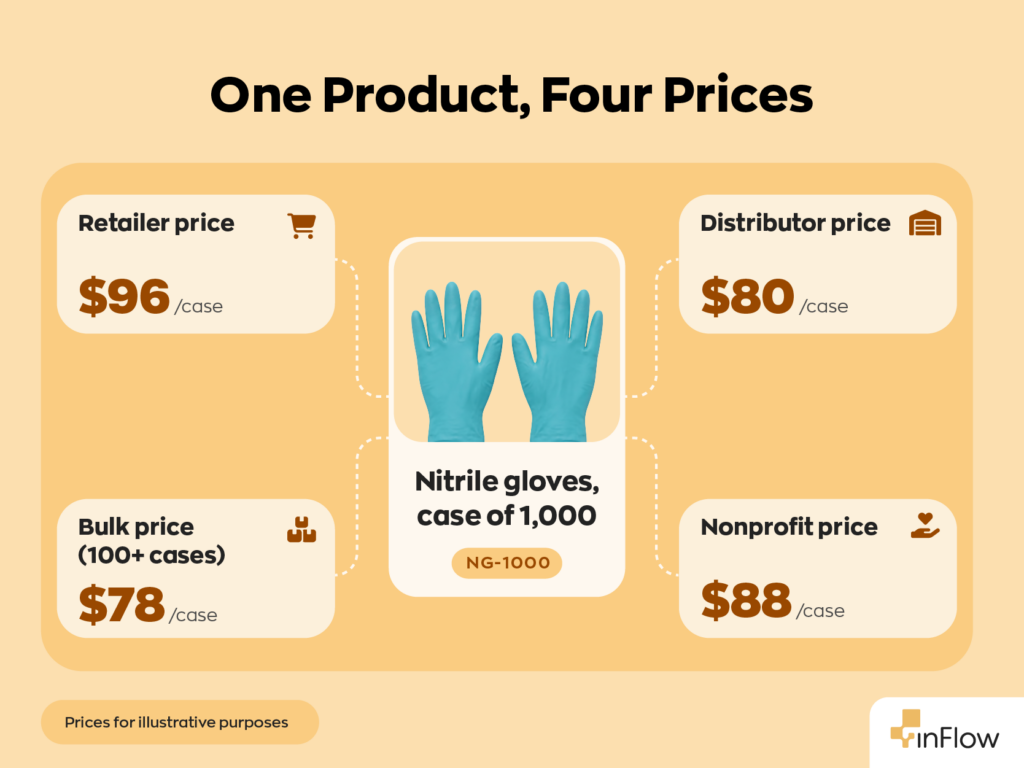
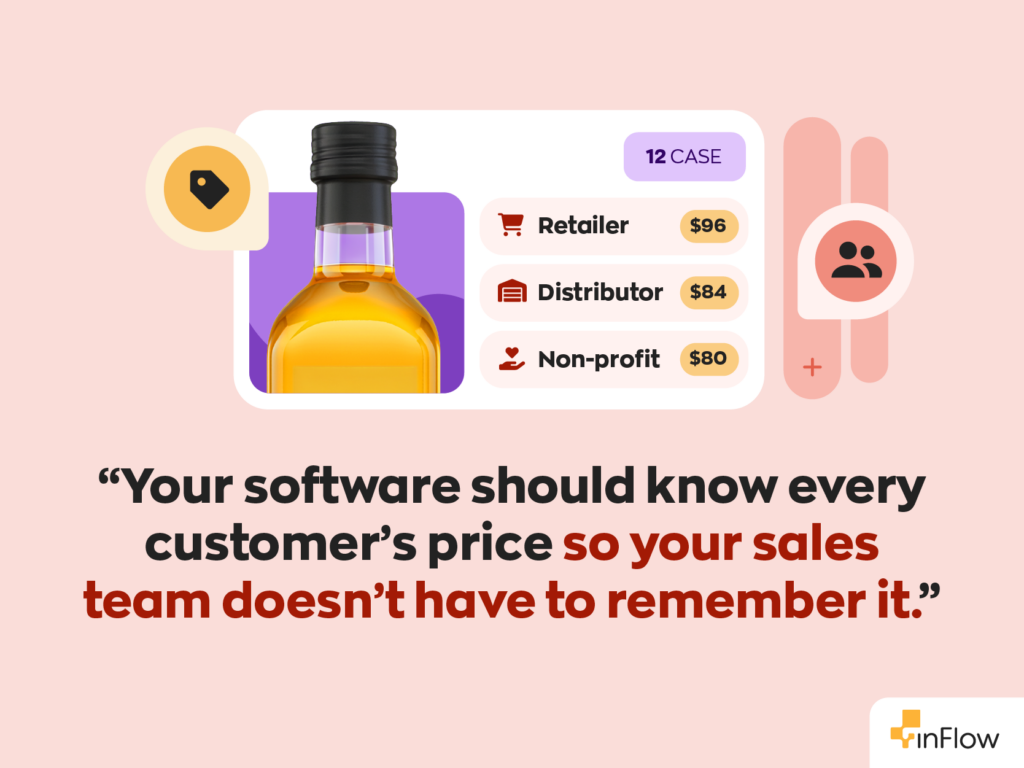
Wholesale pricing is rarely one number. You might have a distributor tier, a retailer tier, volume breaks at 50 and 100 units, and a handful of key clients with negotiated rates. Good software stores each of these as a price list and applies the right one automatically when you pick the customer. Bonus points if you can update costs and markups in bulk when a supplier raises prices.
B2B ordering portal
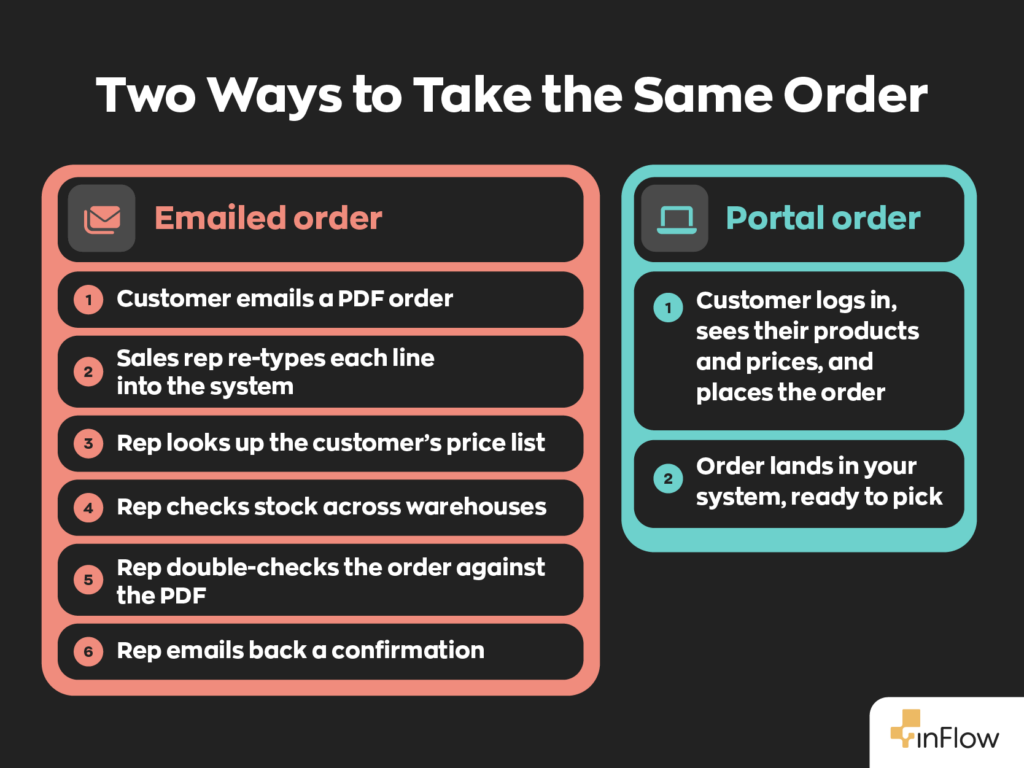
A B2B portal (sometimes called a wholesale portal or showroom) lets customers browse your catalog and place orders themselves, seeing only the products and prices you’ve set for them. The good news is that it cuts the phone calls, emailed spreadsheets, and late-night order entry that eat up a sales rep’s week. Check whether orders land directly in your system or need to be entered manually.
Purchase orders and reorder points
Running out of a fast-moving SKU is expensive in wholesale, because one customer order can be hundreds of units. Look for reorder points you can set per product and per location, low-stock alerts, and one-click purchase orders. Support for units of measure matters here too, since you’ll often buy by the pallet, store by the case, and sell by the unit.
Accounting integration
Your inventory system and your books should agree. At a minimum, the software should push invoices, purchases, and inventory value to QuickBooks Online or Xero without double entry. If you’re still running inventory inside your accounting software, our guide to Xero inventory management and QuickBooks inventory management cover where accounting tools stop, and inventory tools start.
The 7 best wholesale inventory management software tools for 2026
Every tool below gets the same breakdown, including ours. We’d rather you pick the right software whether or not it’s inFlow.
1. inFlow Inventory: best for small and mid-sized B2B wholesalers
Overview: inFlow is cloud inventory and order management software for small and mid-sized businesses. Wholesalers use it to manage price lists, take B2B orders, and reorder from suppliers in one place.
Key features:
- Private B2B portals (called Showroom) where each customer sees only the products and prices you choose, with orders landing directly in inFlow.
- Multiple pricing schemes (volume pricing is in beta), plus bulk price changes and supplier cost imports from a spreadsheet.
- Reorder points per product and per location, with one-click purchase orders.
- Custom units of measure (buy by the pallet, sell by the box) and integrations with both QuickBooks Online and Xero.
Pricing: Lite starts at $99/month billed annually (2 team members, 1 location). Core is $299/month billed annually (5 team members, 5 locations), and Pro is $499/month billed annually with unlimited locations. Showroom is a $39/month add-on on Lite and Core and included on Pro and Max. Core and up require a one-time $499 onboarding package. There’s a 14-day free trial, no credit card required.
Pros:
- Every plan includes unlimited products, sales orders, purchases, and integrations.
- In-house support teams in two time zones, covering North American and European business hours.
- Barcode scanning and label printing on every plan, plus inFlow’s own scanner and printer hardware.
Cons:
- B2B Showroom is a $39/month add-on on Lite and Core.
- A one-time onboarding package is required on Core and up (optional on Lite).
- EDI runs through the Extensiv Integration Manager rather than being built in.
Best for: wholesalers and distributors with 1 to 5 warehouses who sell mostly B2B.
Not ideal for: high-volume, EDI-dependent businesses that supply big-box retailers like Walmart or Target.
2. Cin7 Core: best for multichannel brands that also sell wholesale
Overview: Cin7 Core (formerly DEAR Systems) is an inventory and order management platform for product businesses selling across many channels at once. Wholesale is one of those channels, alongside ecommerce, marketplaces, and retail.
Key features:
- Unlimited inventory locations on every plan.
- 700+ app and channel integrations.
- B2B Portal add-on for self-service customer ordering.
- EDI and 3PL connections through the API and partner solutions.
Pricing: Standard is $349/month (5 users, 6,000 sales orders per year, 2 ecommerce integrations). Pro is $599/month, and Advanced is $1,199/month. The B2B Portal is an add-on on every plan. A free trial is available.
Pros:
- Deep integration library for multichannel sellers.
- Unlimited locations from the entry plan.
- Material requirements planning on Pro for light manufacturing.
Cons:
- The B2B Portal costs extra on every plan.
- Standard caps sales orders at 6,000 per year.
- Highest starting price of the inventory-first software on the list.
Best for: brands selling direct-to-consumer, on marketplaces, and wholesale at the same time.
Not ideal for: pure B2B wholesalers on a tight budget.
3. Zoho Inventory: best for budget-conscious teams already using Zoho
Overview: Zoho Inventory is part of Zoho’s finance suite and connects tightly with Zoho Books and Zoho CRM. It’s one of the few options with a permanent free plan.
Key features:
- Price lists, including volume pricing, for customer-specific rates.
- A customer portal from the Standard plan up.
- Serial and batch tracking plus unit-of-measure conversion from Premium up.
- EDI through integrations like SPS Commerce.
Pricing: The free plan covers 50 orders per month, 1 user, and 1 location. Standard is $29/month billed annually (500 orders, 3 users, 2 locations), Premium is $79/month, and Enterprise is $249/month, both billed annually. There’s also a 14-day free trial.
Pros:
- Free plan and very low paid entry point.
- Strong fit if you already run Zoho apps.
- Add-on users and orders are inexpensive.
Cons:
- Monthly order caps on every plan push growing wholesalers up tiers quickly.
- Location limits per plan (2 on Standard, 4 on Premium).
- Unit-of-measure conversion isn’t on the entry plan.
Best for: startups and Zoho users with modest order volume.
Not ideal for: wholesalers with many locations or thousands of monthly orders.
4. Unleashed: best for distributors that want deep purchasing and costing controls
Overview: Unleashed, now part of The Access Group, is cloud inventory software for distributors and manufacturers. It’s known for detailed costing, including landed costs on purchases.
Key features:
- Multi-warehouse management on Core and Pro.
- Customer-specific pricing and customer groups.
- Landed costs, batch and serial tracking, and multiple units of measure.
- B2B eCommerce Store add-on.
Pricing: Lite is $99/month but doesn’t include multi-warehouse management. Core, the realistic wholesale plan, is $399/month with 3 users and 100 sales orders per month. Pro is $729/month. Extra users are $69/month each on Core and $89/month each on Pro; the B2B store starts at $129/month, and onboarding starts at $449. There’s a 14-day free trial.
Pros:
- Customer-specific pricing included on Core.
- Strong landed-cost and purchasing tools.
- Annual billing saves up to 10%.
Cons:
- Only 100 sales orders per month included before paid upgrades.
- The B2B store is a separate monthly cost.
- Per-user add-ons get expensive for larger teams.
Best for: distributors with complex purchasing who need accurate landed costs.
Not ideal for: high-order-volume wholesalers watching their monthly bill.
5. Fishbowl: best for distributors with EDI and big-box retail requirements
Overview: Fishbowl has been around for 25 years and is best known for its QuickBooks integration. It now sells two products: Fishbowl Inventory for businesses that resell finished goods, and Fishbowl Advanced for multi-warehouse, 3PL, and EDI-driven distribution.
Key features:
- EDI integrations and tiered pricing rules on Advanced Warehouse.
- Unlimited warehouses from the Growth plan up.
- QuickBooks Online and Xero sync.
- B2B Portal add-on.
Pricing: Fishbowl Inventory Essentials is $229/month billed annually (2 users), and Growth is $429/month billed annually (5 users). Advanced Warehouse starts at $595/month and is confirmed by quote. Every purchase requires an implementation package. Fishbowl offers demos rather than a self-serve trial.
Pros:
- EDI integrations for retail compliance on Advanced.
- Mature QuickBooks integration.
- Scales from 2 users to 200+.
Cons:
- The most wholesale-specific features sit on the quote-based Advanced tier.
- Required implementation package on every plan, priced by quote rather than published.
- No self-serve free trial.
Best for: distributors shipping to big-box retailers that mandate EDI.
Not ideal for: small teams that want to start this week.
6. Odoo: best for businesses that want a full ERP suite
Overview: Odoo is an open-source suite of business apps, and “Inventory” is one of them. The appeal for wholesalers is running inventory, sales, purchasing, accounting, and CRM in one database.
Key features:
- All apps (Inventory, Sales, Purchase, Accounting, and more) on the Standard plan.
- Customers and suppliers using the portal don’t count as paying users.
- Multi-warehouse inventory.
- Odoo Studio and external API on the Custom plan.
Pricing: One App Free is $0 for a single app and unlimited users. Standard is $24.90 per user/month, billed yearly for the first year, then $31.10. Custom is $49 for the first year, then $61. Implementation services aren’t included. A free trial is available.
Pros:
- One system for nearly every department.
- Free portal access for B2B customers.
- Open-source flexibility.
Cons:
- Per-user pricing grows with your headcount.
- Implementation often requires a partner.
- More configuration than a focused inventory tool.
Best for: growing distributors ready to replace several systems with one.
Not ideal for: teams that only need inventory and want to be live quickly.
7. QuickBooks Online Plus: best for very small wholesalers keeping everything in their books
Overview: QuickBooks Online is accounting software, and its Plus and Advanced plans include basic inventory tracking for a very small wholesaler that can be enough to start.
Key features:
- Inventory tracking with FIFO valuation and stock level monitoring.
- Purchase order creation and management.
- Up to 5 users on Plus.
- Class and location tracking (up to 40 combined on Plus).
Pricing: Plus is $140/month, and Advanced is $340/month. New customers can choose a 30-day free trial or 50% off for 3 months.
Pros:
- No second system to learn.
- Your accountant probably already knows it.
- Inventory value flows straight into your financials.
Cons:
- No B2B ordering portal.
- Intuit’s plan page lists FIFO tracking and stock monitoring, but not warehouse-level stock or bins.
- Most growing wholesalers end up adding a dedicated inventory app anyway.
Best for: wholesalers with a small catalog and a single stockroom.
Not ideal for: anyone managing multiple warehouses or customer price tiers at scale.
How to choose the right wholesale inventory software
The right tool depends on three things: how many locations you run, how many channels you sell through, and how much setup your team can handle. Start there, and your shortlist will start to take shape quickly.
| If your business looks like this | Start with | Why |
| Mostly B2B, 1 to 5 warehouses, tired of phone and email orders | inFlow | Per-customer portals and price lists without an ERP rollout |
| Wholesale plus Shopify, Amazon, and retail, all at volume | Cin7 Core | Built for many channels at once, with 700+ integrations |
| Very small, low order volume, already on Zoho | Zoho Inventory | Free plan and $39/month entry point ($29/mo billed annually) |
| Complex purchasing where landed cost drives margin | Unleashed | Detailed costing and customer-specific pricing on Core |
| Selling to big-box retailers that require EDI | Fishbowl Advanced | EDI integrations and tiered pricing rules |
| Ready to replace accounting, CRM, and inventory with one suite | Odoo | All apps under one per-user plan |
| One stockroom, small catalog, just leaving spreadsheets | QuickBooks Online Plus | Inventory inside the accounting tool you already use |
A few questions to ask every vendor before you sign:
- How do orders get from my customer into the system? If the answer involves someone re-typing a PDF, keep looking.
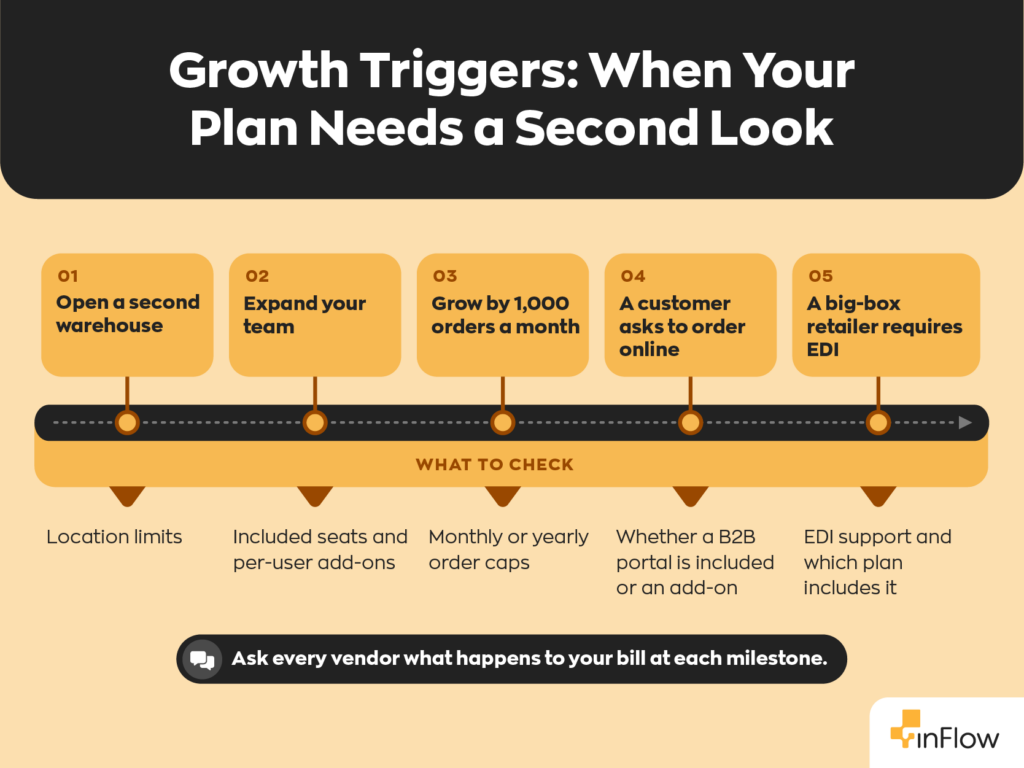
- What happens when I add a warehouse, a user, or 1,000 more orders a month? Order and location caps are where entry prices quietly turn into mid-tier bills.
- What does onboarding cost, and who does the data import? Several tools here require a paid onboarding or implementation package.
- Can I test my real price lists during the trial? Load your top 20 customers and their pricing. If it’s painful in the trial, it’ll be painful forever.
Still comparing spreadsheets to software? Our guide to the signs you’ve outgrown spreadsheets is a good gut check.
Finding the right fit for your wholesale business
There’s no single best wholesale inventory software for everyone. A distributor shipping EDI orders to national chains needs something different from a five-person importer selling to independent shops.
The good news is that every tool on this list offers a trial, a free plan, or a demo. So pick the two that match your size and channels, load your real products and customer price lists, and see which one your team actually wants to use on a busy order day.
If you sell mostly B2B and want per-customer portals, price lists, and reorder automation without an ERP-sized project, inFlow is built for exactly that.
FAQ
What software is best for wholesale distribution?
For small and mid-sized wholesalers selling mostly B2B, inFlow is a strong fit because it combines per-customer B2B portals, multiple pricing schemes, and reorder automation, starting at $129/mo ($99/mo billed annually). Cin7 Core suits brands that also sell heavily through ecommerce and marketplaces. Fishbowl Advanced is the better choice when big-box retailers require EDI.
Is there free wholesale inventory software?
Yes, but with tight limits. Zoho Inventory’s free plan covers 50 orders a month, 1 user, and 1 location. Odoo’s One App Free plan includes one app, such as Inventory, for unlimited users. Most wholesalers outgrow free plans quickly once order volume, locations, or customer price lists grow, so treat them as a starting point rather than a long-term solution.
How much does wholesale inventory software cost?
Most small and mid-sized wholesalers pay $100 to $600 a month for the subscription, based on list prices checked October 5, 2026. Free plans exist but have tight limits. B2B portals, extra users, and higher order caps add to that, and several vendors charge a one-time onboarding fee. Our inventory software cost guide breaks down the full first-year budget.
Can QuickBooks handle wholesale inventory?
QuickBooks Online Plus ($140/month) tracks inventory quantities with FIFO valuation and supports purchase orders, which works for a very small wholesaler with one stockroom. It doesn’t include a B2B ordering portal, and Intuit’s plan page doesn’t list warehouse-level stock or bins. Most growing wholesalers connect a dedicated inventory system that syncs back to QuickBooks.
How is wholesale inventory management different from retail?
Wholesale inventory management deals with fewer, larger orders from business customers, each of whom may have a negotiated price. That means price tiers, minimum order quantities, and purchasing by the case or pallet matter far more than in retail. Retail inventory focuses on many small consumer transactions, point-of-sale syncing, and shelf-level replenishment.
Do wholesalers need a B2B ordering portal?
You don’t need one, but it pays off quickly once you have more than a handful of repeat accounts. A B2B portal lets customers browse your catalog, see their own prices, and place orders around the clock, so your team stops re-keying emailed orders. inFlow includes Showroom on Pro and Max and offers it as an add-on on Lite and Core. Cin7, Unleashed, and Fishbowl sell their portals as add-ons. Zoho includes a customer portal from its Standard plan, and Odoo doesn’t charge for customer portal users.
0 Comments