 Fellow Canadians: All inFlow plans are available in Canadian dollars




The best inventory software for most small businesses in 2026 depends on how you sell. inFlow is the best fit for wholesale, B2B, field service, and in-house manufacturing. Square suits new and in-person sellers, Katana suits production-heavy manufacturers, and Cin7 suits high-volume multichannel brands.
The market is growing fast: Grand View Research projects inventory software spending will nearly double from $3.9 billion in 2026 to $7.1 billion by 2033, which means more options and more noise for small businesses to sort through. But a manufacturer and a wholesale distributor need almost opposite feature sets. This guide compares 10 leading platforms by use case, pricing model, and standout capability, so you can shortlist in minutes instead of demoing all ten.
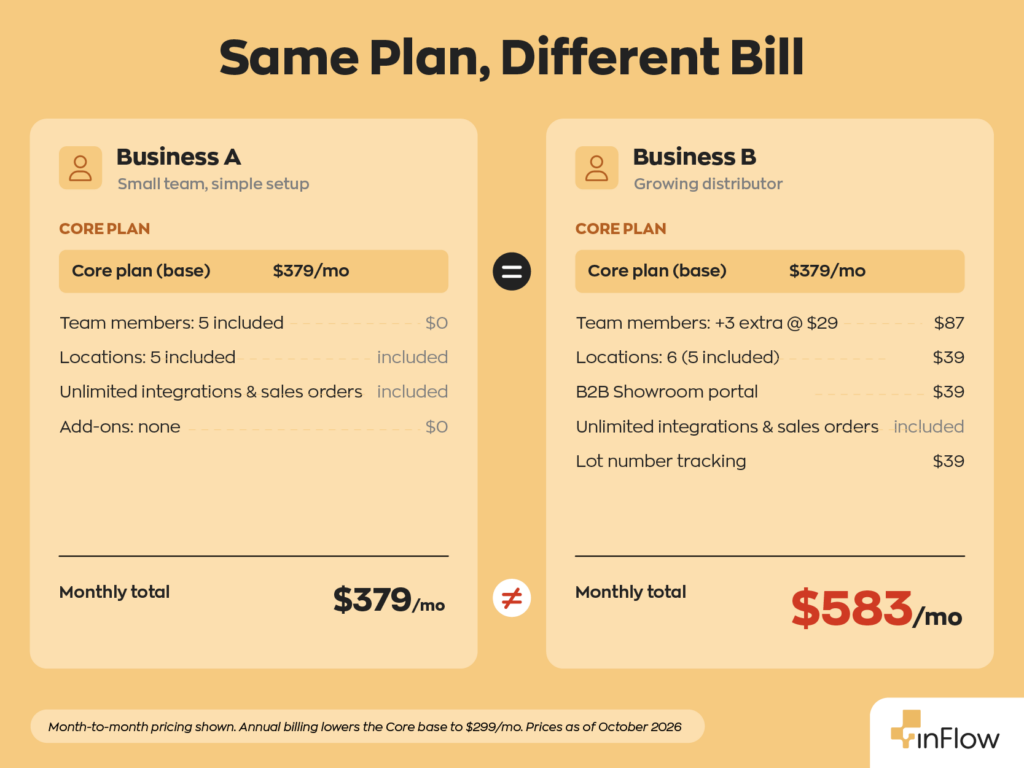
A note on transparency: this comparison is published by inFlow. We’ve worked to keep the table honest and useful regardless of which tool you pick, including being specific about where competitors are the better fit. Pricing figures are published starting prices, not quotes, because several vendors here (inFlow included) use calculator-based pricing: instead of a fixed sticker price, your monthly cost is built from the number of team members, locations, integrations, and sales orders you need, so two businesses on the same “plan” can pay different amounts. Always confirm current pricing on the vendor’s own site.
The 10 best inventory software platforms for small business in 2026, compared
The table below is the fast answer. Each tool is matched to the buyer it serves best, with its pricing model (flat-rate, per-seat, or freemium) called out, since the model often matters more than the headline price as you grow.
| Software | Best for | Starting price | Pricing model | Standout feature |
| inFlow | Wholesale, field service & in-house manufacturing | From $129/mo ($99/mo billed annually) | Per-tier; team seats bundled; unlimited orders and integrations | B2B Showroom portal, multi-level BOMs |
| Zoho Inventory | Businesses already using Zoho apps | Free tier; paid from $39/mo | Per-tier + order limits | Batch/serial tracking with expiration monitoring |
| Square | New & very small businesses | Free tier; paid from $49/mo per location | Freemium, per-location | Built-in POS with real-time, multi-location counts |
| Katana | Manufacturing | Free tier; paid from $299/mo | Flat plan + usage-billed sales orders; unlimited users; manufacturing is an add-on | Raw-material-to-finished-goods tracking |
| Lightspeed Retail | Brick-and-mortar retail | From $109/mo | Per-tier (POS-led) | Retail POS + vendor catalog and analytics |
| Odoo | Free open-source / DIY | Free single app; $38.90/user/mo for suite | Per-user (open-source) | Free inventory app with forecasting and auto-POs |
| Sortly | Asset & supply tracking | Free tier; paid from $49/mo | Per-tier, item-capped | Mobile-first QR/barcode with check-in/check-out logs |
| Cin7 | High-volume multichannel | From $349/mo | Per-tier, order-capped, annual contract | Multichannel sync with WMS app and 200+ carriers |
| MarketMan | Restaurants & food service | From $199/mo per location | Per-location tiers; 12-month minimum | Ingredient-level costing and invoice/AP automation |
| Fishbowl | QuickBooks-centric warehousing | From $229/mo (billed annually) | Annual subscription; manufacturing on Fishbowl Advanced (from $595/mo) | Deep QuickBooks integration for warehousing |
*Prices are month-to-month where offered. Fishbowl bills annually, and Cin7 and MarketMan require 12-month contracts. Most vendors discount annual billing. Verified against vendor pricing pages, October 2026. Bundled-seat plans (like inFlow’s) include a set number of users per tier for one fee, so cost stays flat until you exceed the included block; per-seat and per-location plans scale with every added user or site. Confirm live pricing before buying.
Match the tool to how you sell
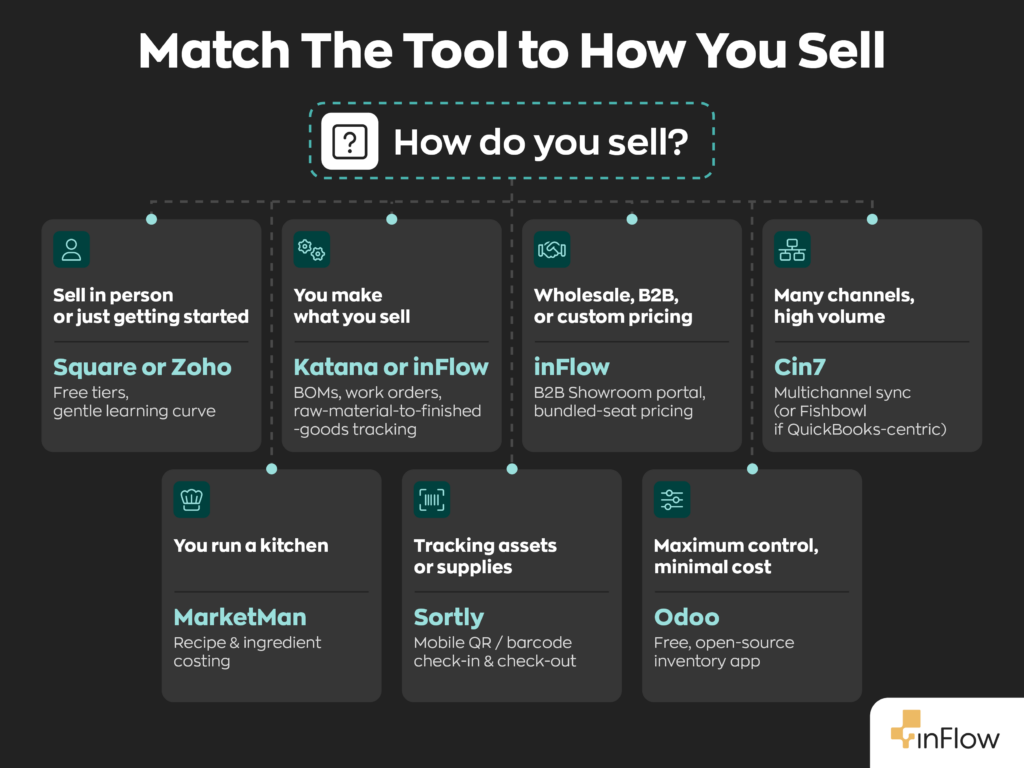
The fastest way to choose is to start from your sales model rather than a feature checklist:
- You sell mostly in person or just getting started → Square, with a free tier and built-in POS.
- You already run on Zoho Books or Zoho CRM → Zoho Inventory, which syncs natively with both.
- You make what you sell → inFlow or Katana. Both offer multi-level BOMs, work orders, and real-time tracking from raw materials to finished goods. Katana leans production-first with visual scheduling; inFlow offers lot tracking and runs manufacturing alongside your sales, fulfillment, and B2B in one system.
- You sell wholesale or B2B, or run customer-specific pricing → inFlow. Its B2B Showroom and bundled-seat pricing fit distribution.
- You sell across many channels at high volume → Cin7 for multichannel sync, or Fishbowl if you live in QuickBooks.
- You run a kitchen → MarketMan, built around recipe costing.
- You’re tracking assets or supplies rather than selling them → Sortly.
- You want maximum control with minimal software cost → Odoo’s open-source app.
What changed in inventory software for 2026
Three shifts now separate modern platforms from legacy stock trackers, and they’re worth checking for in any demo.
Cloud-native syncing is the baseline, not a feature
Real-time, multi-device access is now standard. A sale through Shopify, Amazon, or your storefront updates stock counts instantly, which reduces overselling and fulfillment errors. Be cautious of any platform that still requires manual syncs or on-premise installs to share data across your team.
AI forecasting is moving from premium add-on to included
More platforms now study sales history and seasonal demand to flag reorders before stockouts happen. Cin7, Square for Retail, and Katana’s higher tiers all offer some form of demand forecasting. Maturity varies widely, so ask vendors exactly what their “AI” does. Many small-business tools, inFlow included, use rules-based reorder points and min/max alerts instead of AI forecasting. For businesses with steady demand, this approach reorders reliably and is easier to set up and check than an AI forecasting model.
We should also point out that adoption is still early. IHL Group found fewer than a quarter of retailers have deployed AI in the inventory areas where it matters most, so ‘AI forecasting’ on a feature list deserves a hard look in the demo.
Bundled-user pricing is winning over pure per-seat for growing teams
The advantage of bundled-user pricing isn’t always that it’s cheaper, it’s that it’s predictable. With per-seat pricing, every hire changes your bill and every budget projection is a moving target. That’s a particular headache for warehouse and distribution teams, which often add staff in bursts, bring on seasonal help, or want a few extra people to have read access without turning each one into a line item.
Bundled-user pricing, where each plan includes a set number of users for one fee, removes that friction. inFlow’s plans, for example, include a block of team members in the monthly fee, so you can add or rotate warehouse teams up to that limit without the cost moving; beyond the included seats, extra users are a per-seat add-on. You trade a slightly higher entry price for a number you can actually forecast, and you stop treating “should this person get a login?” as a budget question. For teams whose headcount fluctuates, that stability is usually worth more than shaving a few dollars off the monthly rate.
The features that separate tools that scale
Beyond the basics, four capabilities tend to separate platforms you’ll grow into from ones you’ll outgrow:
- Integration depth. Direct connections to QuickBooks, Xero, Shopify, Amazon, and ShipStation eliminate duplicate data entry. Count the native integrations rather than the ones that require paid middleware.
- Traceability. Lot tracking and serial numbers matter for food, electronics, and medical sellers who face recalls. With lot tracking, a single flagged batch number lets you pull up every affected unit, which customers received it, and which supplier shipped it, so a recall becomes a targeted pull instead of yanking your entire stock of a product. Check whether it’s included in your plan or priced as an add-on. For food businesses, traceability is becoming a legal requirement. Under the FDA’s Food Traceability Rule, companies handling listed foods must be able to hand over lot-level records within 24 hours, with compliance required by July 20, 2028.
- Automated reordering. Setting par levels so the system drafts purchase orders automatically saves the most time during busy periods.
- B2B and wholesale tools. Custom price lists, bulk discounts, and a customer ordering portal let you run direct-to-consumer and wholesale from one system. inFlow’s B2B Showroom is built for exactly this: it’s a branded online portal where your wholesale customers log in, see their own negotiated pricing, browse what’s in stock, and place orders themselves, and those orders flow straight back into inFlow without manual re-entry. General POS tools rarely offer anything equivalent.
Total cost of ownership
Monthly subscription price is only part of the cost. Before you commit, add up:
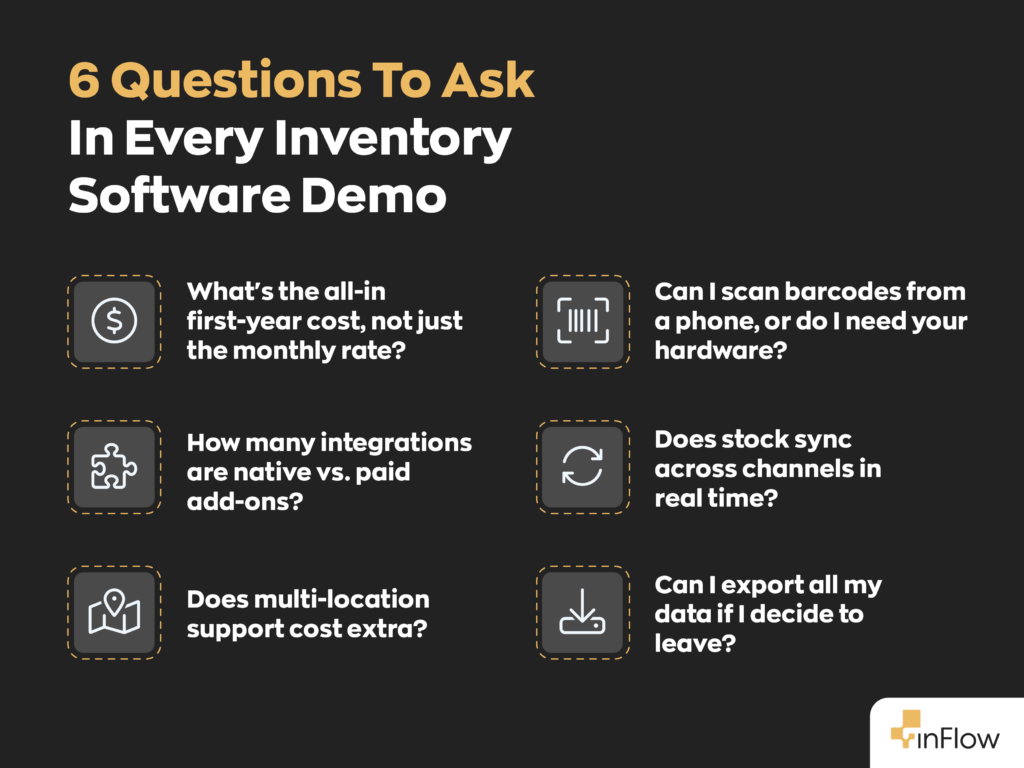
- Setup and onboarding fees. Several vendors charge a one-time setup fee. MarketMan has charged a setup fee on monthly plans, and inFlow has a $499 onboarding package, optional on Lite and required on Core and up. Data imports and extra training are available as professional services at about $199/hour. Ask for the all-in first-year number, not just the monthly rate.
- Per-order or overage charges once you exceed plan limits (often a small per-order fee that adds up at volume).
- Hardware (barcode scanners, label printers).
- Paid integrations or API access, which are sometimes gated to higher tiers.
- Training time, which is easy to overlook and rises with how complex the system is to learn.
inFlow’s recommendation: For most growing small businesses, weigh the pricing model and three-year cost more heavily than the entry price. A bundled-seat plan trades a slightly higher starting fee for a bill you can forecast as you hire, and a tool your staff adopts fully returns more than a powerful one they avoid.
The 10 best inventory management software options
1. inFlow: best for wholesale, B2B, field service and in-house manufacturing
inFlow combines inventory, purchasing, sales orders, manufacturing, and a B2B customer portal in one system. It’s built for small and midsize businesses that buy, assemble, and sell products, with bundled-seat pricing that keeps costs more predictable as your team grows.
Key features
- B2B Showroom (add-on on lower tiers): Let wholesale customers see their negotiated pricing and place orders that flow directly into inFlow. Included on Pro and Max; $39/mo add-on on Lite and Core.
- Multi-level BOMs and work orders: Assemble finished goods from components and manage production.
- Lot and serial tracking (add-ons on lower tiers): Track individual products or batches, plus store vendor-specific SKUs and pricing for purchasing. Included on Max; $39/mo add-ons on Lite, Core and Pro.
Pricing: inFlow Inventory from $129/mo ($99 billed annually). inFlow Manufacturing from $199/mo ($169 billed annually). Unlimited sales orders and integrations. Extra seats from $29/mo. The $499 onboarding is optional on Lite and required on Core and up.
Best for: distributors, B2B sellers, field service teams, and businesses that assemble what they sell.
Not ideal for: high-volume multichannel brands that want built-in AI demand forecasting.
Customer result: Chocosphere, a five-person specialty chocolate importer in Oregon, moved from spreadsheets to inFlow in 2024. By logging lot codes and best-by dates when inventory arrives, the team can trace products from purchase order to customer and catch aging stock before it has to be written off. The company saw results within a week of going live and now saves more than 10 hours each week. Read the Chocosphere case study.
2. Zoho Inventory: best for teams already using Zoho apps
Zoho Inventory is a cloud inventory tool that connects directly with the rest of the Zoho suite. It’s a natural fit if your accounting or CRM already runs on Zoho, and its free tier makes it easy to get started.
Key features
- Native integration with Zoho Books and Zoho CRM.
- Batch and serial tracking with expiration monitoring.
- Order management with marketplace and storefront integrations.
Pricing: free tier; paid plans start at $39/mo, with order limits that vary by tier.
Best for: small businesses already invested in the Zoho ecosystem.
Not ideal for: businesses with multi-level manufacturing or high order volumes that could quickly push them into higher tiers.
3. Square: best for new and very small businesses
Square pairs basic inventory tracking with its point-of-sale system, so stock updates as you make sales. It’s a simple place to start if most of your selling happens in person.
Key features
- Built-in POS with real-time stock counts.
- Multi-location inventory visibility.
- Free tier with a gentle learning curve.
Pricing: free tier; paid plans start at about $49/mo per location.
Best for: new businesses, pop-ups, and in-person retailers.
Not ideal for: wholesale, B2B, or manufacturing businesses that need more advanced purchasing and assembly tools.
4. Katana: best for production-first manufacturers
Katana focuses on the shop floor, tracking materials from purchasing through finished production. It’s best suited to manufacturers whose daily operations revolve around scheduling and managing production.
Key features
- Raw-material-to-finished-goods tracking (Manufacturing Management add-on, $199/mo).
- Visual production scheduling.
- Unlimited users on paid plans.
Pricing: free tier capped at 30 SKUs; Core starts at $299/mo with one inventory location and sales orders billed by usage. Manufacturing and warehouse management are paid add-ons.
Best for: small and midsize manufacturers with production-heavy workflows.
Not ideal for: businesses that primarily resell or distribute products, or need a B2B ordering portal.
5. Lightspeed Retail: best for brick-and-mortar retail
Lightspeed Retail is a POS-led platform built for physical stores. It combines checkout, product catalogs, inventory management, and sales analytics for retailers managing lots of SKUs on the shop floor.
Key features
- Retail POS with integrated inventory.
- Vendor catalogs for faster product setup and reordering.
- Retail sales and inventory analytics.
Pricing: starts at $109/mo.
Best for: independent retailers and multi-store businesses.
Not ideal for: wholesale, B2B, or manufacturing businesses that don’t primarily sell through a storefront.
6. Odoo: best for free, open-source DIY setups
Odoo’s inventory app is open source and free on its own, with the option to expand into a larger business suite. That flexibility makes it a good fit for teams willing to spend more time configuring the system themselves.
Key features
- Free standalone inventory app.
- Demand forecasting and automatic purchase orders.
- Optional modules for accounting, sales, and manufacturing.
Pricing: one app is free; the full suite starts at $38.90/user/mo.
Best for: technical teams that want maximum control with a low initial software cost.
Not ideal for: teams without the time or technical resources for setup, or growing businesses where per-user pricing can add up.
7. Sortly: best for asset and supply tracking
Sortly is a mobile-first app designed more for tracking things you own or use than products you sell. Barcode and QR scanning make it easy to keep tabs on what’s available and what’s been checked out.
Key features
- Mobile QR and barcode scanning.
- Check-in and check-out logs.
- Simple, visual item organization.
Pricing: free tier; paid plans start at $49/mo, with item caps that vary by tier.
Best for: tools, equipment, and supply rooms.
Not ideal for: businesses that need sales orders, purchasing workflows, or B2B selling.
8. Cin7: best for high-volume multichannel brands
Cin7 is built for brands selling across multiple channels, from ecommerce stores and marketplaces to retail partners. It keeps inventory synced across channels while adding warehouse, shipping, and forecasting tools.
Key features
- Multichannel inventory syncing across stores and marketplaces.
- Warehouse management app and connections to 200+ shipping carriers.
- Built-in demand forecasting.
Pricing: starts at $349/mo for Standard (5 users and 6,000 sales orders per year) on a 12-month contract.
Best for: growing brands handling high order volumes across multiple sales channels.
Not ideal for: small teams or single-channel businesses that won’t use its multichannel capabilities.
9. MarketMan: best for restaurants and food service
MarketMan manages inventory at the ingredient level and is built around how kitchens purchase supplies, prepare food, and calculate menu costs. It also includes tools for automating supplier invoices.
Key features
- Ingredient-level recipe costing.
- Invoice and accounts-payable automation.
- Supplier ordering for food service.
Pricing: starts at $199/mo per location. Monthly plans have included a one-time setup fee, although a 2026 promotion has waived it.
Best for: restaurants, cafes, and multi-location food service businesses.
Not ideal for: businesses outside the food service industry.
10. Fishbowl: best for QuickBooks-centric warehousing
Fishbowl adds warehouse inventory management to QuickBooks, while manufacturing is available through its separate Fishbowl Advanced platform. It’s designed for businesses that want to keep QuickBooks at the center of their accounting workflow.
Key features
- Deep QuickBooks integration.
- Warehouse management across multiple locations.
- BOMs and work orders through Fishbowl Advanced.
Pricing: Fishbowl Inventory starts at $229/mo billed annually; Fishbowl Advanced starts at $595/mo. Fishbowl also requires an implementation package.
Best for: warehouses and distributors committed to QuickBooks.
Not ideal for: teams that don’t use QuickBooks or businesses looking for month-to-month billing.
The bottom line
The best inventory software for your small business in 2026 is the one that matches how you sell. Start from your sales model, use the comparison table to shortlist two or three tools, and weigh the pricing model and total cost of ownership before you commit. If you sell wholesale, B2B, or in-house manufacturing and want predictable bundled-seat pricing with a built-in customer ordering portal, take the inFlow Inventory tour and see whether it fits your workflow.
Published by the inFlow team. inFlow has provided order and inventory management software to small and midsize businesses in over 90 countries since 2007. Comparison data compiled from public vendor listings as of mid-2026; verify current pricing and features on each vendor’s official site before purchasing.
FAQ
What is the best inventory software for a small business in 2026?
The right choice depends on your sales model. Retailers tend to do well with Zoho or Square, manufacturers with Katana or inFlow, and wholesale or B2B operations with inFlow. Start from how you sell and the shortlist gets short quickly.
How much does inventory software cost for a small business?
Most small-business inventory platforms range from free starter tiers to roughly $100–$400 per month for paid plans, with high-volume and multichannel tools running higher. Watch for setup fees, per-order overages, and per-seat scaling on top of the base price.
What’s the difference between flat-rate and per-seat pricing?
Flat-rate pricing bills one fee per company regardless of how many users you add, while per-seat pricing charges for each user. The main advantage of flat-rate isn’t always a lower price; it’s predictability, since your bill doesn’t change as you hire. Per-seat can be cheaper for very small or solo operations that won’t add many users.
Which inventory software is best for wholesale and B2B?
inFlow is built specifically for wholesale and B2B, with a B2B Showroom portal, customer-specific pricing tiers, and bundled-seat pricing that suits distribution teams. Cin7 is a strong alternative for high-volume multichannel B2B.
Do small businesses need AI forecasting?
Not necessarily. AI demand forecasting helps businesses with seasonal or high-volume sales, but most small operations are well served by rules-based reorder points and min/max stock alerts, which prevent stockouts without added complexity.
0 Comments