 Fellow Canadians: All inFlow plans are available in Canadian dollars




Key takeaways
- Cloud inventory software is the better fit for most growing businesses because it has lower upfront costs, scales quickly, and shifts maintenance, updates, and security to the vendor. On-premise is better suited to organizations with strict compliance, offline operation, or deep customization requirements.
- The biggest difference between cloud and on-premise software is who owns and maintains the infrastructure.
- Over a five-year period, hardware, IT labor, electricity, maintenance, and upgrades often make on-premise deployments more expensive than cloud subscriptions for small and midsize businesses.
- Hybrid deployments combine on-premise data storage with cloud accessibility, making them useful for businesses with strict data residency requirements. However, they also inherit much of the cost and complexity of both deployment models.
- Companies with lean IT teams, multiple locations, or growth plans will typically benefit from cloud software, while organizations with regulatory or customization demands may justify on-premise solutions.
Cloud inventory software is the better choice for most growing businesses because it costs less to start, scales faster, and needs less maintenance. On-premise makes sense when you need to keep data in-house, run offline, or customize heavily. That verdict holds for the large majority of small and midsize operations, and the sections below show exactly when the exception applies.
According to Grand View Research, the global inventory management software market reached $3.74 billion in 2025 and is expected to hit $3.93 billion in 2026, with the cloud segment already holding the largest share. This is largely because cloud avoids the upfront hardware investment that on-premises requires. But cloud’s lead doesn’t make on-premise obsolete: the same research expects on-premise demand to keep growing, driven by finance, healthcare, and other sectors that need tighter control over data. The right model depends on your cost horizon, your IT resources, and your compliance needs.
What’s the difference between cloud and on-premise inventory software?
Cloud inventory software is hosted by the vendor and accessed through a browser on a subscription. On-premise software runs on servers your business owns and maintains. The real difference is who owns the infrastructure and who pays to keep it running.
| Cloud-based | On-premise | |
| Hosting | Vendor’s servers, accessed via browser/app | Your own servers, on-site |
| Cost model | Operating expense (OpEx) — recurring subscription | Capital expense (CapEx) — large upfront license + hardware |
| Upfront cost | Low | High |
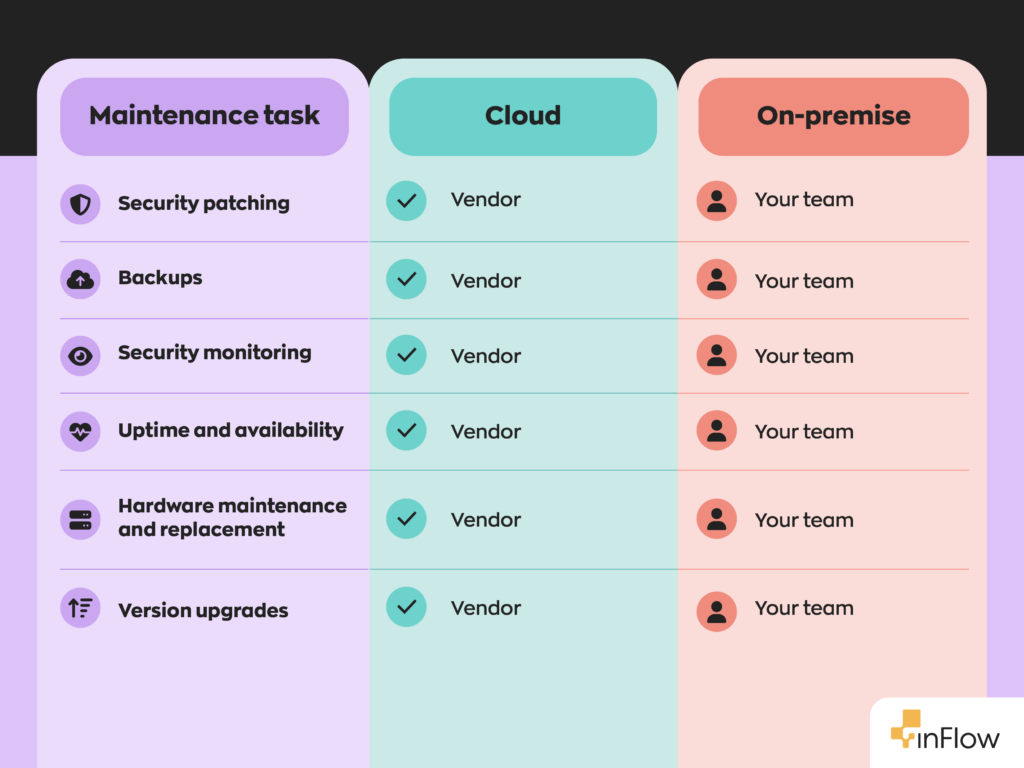
| Maintenance | Handled by vendor (updates, backups, security) | Your IT team’s responsibility |
| Scalability | Add users/locations in hours via subscription | Requires new hardware and configuration |
| Remote access | Built in, from anywhere | Requires VPN or remote desktop |
| Offline operation | Not supported — requires a live connection | Runs on local network without internet |
| Customization | Configuration and integrations within vendor limits | Deep, code-level customization possible |
| Best fit | Growing, multi-site, or lean-IT businesses | Strict-compliance, offline, or highly customized operations |
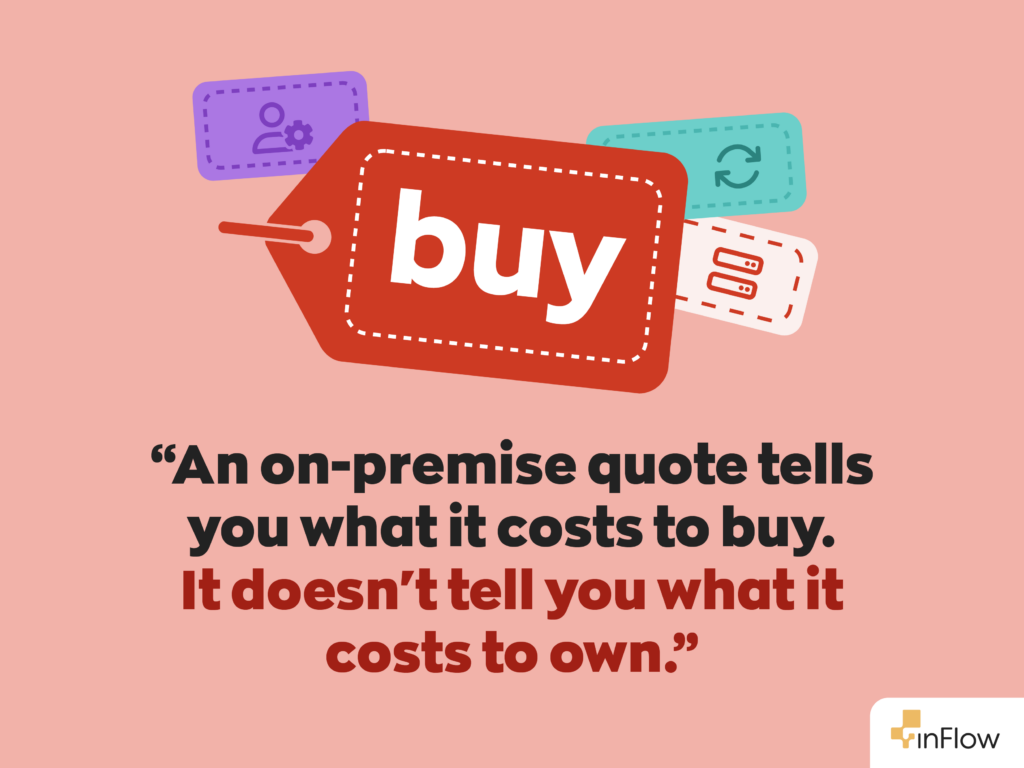
The cost models are worth understanding before comparing prices. Cloud is an operating expense (OpEx): a recurring subscription you pay as you go, which keeps cash flow predictable and spreads cost over time. On-premise is a capital expense (CapEx): a large one-time purchase you own and depreciate, which ties up money upfront but ends the recurring fee. This distinction drives most of the five-year cost difference below.
What are the pros and cons of cloud-based inventory software?
Cloud inventory software offers lower upfront costs, automatic updates, and fast scaling, but it depends on internet connectivity and carries recurring fees that never stop.
Pros
- Low upfront cost and fast setup. No servers to buy; you subscribe and log in through a browser. inFlow’s published plans, for example, run from $161/mo for the entry Entrepreneur tier to $874/mo for Mid-Size on monthly billing, with Enterprise at $2,249/mo — roughly 20% less on annual billing across every tier — and no hardware purchase required.
- Priced by tier, not per seat. Some cloud inventory platforms (inFlow among them) charge a set monthly rate per plan tier with a number of team members included — 2 on Entrepreneur, 5 on Small Business, 10 on Mid-Size, 25 on Enterprise. Additional members are available as an add-on, so costs step up at predictable thresholds rather than climbing with every hire.
- Automatic updates and maintenance. The vendor handles patches, backups, and security monitoring, which reduces the need for dedicated IT staff.
- Scales in hours. Add users, locations, or capacity through a subscription change rather than a hardware purchase.
- Access from anywhere. Managers can monitor stock across warehouses from any location, which speeds response to supply-chain issues.
Cons
- Internet dependency. Cloud platforms need a live connection to read or update stock. If the connection drops, access is interrupted until it returns.
- Recurring cost forever. Subscription fees continue for as long as you use the system and can accumulate significantly over many years.
- Less deep customization. You configure within the vendor’s framework rather than modifying core code.
- Vendor dependency. Uptime and data portability rest partly on the provider’s reliability.
What are the pros and cons of on-premise inventory software?
On-premise inventory software gives you maximum control, offline operation, and deep customization, but it demands a high upfront investment and ongoing IT labor that often hides the true long-term cost.
Pros
- Full data control. Inventory data stays on servers you own, which can help meet strict data-residency or compliance rules. Industries such as finance and healthcare often prefer on-premise for exactly this reason.
- Runs without internet. The system operates on your local network during outages, valuable for remote or low-connectivity sites.
- Deep customization. Internal teams can modify workflows and integrate tightly with legacy systems.
- Control over upgrade timing. You decide when to apply updates rather than following a vendor’s schedule.
Cons
- High upfront investment. Servers, licenses, and implementation create a large initial cost barrier.
- Ongoing IT burden. Your team handles patches, hardware replacement, backups, and security.
- Hidden operating costs. Electricity, cooling, server-room space, and labor rarely appear in the first quote.
- Slow, costly scaling. Growth means new hardware and configuration, often weeks of work rather than a same-day change.
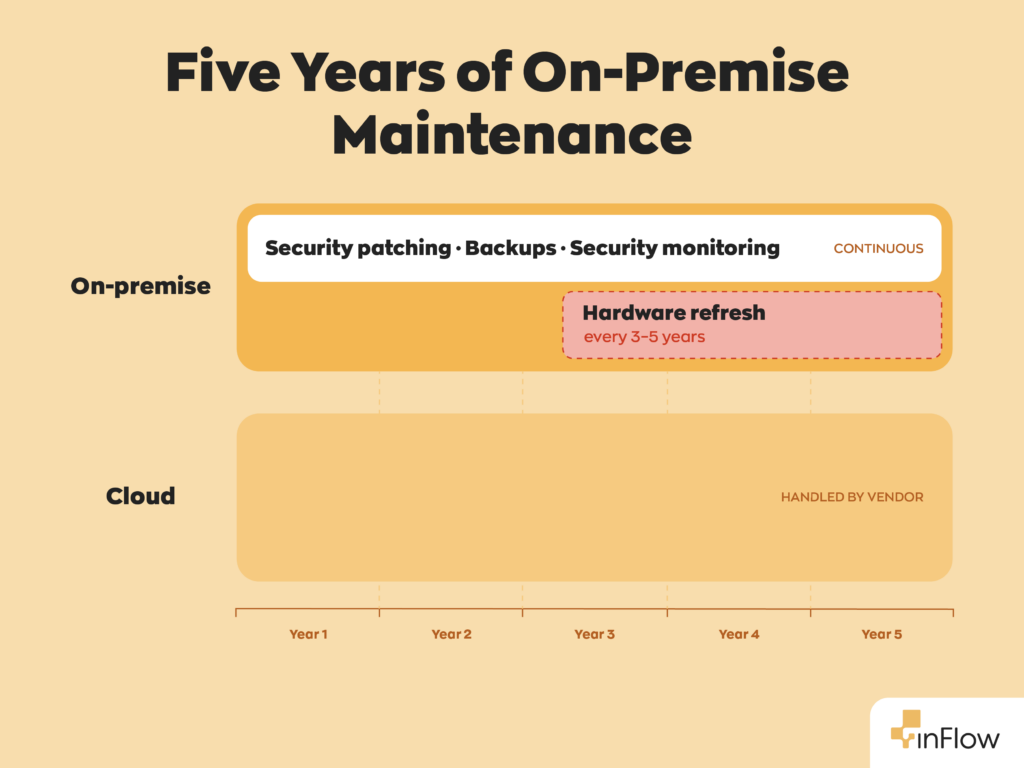
inFlow has lived this tradeoff directly. We sold and supported an on-premise version of inFlow for over a decade before sunsetting it on July 31, 2024. The deciding factor wasn’t customer demand; it was the stack underneath. The software depended on components that had aged past their support windows, and once the vendors behind them stopped shipping patches, there was no way to keep the product secure without rebuilding it. Every one of those dependency upgrades was work with no new features attached, and that treadmill is a cost that never appears in an on-premise quote.
What is the 5-year total cost of ownership for each model?
The cheapest option on day one is often not the cheapest over five years. Cloud spreads predictable subscription costs across the period. On-premise front-loads a large purchase, then adds hardware refreshes, IT labor, electricity, cooling, and upgrades that the initial license price never shows.
The cloud column below uses inFlow’s actual published pricing. The on-premise column is a researched range, not a single quote, because on-premise costs vary widely with your hardware, staffing, and location; each line is tied to a primary source so you can check the basis and plug in your own numbers.
| Cost component (5-yr) | Cloud-based (inFlow Small Business) | On-premise (researched range) |
| Software | $349/mo annual billing plus a one-time $499 onboarding fee — about $21,400 over 5 years (inFlow pricing) | One-time perpetual license, varies by vendor |
| Server hardware | None | ~$4,500 entry to $42,000 configured, mid-range configs landing around $20–24K, plus a refresh every 3–5 years (Dell PowerEdge) |
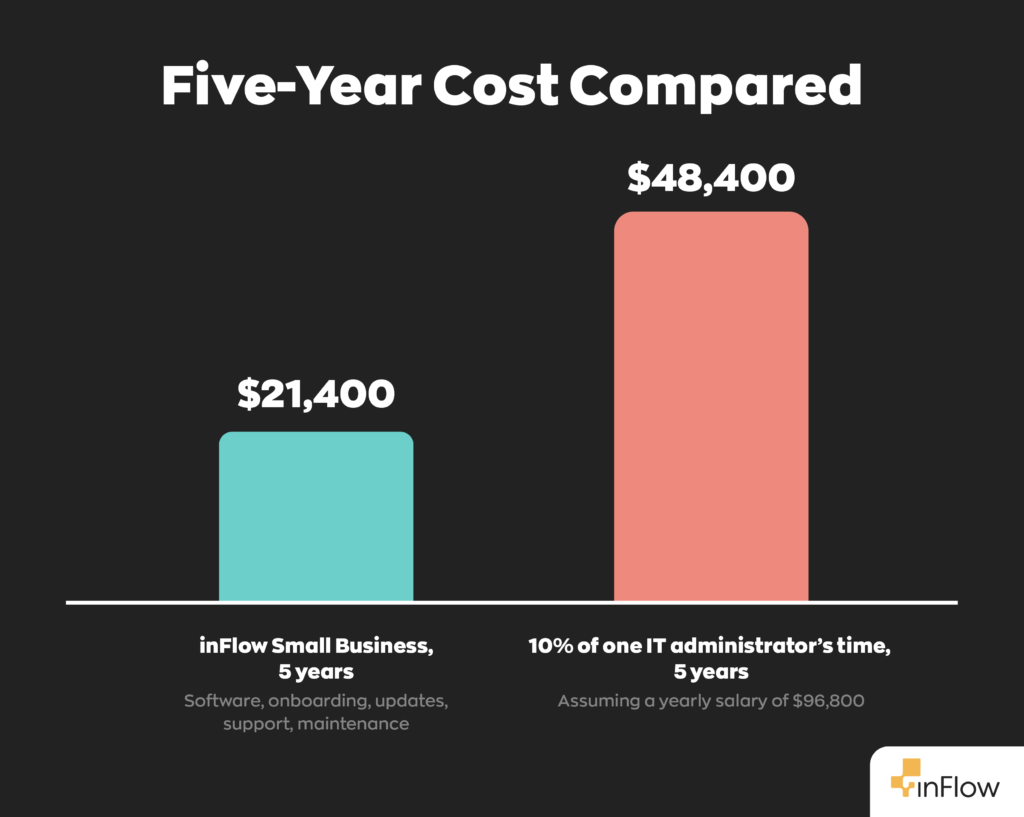
| IT labor | Included in subscription | Median IT admin wage $96,800/yr; even a 10% time allocation is roughly $48,000 over 5 years (U.S. BLS, May 2024) |
| Electricity (always-on server) | None | ~500W running continuously = ~21,900 kWh over five years, or about $2,960 at 13.51¢/kWh, before cooling. (EIA, Electric Power April 2026 data — EIA updates this table monthly.) |
| Updates and security | Automatic, included | Manual; your team’s time |
The figures show why a license-versus-subscription comparison is misleading. inFlow’s Small Business plan runs about $21,400 over five years, onboarding included, with maintenance, updates, and support bundled in. An on-premise system can match or beat that on software alone, but the IT labor line dwarfs everything else: even a fraction of one administrator’s time, at the BLS median wage, can exceed the entire five-year cloud subscription on its own. Add hardware, refreshes, and power, and the on-premise total usually meets or passes cloud for any business that doesn’t already employ IT staff with spare capacity.
inFlow’s recommendation
Judge your buying decision on five-year total cost, not the first invoice. For most small and midsize businesses without a dedicated IT team, cloud’s bundled maintenance and predictable billing make it the safer, cheaper option overall. On-premise is worth it when you have real compliance, offline, or customization needs that cloud configuration can’t meet.
What about hybrid deployment?
Hybrid deployment keeps sensitive data on-premise while running the rest of the system in the cloud. It exists for businesses caught between a compliance rule that requires local data control and a need for cloud’s accessibility and scaling. A common setup stores regulated records on in-house servers and uses cloud tools for everyday tracking, reporting, and multi-site access.
The trade-off is complexity. A hybrid system carries some of both models’ costs and some of both models’ maintenance, so it’s rarely the cheapest path. It makes sense mainly when a strict data-residency mandate rules out full cloud but the business still wants most of cloud’s benefits. For companies without that constraint, a straight cloud or on-premise choice is usually simpler and cheaper.
How do you choose between cloud and on-premise?
Choose cloud if you want low upfront cost, multi-site access, fast scaling, and minimal IT overhead. Choose on-premise if you require strict in-house data control, reliable operation without internet, or customization that off-the-shelf cloud platforms can’t support.
A simple decision rule:
- Lean IT team or no IT team? → Cloud.
- Multiple locations or remote access needed? → Cloud.
- Rapid or seasonal growth? → Cloud.
- Strict data-residency or compliance mandate? → On-premise (or a hybrid).
- Must operate during internet outages? → On-premise.
- Need deep, code-level customization? → On-premise.
If most of your answers point to cloud, as they do for most growing SMBs, the question becomes how to migrate rather than whether to. If you’re already on an on-premise system and weighing the switch, it might be time to plan the next step in migrating over.
The bottom line
For most growing businesses, cloud inventory software costs less upfront, scales more easily, and takes far less maintenance over five years. On-premise still fits operations with specialized control, offline, or compliance needs. A good comparison looks past the first invoice to the full five-year cost, the support burden, and how each option handles growth.
Want to see how the cloud simplifies stock management? Try inFlow Inventory to see how it scales with your business.
FAQ
What’s the main difference between cloud and on-premise inventory software?
It comes down to who owns the infrastructure and who pays to keep it running. Cloud inventory software is hosted on the vendor’s servers and accessed through a browser, billed as a recurring subscription (OpEx). On-premise software runs on servers you own and maintain, funded by a large upfront purchase (CapEx). That one distinction shapes nearly everything else.
Is cloud or on-premise inventory software cheaper over five years?
For most small and midsize businesses, cloud comes out ahead. inFlow’s Small Business plan runs about $21,400 over five years, onboarding included, with maintenance and updates bundled in. On-premise can match that on software alone, but IT labor, hardware refreshes, and electricity add up fast, often pushing the total past cloud unless you already have IT staff with spare capacity.
What are the benefits of cloud-based inventory software?
Cloud inventory software offers a low upfront cost, automatic updates, and the ability to scale in hours rather than weeks. Because the vendor handles patches, backups, and security, you don’t need a dedicated IT team. You also get remote access from anywhere, making it easier to monitor stock across multiple locations and respond quickly to supply-chain issues.
How do I decide between cloud and on-premise inventory software?
Start with a few questions. If you have a lean IT team, multiple locations, or expect rapid growth, cloud is usually the better fit. If you’re bound by strict data-residency rules, need to operate without internet access, or require deep code-level customization, on-premise (or a hybrid setup) makes more sense.
Is cloud-based inventory software secure?
Reputable cloud vendors handle security monitoring, patching, and backups as part of your subscription, which often means tighter, more consistent protection than an internal team can manage alone. The tradeoff is that your data lives on the vendor’s servers, so uptime and portability depend partly on their reliability. On-premise keeps data fully in-house, which some regulated industries prefer.
What is hybrid inventory deployment, and when does it make sense?
Hybrid deployment keeps sensitive data on-premise while running the rest of your system in the cloud. It’s built for businesses facing a compliance rule that requires local data control but still want cloud’s accessibility and scaling. It’s rarely the cheapest option since it carries costs from both models, so it only makes sense when a strict mandate rules out full cloud.
Which inventory system works best for a growing small business?
For most growing SMBs without dedicated IT staff, cloud-based inventory software like inFlow is the safer, more affordable choice. It keeps upfront costs low, scales as you add users or locations, and bundles maintenance into one predictable subscription.
0 Comments