 Fellow Canadians: All inFlow plans are available in Canadian dollars






Key takeaways
- Units of measure (UOM) clarify how a product is purchased, stored, and sold, so the same item can be received by the case and counted by the piece without the numbers getting scrambled.
- Most businesses need three: a purchasing UOM, a standard (base/stocking) UOM, and a sales UOM. Only the standard UOM is mandatory.
- A conversion factor is what ties them together: one box = six pairs. Without it, “box” tells your team nothing useful.
- Work out your cost and margin per standard unit, then enter each price in the unit that the transaction actually uses.
- Spreadsheets can track UOM with the right columns, but inventory software like inFlow applies the right unit automatically in the right context.
Units of measure (UOM) can help your business get really specific about your inventory levels. They’ll tell your warehouse team how a product will be coming in (ex. in boxes or on pallets) and they’ll ensure that your customers won’t see any weird quantities on their invoices (ex. 0.5 boxes instead of 10 sunglasses).
It can be a little tricky to track the various units of measure on different products, so we’ll go over a few tips in this article. We’ll cover the three UOM types you’ll actually use, how conversions work (including the messy ones like wire and fabric), how to track it all in a spreadsheet or in software, and the handful of mistakes that cause most UOM headaches.
What is a unit of measure (UOM) in inventory?
A unit of measure is the quantity label attached to a product: the each, box, case, pallet, foot, or pound that tells your system what “1” actually means for that item.
That sounds obvious until a product moves between teams. Your buyer orders 10. Your warehouse counts 60. Your invoice says 12. Nobody’s wrong; they’re just using different units. UOM is what keeps all three talking about the same stock.
In general, you’ll want to keep three categories in mind when tracking units of measure:
- How you receive it (purchasing UOM)
- How you track it (standard UOM)
- How you sell it (sales UOM)
| UOM type | Question it answers | Sunglasses example |
|---|---|---|
| Purchasing | How does it arrive from the vendor? | Box |
| Standard / base / stocking | How do we count it on the shelf? | Pair |
| Sales | How does the customer buy it? | Pair (or box for wholesale) |
You won’t need to have these UOM in place for every single product, but you should always have a unit of measure that reflects how you track that product.
Standard, base, or stocking UOM
The standard UOM is the unit everything else converts back to, and it’s the only one you truly need.
You’ll see it called the standard UOM, the base UOM, or the stocking UOM depending on where you get your information. They all mean the same thing: the unit your on-hand quantity is stored in. When inFlow (or your spreadsheet) says you have 240 of something, the standard UOM is what those 240 are.
Pick the smallest unit you realistically handle, because everything larger divides into it cleanly. Six pairs fit in a box, but a box doesn’t fit neatly into a pair.
It’s also OK to get creative with your units of measure. If you’re having trouble tracking a product as distinct pieces, you can also use the dimensions or weight as units of measure.
Purchasing UOM
The purchasing UOM is how the product arrives from your vendor.
You might receive items like sunglasses in boxes or pallets, but store them on the shelves as pairs. So you’ll need to make sure you know how many sunglasses come in a box, and you need a system that can recognize that not all boxes are the same size.
Setting a purchasing UOM means your purchase orders speak your vendor’s language. You order 10 boxes, they ship 10 boxes, and your inventory goes up by 60 pairs without anyone doing mental math on the receiving dock.
Sales UOM
The sales UOM is how your customer buys the product, and it doesn’t have to match either of the other two.
A distributor might buy sunglasses by the box, then sell them by the pair to retail walk-ins and by the box to small shops. Your sales UOM is whichever of those is your normal way of selling. Most systems, inFlow included, give a product one sales UOM, so if you genuinely sell the same item two ways, that’s a pricing scheme or a second product record rather than a second UOM.
The payoff is on the invoice. A customer who ordered two boxes should see “2 boxes” on their paperwork, not “12 pairs,” and definitely not “0.5 boxes.”
Why multiple UOMs matter
Some items are easy to track because you buy them as bottles, store them as bottles, and then sell them as bottles. But not all products are quite that simple.
There are a lot of reasons you might need to break a product out into multiple units of measure:
- You might be dealing with pipes or wires, which are bought at a certain length and then cut into shorter pieces. You can’t just track these items by the meter or foot because that won’t account for the sizes the pieces are cut into.
- You might receive items like sunglasses in boxes or pallets, but store them on the shelves as pairs.
- You might buy in bulk to hit a vendor’s minimum order quantity, but sell in quantities your customers actually want.
Receiving and warehouse accuracy
Multiple UOM exist so your warehouse team never has to convert anything in their head.
When a pallet arrives and the receiver types in “4,” the system needs to know whether that’s 4 pallets, 4 cases, or 4 pieces. Get it wrong and your on-hand count is off by a factor of dozens, and you won’t find out until someone counts the shelf or a customer order comes up short.
Having the right UOM in place means your teams can relate to your products in the way they’re used to doing, without any numbers getting lost in translation when a product moves from purchasing to sales. Receivers think in cases. Pickers think in pieces. Both are right.
Pricing, costing, and customer orders
On the sales side, UOM is what keeps your paperwork readable and your margins honest.
Customers notice odd quantities. An invoice line that reads “0.5 boxes” instead of “10 sunglasses” creates a support email, and sometimes a dispute. And if your cost is stored per box while your price is stored per piece, every margin report you run will be quietly wrong.
More on how to line those two up in the pricing section below.
How UOM conversions work
A UOM conversion is just a number that says how many standard units fit inside a larger unit: one box = six pairs, one case = 24 bottles, one pallet = 40 cases.
That number is doing all the work. Without it, “box” is a word with no quantity attached, which is why a UOM setup that only lists unit names never actually helps anybody.
Fixed conversion factors
A fixed conversion factor is one that never changes: the box always holds six, every time, from every vendor.
This is the easy case, and it covers most packaged goods. Set the factor once and your system can move between units forever without asking anyone to confirm anything.
Case-to-each conversion example
Say sunglasses come six pairs to a box, and 20 boxes to a pallet. Here’s the full chain:
| Unit | Conversion | Pairs |
|---|---|---|
| Pair (standard) | 1 | 1 |
| Box | 6 pairs | 6 |
| Pallet | 20 boxes | 120 |
Receive 2 pallets and your on-hand goes up by 240 pairs. Sell one box and it drops by 6. Nobody touches a calculator.
Variable-measure inventory
Variable-measure items are products where the quantity changes with every unit, so a single fixed factor won’t cover it.
This might be pipes, wires, or even rolls of fabric, which are bought in certain sizes and then cut into smaller pieces. You can’t just track these items by the meter or foot because that won’t account for the new sizes you’re cutting them into.
The usual fix is to make the measurement itself the standard UOM. Track feet, not pipes, and record the actual measured amount on each receipt, transfer, or sale. You’ll also want a way to know what’s on hand as usable pieces, because 100 feet of wire sitting in ten 10-foot lengths is a very different thing from one 100-foot spool.
Weight, length, and volume examples
| Product | Bought as | Standard UOM | Sold as |
|---|---|---|---|
| Copper wire | Spool | Foot | Cut length |
| Steel sheet | Sheet | Square foot | Cut piece |
| Bulk coffee | 60 lb bag | Pound | 12 oz bag |
| Cleaning solution | 55 gal drum | Litre | 1 L bottle |
| Knitted fabric | lbs of yarn | Pound | Roll (variable weight) |
That last row is the genuinely hard one, and it comes up more than you’d think. In fact, a reader brought this up: yarn comes in by weight, gets knitted into rolls of varying weights, and those rolls get grouped into lots for shipping. The unit stays the same the whole way through (pounds), but the grouping changes at every stage. The setup that works in inFlow is a weight-based standard UOM with each roll received as its own lot number, so the lot records the weight that actually arrived rather than asking a conversion factor to predict it.
Packaging hierarchy and barcodes
Your packaging hierarchy should have a barcode at every level you actually scan.
This is where UOM and barcoding meet. A piece usually carries a UPC or GTIN-12, while a case carries a separate case barcode (often a GTIN-14) that resolves to the same product at a different quantity. Scan the case barcode and the system should add six pairs, not one.
If you skip this, your team ends up scanning the piece barcode six times per case, or scanning once and correcting the count later. Our ultimate barcoding guide walks through how those barcodes work if you’re setting this up from scratch.
How to track units of measure (UOM)
You’ve got two realistic options: a spreadsheet with the right columns, or inventory software that handles conversions for you. Both work, just at different scales.
Spreadsheet method
In a 2026 survey of 400 inventory and operations professionals, 84.8% of respondents said they use spreadsheets to track inventory. So if this is how you do it, you’re not alone. If you’re using a spreadsheet for tracking inventory, you can add extra columns to track your units of measure.
But having just one column per UOM type isn’t enough. Taking the example of sunglasses again: if you just say that your purchasing unit of measure is box, that doesn’t tell anyone how many sunglasses are in a box.
Required spreadsheet fields
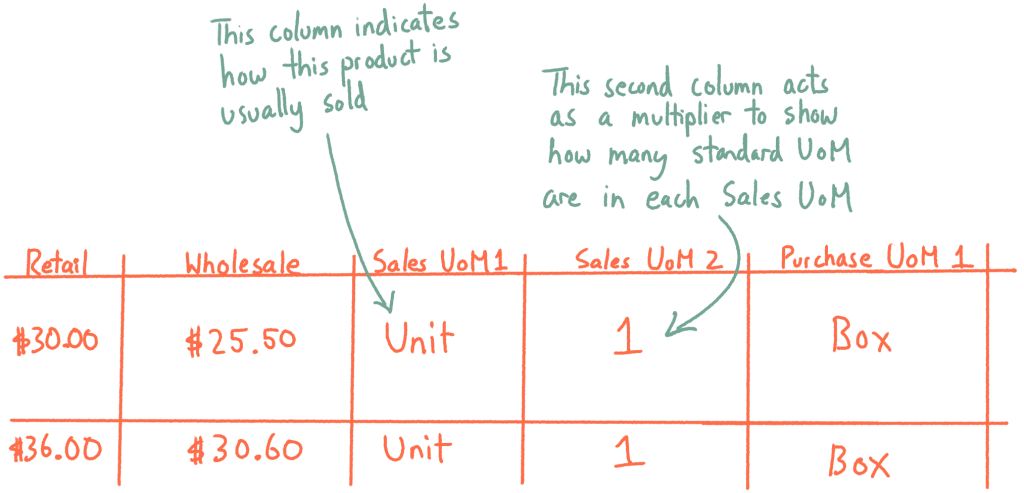
Each UOM type (sales, purchasing) should have two columns. The first column should be the specific purchasing UOM, like box. The second column should then show how many of the standard UOM fit within that container; it’s basically a column that you can use as a multiplier to find out how many standard UOM fit inside that purchasing or sales UOM.
At minimum, your product list needs:
- Product name / SKU
- Standard UOM: the unit your on-hand count is in
- Purchasing UOM: the unit name your vendor uses
- Purchasing UOM quantity: how many standard units are inside it
- Sales UOM: the unit name your customer buys in
- Sales UOM quantity: how many standard units are inside that
- Cost and price, per standard UOM
Here’s what that would look like on a spreadsheet:
Inventory software method
Inventory software stores the conversion factor once and then applies the right unit automatically, depending on what you’re doing.
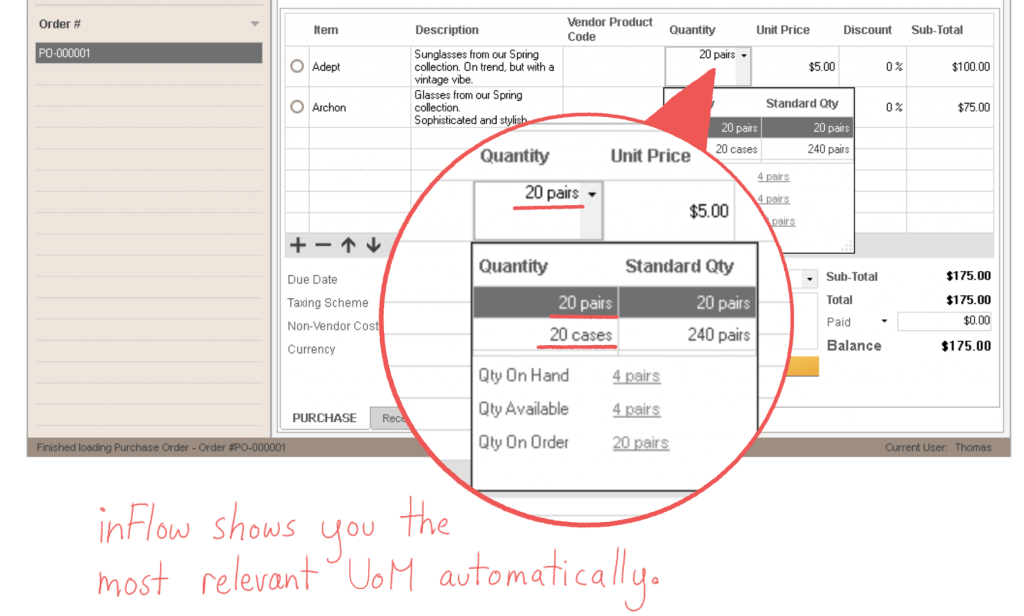
Our software, inFlow Inventory, can help by tying UOM to each product and using each UOM where appropriate. This means you won’t have to remember to use purchasing UOM when buying from a vendor because inFlow will already know that they deal in boxes and how many sunglasses are in each box.
With proper inventory management software, you’ll see boxes on purchase orders and pairs when you’re counting or selling stock. The right unit of measure in the right context, with the correct price and cost already attached.
When to move beyond spreadsheets
Inventory spreadsheets are a tried-and-true medium for tracking inventory, but the problem is that they aren’t really scalable. There comes a point where you’ll have too many products to keep up to date, and it can be easier to make mistakes when everything is a grid of rows and columns. You’ll want to switch to inventory software before your business reaches that point.
A few signs you’ve hit it:
- More than one person needs to update stock at the same time
- The same product has different pack sizes from different vendors
- You’re correcting counts after every delivery
- Someone has to convert units by hand before invoicing
If any of those sound familiar, it’s worth reading through the other signs your business has outgrown spreadsheets for inventory before the problem starts costing you real money.
And if you have a spreadsheet, inFlow also makes sure your hard work won’t go to waste. You can import spreadsheets right into the software so that you can start where you left off, without having to enter everything all over again.
UOM pricing and costing
If you tie your units of measure to your product prices and costs, you’ll make it easier to do your inventory accounting and also provide your business with flexibility to sell using different UOM.
One thing to get straight before you start typing numbers in, though: the unit you think in and the unit you enter aren’t always the same one.
Normalize price and cost to the standard UOM
Work out your true cost and margin per standard unit first, then convert up from there.
The standard unit is the only one that stays constant no matter how the product arrives or leaves, which makes it the only fair basis for comparing margin. So if sunglasses come in boxes but you sell them as individual pairs, start with what a pair costs you and what a pair earns you: $5.00 cost, $15.00 price, $10.00 margin.
Every other unit is that figure times a conversion factor. A box of six sells for $90 ($15.00 per pair × 6) and costs your business $30 ($5.00 per pair × 6).
This matters most when the same product ships in three different pack sizes. Compare box price to box price and you’re comparing packaging. Compare cost per pair and you’re comparing the actual deal.
Price alternate selling units
Software asks for each price in the unit that transaction actually uses, so the number you enter isn’t always your standard-unit figure.
In inFlow specifically:
- The sales price, in the Cost and price section, is the price per sales UOM. Sell in packs of four and you enter the pack price.
- The vendor price, in the Product vendors section, is the price per purchasing UOM. Buy in cases of 24 and you enter the case price.
- Leave the sales UOM blank and inFlow falls back to your standard UOM, so the price you enter is simply the price per standard unit.
Here’s the sunglasses setup, field by field:
| What you’re entering | The unit it expects | Sunglasses value |
|---|---|---|
| Standard UOM | The unit you stock and count | Pair |
| Sales price | Per sales UOM, or standard if blank | $15.00 per pair |
| Purchasing UOM | The unit your vendor ships | Box (6 pairs) |
| Vendor price | Per purchasing UOM | $30.00 per box |
Stock still moves in standard units behind the scenes. Receive 10 boxes at $30 each and inFlow adds 60 pairs to your on-hand count.
The useful consequence is that a wholesale price isn’t locked to your conversion factor. If you sell by the box and want to reward bulk buyers, you enter $84 in the sales price field instead of the $90 the math implies. Just make that a deliberate margin decision rather than a number someone typed over, because your per-pair margin drops from $10.00 to $9.00 in the process.
Common UOM errors and best practices
Most UOM problems aren’t conceptual. They’re small setup decisions that quietly go wrong at scale.
Vendor-specific pack sizes
Don’t assume a unit name means the same quantity across every vendor.
You need to have a system that can recognize that not all boxes are the same size. Vendor A’s “case” of sunglasses might hold six pairs, and Vendor B’s might hold twelve, and if your product record stores a single global conversion for “case,” every receipt from one of those vendors will be wrong.
The fix is to store the conversion factor against the vendor-product relationship, not just the product. Where your system can’t do that, give the units distinct names (case-6, case-12) so nobody has to guess.
Naming and unit codes
Pick one name per unit and use it everywhere.
Ea, each, EA, and pc will all end up in the same product list if you let them, and then nobody can filter a report cleanly. Agree on a short list up front, write it down, and keep it to units you actually handle.
If you trade internationally or send EDI documents, it’s worth mapping your names to standard UN/CEFACT codes (EA for each, CS for case, KGM for kilogram) so your documents match what your partners expect.
Rounding and indivisible units
Never let a system sell a fraction of something you can’t physically split.
This is the “0.5 boxes” problem, and it usually shows up when someone enters a quantity in the wrong unit. A sealed box of six is indivisible. You can sell 1 box or 2 boxes, not 1.5. Meanwhile, wire genuinely can be sold at 12.5 feet.
So decide per product whether fractional quantities are legitimate, and set your decimal precision to match. Two decimals on weight-based items, zero decimals on anything sealed. It’s a small setting that prevents a surprising number of awkward invoices.
Track units of measure automatically with software
Tracking units of measure is just one of the amazing things inFlow can do. Our software has loads of features that make tracking inventory a breeze. Things like reorder points, purchase & sales orders, and a built-in barcoding system, to name just a few. So what are you waiting for? Why not click the link below and give inFlow a try and see for yourself why thousands of SMBs love it!
I manufacture knitted fabric and have a slightly more complicated issue for UOM. My received goods (YARN) come in as LBS that are then knitted into ROLLS of fabric with varying weights; which are then grouped into LOTS of varying roll counts for shipping to the customer. Each packing slip lists the lots shipped which in turn are billed by LBS. So although my counting groups are all using LBS for the UOM, my grouping levels make this complicated for how to create a pick list of rolls (serialized barcoded labels) for assembling the lots (barcode for the Lot is the Sales or Work Order #) and then a pick list of lots for shipping and billing. So then my packing slip lists all the rolls that comprise the lot, and my invoice lists each lot shipped for a particular order.
Any ideas on how I might handle this in InFlow? I’m working on the trial version at the moment.
Hi Robin, sorry we missed this comment. I did check your email against our support tickets and it looks like you’ve already had a discussion with us about this, so I hope that helped!