 Fellow Canadians: All inFlow plans are available in Canadian dollars





Key takeaways
- Xero inventory is accounting-first, handling basic stock tracking, valuation, and COGS well, but lacking more complex inventory management features.
- Xero works best for simple, single-location setups with low SKU counts and no assemblies, lot tracking, or advanced replenishment needs.
- Core limitations include limited multi-location capability, no BOM/assemblies, no serial or lot tracking, and minimal replenishment automation.
- Xero Inventory Plus adds FIFO and basic reorder levels, but replenishment remains informational, and operational workflows are still limited.
- Pairing Xero with inFlow adds manufacturing/BOMs, smarter reordering, barcode workflows, richer reporting, and multiple valuation methods.
If you’re running a product-based business and you use Xero, you may be wondering whether its built-in inventory features can handle your growing inventory management needs. The short answer? It depends on your operations and where you are in your business journey.
Xero does offer inventory-tracking features, but the design is very much accounting-first rather than operations-first. Xero inventory works well for straightforward scenarios, but as you scale, you’ll quickly find yourself struggling with manual workarounds.
Today, we’ll dive into what Xero inventory tracking actually offers, where it shines, and where it falls short. By the end, you’ll know whether Xero’s native inventory tracking tools are “good enough” for your business or if it’s time to look for an alternative.
What is Xero inventory?
Xero inventory is the built-in stock-tracking functionality within Xero’s cloud accounting platform. It allows businesses to monitor inventory quantities, track costs, and automatically calculate cost of goods sold (COGS) as items move through purchase and sales transactions.
The process is fairly simple. You set up your inventory items, record purchases to increase stock levels, process sales to decrease quantities, and let Xero handle the accounting behind the scenes. The design is meant to keep your financial records accurate while providing basic visibility into what you have on hand.
However, calling it a comprehensive inventory management system would be generous. It’s designed for simple inventory accounting, but lacks many operational features that growing businesses need.
Xero inventory management features
Rather than trying to be a full-blown inventory management system, Xero focuses on the basics: tracking stock as it’s bought and sold, valuing that inventory correctly, and ensuring all that information flows into your financial reports. Let’s take a closer look at Xero’s inventory tracking features.
Setting up inventory items
Creating inventory items in Xero is straightforward. When you set up your inventory in the system, you’ll fill in basic details like item code (Xero’s version of a SKU), descriptions, sales prices, and purchase costs.
You can choose between tracked and untracked inventory items, giving you flexibility in how detailed you want your inventory management to be. Tracked items provide full quantity and cost visibility, while untracked items simply record revenue and expenses without monitoring stock levels.
Purchase and sales tracking
When you receive inventory, Xero increases your stock quantities and updates the total inventory value on your balance sheet. Sales transactions automatically reduce quantities and transfer costs to your COGS, maintaining accurate financial records without manual entries.
This automated flow between inventory movements and accounting entries is where Xero inventory tracking truly shines. Your accounting stays up to date, and you don’t need to worry about constantly making adjustments when you buy or sell products.
Inventory valuation methods
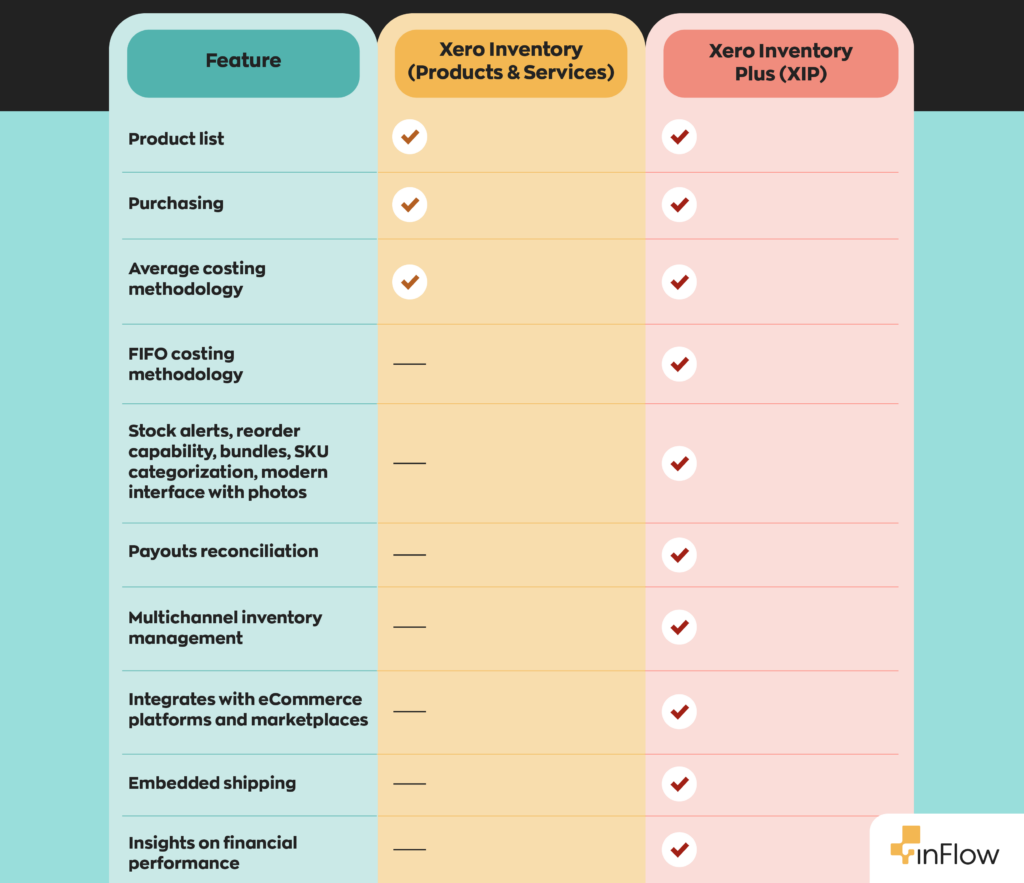
At the basic level, Xero inventory supports only one valuation method: weighted average cost, which calculates an average cost across all units in stock.
However, users who pay for Xero Inventory Plus will have two valuation methods available. In addition to weighted average cost, they can also choose first in, first out (FIFO), which assumes you sell the oldest inventory first.
What are the limitations of Xero inventory tracking?
The simplicity of Xero’s inventory tracking can be great, but that simplicity comes with tradeoffs. While it handles basic stock accounting well, it wasn’t built to manage the operational complexity that many growing product-based businesses face. This is why many teams begin researching the best add-ons for enhancing Xero’s inventory features as their operations become more demanding.
Multi-location inventory management
One of the most significant limitations of Xero’s basic inventory functions is its inability to track inventory across multiple locations. Whether you have multiple warehouses, retail stores, or even just separate storage areas, Xero treats all inventory as if it were in one place.
While Xero’s core inventory does not support multiple physical stock locations, if you add Xero Inventory Plus, you can assign and manage stock at different locations like warehouses or stores. However, its multi-location features won’t be as sophisticated as a dedicated warehouse management system. For example, there are no detailed pick/pack workflows or bin locations.
Assembly and kitting
This is a big one for anyone doing manufacturing or light assembly. Xero inventory doesn’t support assemblies or subassemblies. If you manufacture items or create bundles from existing stock, you’ll need workarounds that often involve manual adjustments and separate tracking systems.
This limitation affects businesses ranging from manufacturers who assemble finished goods to retailers who do kitting and bundling. The lack of bill of materials (BOM) functionality means you can’t automatically adjust component quantities when assemblies are built or sold.
Serial number and lot tracking
For businesses that need to track serialized products or batches, Xero inventory falls short. There’s no built-in way to manage serial numbers, lot numbers, or expiration dates.
This creates compliance issues for businesses in regulated industries and makes it difficult to handle recalls, warranty claims, or quality control processes that require item-level traceability.
Advanced replenishment features
Replenishment tools are a huge selling point for most inventory management systems, and this is another area where Xero falls short. It lacks things like automatic reorder points, purchase order suggestions, and demand forecasting.
For users of Xero Inventory Plus, you can manually set basic reorder levels, but the system won’t automatically generate purchase orders or provide restocking recommendations. Reorder points in Xero Inventory Plus are strictly informational.
Who should use Xero to track inventory?
Xero inventory tracking works best for businesses with simple, low-volume inventory needs. If your inventory workflow is straightforward and unlikely to change in the near future, Xero might be a solid choice. Xero inventory is typically a good fit for:
- Small retail operations selling a handful of SKUs from a single location, with no need for assemblies, lot tracking, or advanced replenishment tools.
- Service-based businesses with limited products, such as consultants or agencies that sell physical add-ons like books, kits, or training materials.
- Early-stage or startup businesses that need basic inventory tracking while validating their business model and building momentum.
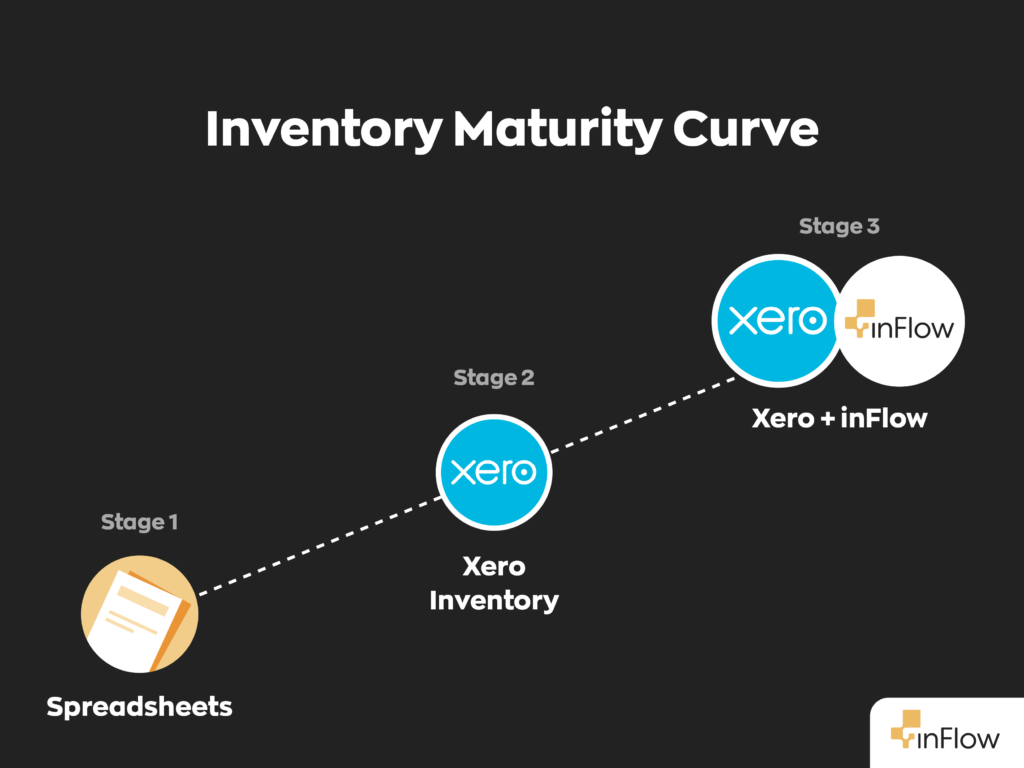
It’s important to recognize when Xero’s simplicity stops helping and starts holding you back. As soon as inventory becomes more operational than financial, it’s usually time to look for an alternative.
Common pain points that signal it’s time to move beyond Xero
When your inventory management becomes a core operational function of your business, you’ll know it’s time to move away from Xero for inventory tracking. The cracks tend to show up in similar ways across businesses. If any of the following points strike a chord, you’re likely pushing Xero beyond what it was designed for.
- Manual workarounds become the norm, especially spreadsheets used to track locations, assemblies, or stock adjustments outside of Xero.
- Limited operational reporting, where you can see stock levels but can’t answer questions about turnover, slow-moving items, or inventory performance.
- Growing SKU complexity makes it harder to manage large product catalogs, find items quickly, or analyze trends efficiently.
- Integration pressure with other systems, such as ecommerce platforms or warehouse software, that require more flexible APIs and deeper data syncing. This is often the point at which businesses start actively searching for Xero inventory add-ons to bridge the gaps.
At this stage, inventory management isn’t just about keeping the books clean. It’s about protecting margins, reducing errors, and scaling without chaos.
Why inFlow is a great alternative to Xero for inventory management
Once you’ve recognized that Xero’s inventory tracking features just won’t cut it, it’s time to look for alternatives. The good news is you don’t have to replace Xero to fix the problem. Instead, many businesses keep Xero for their accounting needs and connect it with dedicated inventory software. When businesses ask which inventory management systems work best with Xero, they’re typically looking for tools like inFlow that extend Xero’s accounting strengths with added operational control.
The integration with inFlow is seamless. For businesses wondering how Xero integrates with inventory management software, the model is simple: inFlow handles complex inventory operations while syncing invoices, purchase orders, costs, and stock values back to Xero for accurate accounting. This means you get powerful inventory management without sacrificing the rest of what Xero offers on the accounting side.
The connection also has two-way payment sync: a payment recorded in either inFlow or Xero automatically appears in the other, so your books stay reconciled without double-entry. You can also map your payment methods to specific Xero accounts, so payments post to the right place on their own.
The integration also helps with reporting. You can map inFlow fields, such as location, sales rep, or product category, to Xero’s tracking categories, so transactions arrive already segmented. The reports you run in Xero can then break down revenue and costs by the dimensions you actually operate on, without tagging each transaction by hand.
What features does inFlow offer that Xero doesn’t?
Xero does accounting really well. There’s no question about that. But when it comes to tracking inventory, several features are either missing or too barebones for complex inventory management. Here are the key features that inFlow offers that Xero doesn’t:
- Advanced manufacturing: Unlike Xero, inFlow Manufacturing supports full bill of materials (BOM) functionality. You can create assemblies or subassemblies, track component usage, and automatically adjust inventory levels when you manufacture finished goods.
- Smart reordering: inFlow offers automated reorder point alerts that you can set based on recommendations. You’ll know when to restock before you run out, rather than discovering shortages after the fact.
- Comprehensive reporting: While Xero provides basic inventory values, inFlow delivers additional insights, enabling you to analyze inventory turnover rates, slow-moving stock, and detailed movement histories. These reports help you make data-driven decisions about purchasing, pricing, and product mix.
- Barcode scanning and label printing: inFlow includes a built-in barcode system for faster, more accurate inventory management. You can scan items during receiving, picking, and cycle counts, dramatically reducing errors and speeding up operations.
- Lot, serial number, and expiry date tracking: inFlow lets you track individual items by lot or serial number and manage expiration dates, making it easier to trace inventory, rotate stock correctly, and stay compliant.
- Four inventory valuation methods: With inFlow, you’ll have access to four popular methods to choose from, so you can use whichever one makes the most sense for your business.
Most businesses find the transition straightforward because they’re not changing their accounting processes. They’re simply adding better inventory tools on top of their existing Xero foundation.
The bottom line on Xero inventory management
Xero inventory tracking works well for simple scenarios, but as businesses grow quickly, it reaches its limits. For many growing companies, the solution isn’t abandoning Xero; it’s understanding how Xero integrates with inventory management software and choosing the right add-ons to support scaling operations.
If you’re spending time on manual workarounds or missing opportunities due to inventory blind spots, it’s time to consider a dedicated solution like inFlow that integrates seamlessly with your existing Xero setup.
For growing businesses with real inventory challenges, pairing Xero with inFlow provides the operational power you need while keeping your existing accounting foundation intact.
FAQ
What is Xero inventory management?
Xero inventory management is the built-in stock-tracking functionality within Xero’s cloud accounting platform. It lets you monitor stock quantities, track costs, and automatically calculate cost of goods sold (COGS) as items move through purchases and sales. It’s designed for basic inventory accounting rather than full operational inventory management, making it a solid fit for simple, low-volume product businesses.
What are the limitations of Xero inventory tracking?
Xero’s inventory tracking lacks several features that growing businesses need. It doesn’t support multi-location tracking, bill of materials (BOM) or assemblies, serial or lot number tracking, or automated replenishment. While Xero Inventory Plus adds FIFO valuation and basic reorder levels, those reorder points are informational only, meaning the system won’t automatically generate purchase orders or provide reorder point recommendations.
What is the difference between Xero Inventory and Xero Inventory Plus?
Xero’s standard inventory uses weighted average cost as its only valuation method and offers no multi-location support. Xero Inventory Plus adds FIFO (first in, first out) valuation and the ability to assign stock to different locations like warehouses or stores. However, even Inventory Plus lacks advanced warehouse workflows, bin locations, and automated replenishment, making it accounting-first by design.
What are the best add-ons for enhancing Xero’s inventory features?
For businesses that need more than Xero’s built-in tools, pairing Xero with a dedicated inventory management system like inFlow is a popular approach. inFlow adds manufacturing and BOM support, smart reorder alerts, barcode scanning, lot and serial number tracking, and four inventory valuation methods, all while automatically syncing invoices, purchase orders, and stock values back to Xero.
How does Xero integrate with inventory management software?
Xero integrates with inventory management software through direct API connections. Tools like inFlow handle things like receiving, picking, manufacturing, and reordering, while syncing financial data like invoices, purchase orders, and inventory costs back to Xero in real time. This means you keep Xero as your accounting foundation while gaining the inventory control your operations actually need.
When should a small business move beyond Xero for inventory management?
It’s time to look beyond Xero when manual workarounds (like spreadsheets) become routine, when you can’t track inventory across multiple locations, when you’re managing assemblies or kitting, or when you need lot and serial number traceability. If inventory has become a core operational function rather than just a line item in your books, a dedicated inventory management system will serve you far better.
Does Xero support manufacturing or bill of materials (BOM)?
No. Xero does not support assemblies, subassemblies, or bill of materials functionality. If you manufacture finished goods or bundle products from existing stock, you’ll need to manage component quantities manually or through a separate system. For businesses with any manufacturing or kitting needs, integrating Xero with a tool like inFlow offers full BOM support, making it the recommended approach.
0 Comments