


For small manufacturers that build and sell their own products, the best inventory software is inFlow, which runs multi-level BOMs, manufacture orders, purchasing, and sales in one system. Production-first shops that need workstation scheduling are better served by Katana, teams that want a full MRP by MRPeasy, and QuickBooks-centered manufacturers by Fishbowl Advanced.
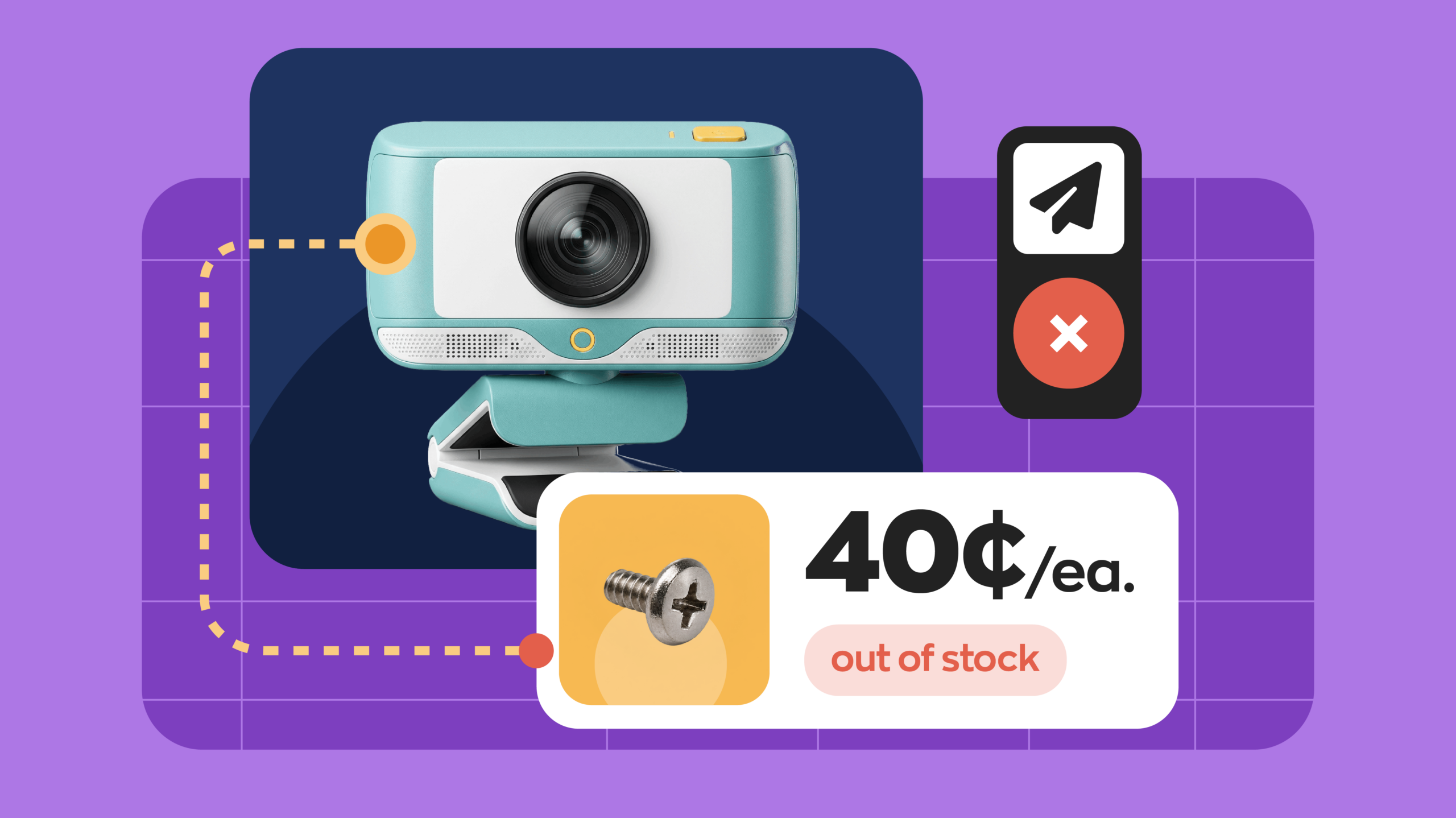
Picture a finished order that can’t ship because a 40-cent component ran out last Tuesday. That’s the problem manufacturing inventory software exists to prevent, and it hits small shops hardest. Around three-quarters of U.S. manufacturing firms have fewer than 20 employees, according to the NAM’s analysis of 2022 Census data, so most need software sized for a small team, not a full ERP. Below, we compare eight tools on the features small manufacturers rely on most.
Full disclosure: this guide is published by inFlow. Every tool, ours included, gets the same breakdown, and we’ve flagged where a competitor is the better fit.
Best manufacturing inventory software compared
The table below sums up who each tool suits, what it costs to get started, and the one feature that sets it apart for manufacturers. All prices are in USD and come from each vendor’s own pricing page.
| Software | Best for | Starting price | Key manufacturing feature | Free trial or plan |
| inFlow Manufacturing | Small manufacturers that make and sell from one system | $199/mo ($169/mo billed annually) | Multi-level BOMs with labor and operation costs | 14-day free trial |
| Katana | Production-first shops that need workstation scheduling | Free plan; Core from $299/mo | Manufacturing orders, routings, and a shop floor app | Free plan (up to 30 SKUs) |
| MRPeasy | Teams that want a full MRP planning run | $49 per user/mo (billed monthly) | MRP and production planning on every plan | 15-day trial, extendable to 30 |
| Fishbowl Advanced | Manufacturers committed to QuickBooks | From $675/mo, by quote | MRP, work orders, and capacity scheduling | Demo only |
| Odoo (Manufacturing) | Manufacturers that want one ERP for everything | Free for one app; Standard $24.90 per user/mo billed yearly (first year) | Manufacturing app inside an all-in-one suite | Free plan and free trial |
| Cin7 Core | Ecommerce brands that assemble or kit products | $349/mo | Assembly BOMs plus 700+ integrations | Free trial |
| Unleashed | Distribution businesses doing light assembly | $399/mo plus $69/mo production add-on (Core, billed monthly) | Production costing with landed costs | 14-day free trial |
| QuickBooks Enterprise | Shops that only need simple assemblies | Annual or monthly plan; varies by tier and users | Inventory assemblies inside your accounting software | 60-day money-back guarantee |
Pricing verified as of October 15, 2026. Vendors change plans often, so confirm current pricing before you buy.
What is manufacturing inventory management?
Manufacturing inventory management means keeping tabs on raw materials, components, work in progress, and finished goods as they move through production. It ties each finished product to its bill of materials, so building one unit automatically consumes the right parts and adds the finished item to stock.
For a small manufacturer, it also connects production to the rest of the business. U.S. manufacturers held $972.4 billion in inventories in August 2026, according to the Census Bureau. Managing it well means knowing which components to reorder before a build stalls, what each unit actually costs to make, and whether you have enough finished goods to fill incoming orders. Good software handles all three in one place, instead of across a spreadsheet and someone’s memory.
What features should small manufacturers look for?
For small manufacturers, the must-haves are multi-level BOMs, manufacture orders with barcode scanning, true cost tracking, component reordering, and integrations with accounting and sales channels.
Multi-level bills of materials (BOMs) and subassemblies
A bill of materials lists every component that goes into a finished product. A multi-level BOM goes one step further and lets a component have its own BOM. Think of an electronics assembler: the circuit board is built from chips and resistors, then the board goes into the finished device. Your software should treat that board as a subassembly, track its stock, and let you build it on its own order when you’re short.
Manufacture orders, component picking, and barcode scanning
A manufacture order (sometimes called a work order) tells your team what to build, how many, and which components to pull. Look for orders that flag missing components before anyone starts, floor-ready pick lists, and barcode scanning so each picked part is the right one. Scanning matters more than it sounds (ask anyone who’s built 200 units with the wrong screw).
True cost to manufacture: materials, labor, and overhead
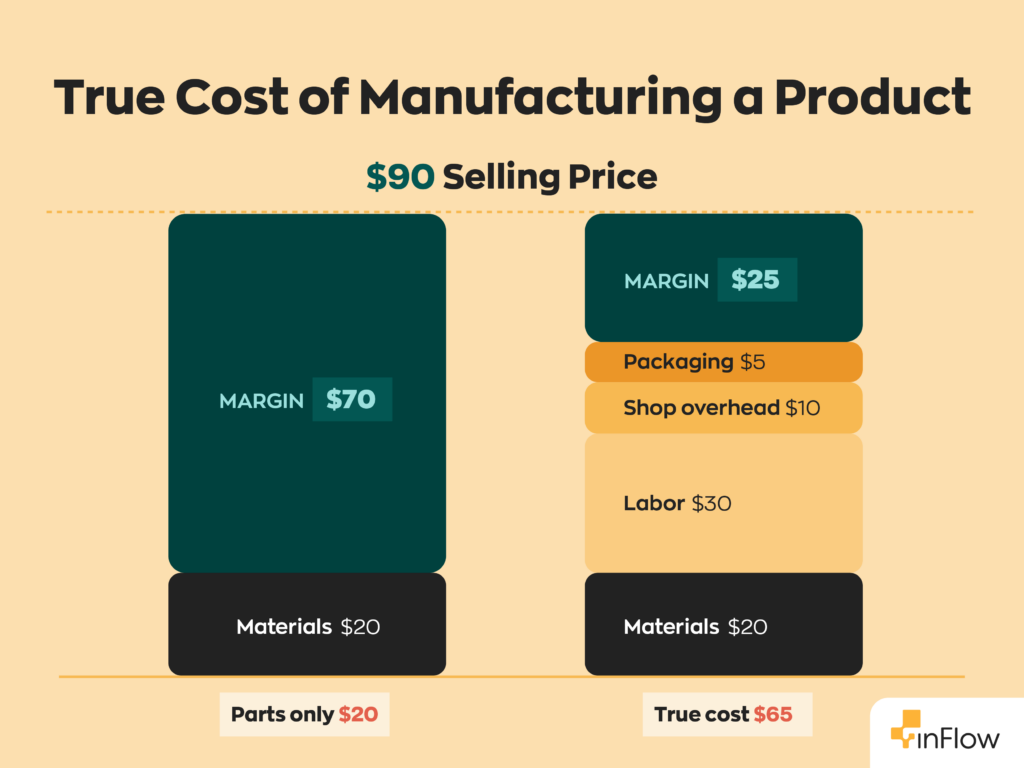
Your real cost of goods manufactured (COGM) is more than the sum of your parts. Labor time, machine operations, and per-unit fees for outside work all add up. Good software rolls those costs into the finished product, so your true costs reflect reality, not a rough guess.
Component reordering and purchasing
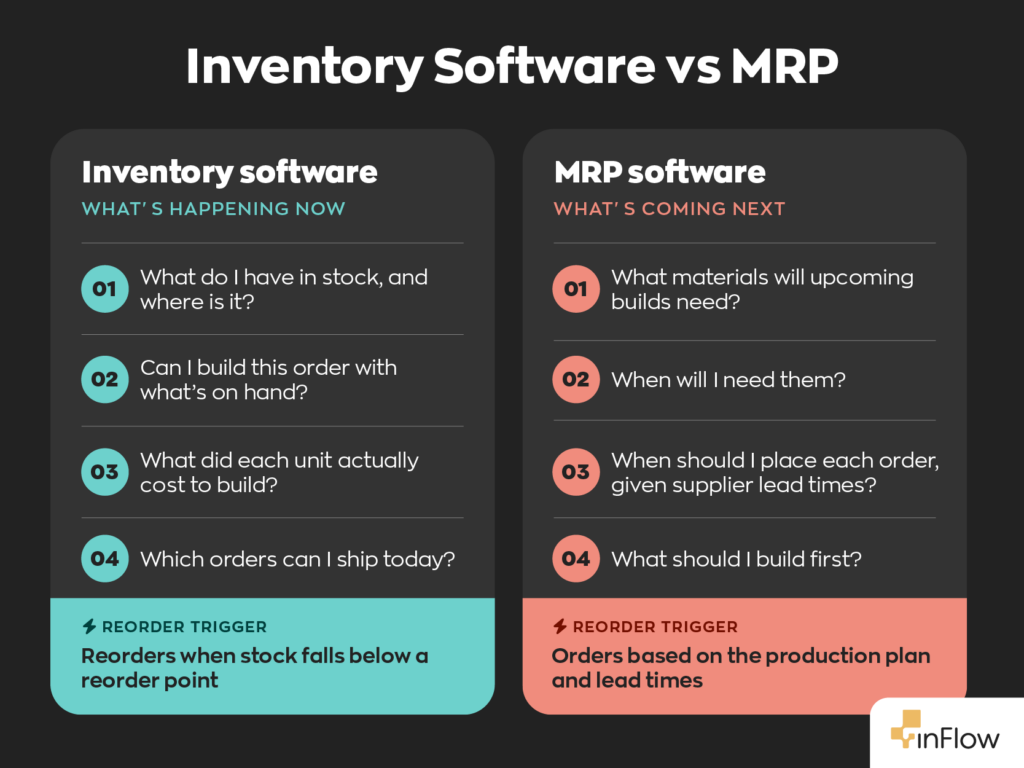
A build is only as fast as its slowest-arriving component. Reorder points tell your software when stock is getting low, and the best tools let that signal turn into a purchase order for components or a manufacture order for subassemblies. Some tools go further with a full material requirements planning (MRP) run that schedules purchases against future production. Here’s how MRP software works if you’re weighing that.
Accounting and sales channel integrations
Most small manufacturers also sell what they make, whether that’s on Shopify, Amazon, or directly to business customers. Your inventory software should sync finished goods to those channels and push costs and invoices to QuickBooks or Xero. If you sell wholesale, a B2B ordering portal lets repeat customers place orders without a phone call or an email chain.
The 8 best manufacturing inventory software tools for 2026
Each entry follows one template: overview, key features, pricing, pros, cons, and fit. And yes, inFlow gets real cons too.
1. inFlow Manufacturing: best for small manufacturers that make and sell from one system
Overview: inFlow is best known for purchasing, sales, and stock control, and inFlow Manufacturing adds BOMs, manufacture orders, and production management. It’s built for assemblers that buy components, build products, and sell them, all from the same system.
Key features:
- True multi-level BOMs, where subassemblies can be built inside the parent order or split into their own manufacture order.
- Production management on every Manufacturing plan: operations, labor rates, timesheets, and a mobile app your team can use on the shop floor.
- Cost to manufacture that rolls component, labor, and operation costs into the finished product.
- Kits that auto-assemble when sold, plus reorder settings that can generate purchase orders or manufacture orders from one screen.
Pricing: Manufacturing Start-up is $199/month ($169/month billed annually) for 2 team members and 1 location. Growth is $479/month ($399/month billed annually) for 5 team members and 5 locations. Scale is $759/month ($629/month billed annually) and adds the B2B Showroom. Expansion is $1,029/month ($859/month billed annually) and includes lot and serial numbers. You can try it free for 14 days without a credit card. inFlow uses bundled-seat pricing, so extra team members and locations cost more.
Pros:
- Purchasing, manufacturing, sales, and B2B ordering live in one system.
- No caps on products, sales orders, purchases, or integrations, whatever the plan.
- Components can be scanned as they’re picked, with inFlow’s own scanner and printer hardware as an option.
Cons:
- No workstation or resource capacity scheduling.
- No demand forecasting or full MRP functionality; reordering runs on reorder points.
- Lot and serial numbers are $39/month add-ons each below the Expansion plan.
Best for: small manufacturers and assemblers that build repeatable products and sell them through several channels.
Not ideal for: job shops building one-off custom products, formula-based process manufacturers, or shops that need capacity scheduling.
2. Katana: best for production-first shops that need workstation scheduling
Overview: Katana is cloud manufacturing software built around the production floor. It’s a strong fit for makers who schedule work across people, machines, and workstations.
Key features:
- BOMs with subassemblies, and manufacturing orders for subassemblies up to 10 levels deep.
- Routings and operations, with “resources” for each workstation, machine, or operator.
- A shop floor app for operators.
- Batch and serial tracking (a paid add-on on Core), plus QuickBooks Online, Xero, and Shopify integrations.
Pricing: Katana’s Free plan costs $0 for up to 30 SKUs, with unlimited users and access to every feature and add-on. Core starts at $299/month, with add-ons like Manufacturing Management ($199/month) and Traceability ($249/month) billed on top. Advantage is a custom-priced annual contract for larger teams.
Pros:
- Strong production planning and shop floor tools.
- Free plan to test with a small catalog.
- No per-user fees on any plan.
Cons:
- Manufacturing Management and Traceability are paid add-ons on Core.
- Core’s $299 is a starting price; usage and add-ons push it higher.
- Live support isn’t included on the Free plan.
Best for: makers that need to schedule operations across workstations and operators.
Not ideal for: budget-conscious shops once add-ons are counted.
Compare: inFlow vs. Katana
3. MRPeasy: best for teams that want a full MRP system
Overview: MRPeasy is cloud MRP and ERP software for small manufacturers. It covers production planning, purchasing, inventory, and a built-in CRM, priced per user.
Key features:
- Production planning, BOM management, and lot traceability on every plan.
- Master production schedule, backward scheduling, multi-site, barcodes, and forecasting on the Enterprise plan.
- Serial numbers, quality control, and subcontracting from the Professional plan.
- Shopify, QuickBooks Online, and Xero integrations.
Pricing: Plans are $49, $69, $99, and $149 per user/month (Starter, Professional, Enterprise, and Unlimited), billed monthly. Annual billing costs 11 times the monthly price, so you get one month free. The free trial runs 15 days and can be extended to 30. There’s no free plan.
Pros:
- Deep MRP functionality at a low per-user price.
- Lot traceability included on every plan.
- Subcontracting support from the Professional plan.
Cons:
- Every new user adds to the monthly bill.
- Barcodes and multi-site sit on the Enterprise plan.
- More planning depth than a simple assembly shop may need.
Best for: small manufacturers that plan production weeks ahead and need MRP.
Not ideal for: teams that mostly assemble to order and want simple workflows.
4. Fishbowl Advanced: best for manufacturers committed to QuickBooks
Overview: Fishbowl has been a go-to QuickBooks companion for years. Its manufacturing tools live in Fishbowl Advanced Manufacturing rather than the Fishbowl Inventory plans.
Key features:
- Multi-level BOMs, manufacture orders, and work orders.
- MRP and capacity planning and scheduling.
- Lot, batch, and serial tracking.
- QuickBooks Online, QuickBooks Desktop, and Xero integrations.
Pricing: Advanced Manufacturing starts at $675/month, and your final quote depends on user count and deployment. An implementation package comes with every purchase, with no price listed on the site. Instead of a trial, you’ll book a demo.
Pros:
- Long track record syncing with QuickBooks Online and Desktop.
- MRP and capacity scheduling built into the same package.
- Room to grow, with plans sized from 2 to 200+ users.
Cons:
- The highest entry price of any tool here.
- Implementation is mandatory and isn’t priced publicly.
- You’ll need a sales demo to see it in action.
Best for: established manufacturers that run their books in QuickBooks and need MRP.
Not ideal for: shops that want to be building inside the software within days.
Compare : inFlow vs. Fishbowl
5. Odoo (Manufacturing): best for manufacturers that want every department in one ERP
Overview: Odoo is a modular business platform with an open-source core, where Manufacturing is one app among dozens. You add apps like Inventory, Purchase, and Accounting as you need them, and they all share one database.
Key features:
- Manufacturing app with BOMs and work orders.
- The Standard plan unlocks every app, from Manufacturing to Accounting.
- One shared database for production, purchasing, and accounting.
- The Custom plan adds Odoo Studio and the external API.
Pricing: On One App Free, you get a single app at no cost for unlimited users, and Odoo says any apps it relies on (Inventory, for Manufacturing) are free too. Standard is $24.90 per user/month billed yearly in year one, rising to $31.10 after that. Budget separately for implementation help.
Pros:
- Manufacturing, accounting, and CRM in a single system.
- A genuinely free entry point.
- Open-source Community edition you can self-host.
Cons:
- Costs climb with every seat you add.
- Setup usually calls for an Odoo partner.
- Takes more configuring than a dedicated manufacturing inventory tool.
Best for: growing manufacturers ready to run the whole company on one ERP.
Not ideal for: shops that want to go live without outside help.
Compare: inFlow vs. Odoo
6. Cin7 Core: best for ecommerce brands that assemble or kit their own products
Overview: Cin7 Core is built for multichannel brands that need stock, orders, and fulfillment in sync. Its assembly tools suit brands that kit or build products alongside a busy ecommerce operation.
Key features:
- Assembly manufacturing, kits and bundles, and BOM tracking on the Standard plan.
- MRP as an add-on on Standard, and included from the Pro plan.
- Batch and expiry tracking.
- 700+ integrations across ecommerce, marketplaces, and accounting (Standard includes 2 connections, with more available for purchase).
Pricing: Cin7 Core Standard is $349/month for 5 users and 6,000 sale orders a year. Pro is $599/month for 10 users and includes MRP. Advanced Production is an add-on on Pro and Advanced, priced by quote. You can start with a free trial.
Pros:
- One of the largest integration libraries on this list.
- Kits, bundles, and assemblies on the entry plan.
- Batch and expiry tracking.
Cons:
- Yearly sale order limits apply on every plan.
- MRP is an add-on on the entry plan.
- Advanced Production costs extra and isn’t priced publicly.
Best for: ecommerce-heavy brands that assemble or kit what they sell.
Not ideal for: shops where production, not sales channels, is the main challenge.
Compare: inFlow vs. Cin7 Core
7. Unleashed: best for light assembly alongside distribution
Overview: Unleashed is a cloud inventory platform from The Access Group that serves both distributors and manufacturers. Its costing tools are a big part of the appeal, which makes it a good match when purchasing and light assembly go hand in hand.
Key features:
- Production & Manufacturing add-on with BOMs, assembly and disassembly, and production planning.
- Production costs that capture materials, labor, logistics, and packaging.
- Batch and serial tracking, plus landed costs split by value, quantity, weight, or volume.
- QuickBooks Online, Xero, and Shopify integrations.
Pricing: Lite is $99/month, Core is $399/month (3 users), and Pro is $729/month (5 users), billed monthly. Paying annually knocks up to 10% off. Production & Manufacturing is a $69/month add-on on Core, included on Pro, and not listed for Lite. Onboarding packages start at $449. Trials run for 14 days.
Pros:
- Production costs include labor, logistics, and packaging, not just materials.
- Strong Xero and QuickBooks Online integrations.
- Production tools included on Pro.
Cons:
- Production is an add-on on Core and isn’t available on Lite.
- Nested BOMs are built one level at a time, per Unleashed’s own FAQ.
- Extra users cost $69 to $89/month each.
Best for: distributors that assemble or kit part of what they sell.
Not ideal for: manufacturers building multi-level products every day.
Compare: inFlow vs. Unleashed
8. QuickBooks Enterprise: best for shops that only need simple assemblies
Overview: QuickBooks Enterprise is Intuit’s desktop accounting software for larger small businesses. It’s the baseline on this list, showing where accounting software’s manufacturing tools stop.
Key features:
- Inventory assemblies with pending builds.
- An option to automatically build required subassemblies.
- Advanced Inventory (Platinum and Diamond) adds multiple locations, lot and serial tracking, and barcode scanning.
Pricing: QuickBooks Enterprise comes in Silver, Gold, Platinum, and Diamond tiers, on an annual or monthly plan, with pricing that varies by tier and user count. Diamond is only available on a monthly plan. Annual plans include a 60-day money-back guarantee.
Pros:
- Inventory and accounting in the same file.
- Familiar to accountants and bookkeepers.
- Lot and serial tracking on the higher tiers.
Cons:
- QuickBooks Enterprise’s pages don’t list manufacture orders or routing.
- Advanced Inventory only comes on the top two tiers.
- Desktop software rather than cloud-native.
Best for: small shops with simple assemblies that want to stay inside QuickBooks.
Not ideal for: manufacturers that need production tracking, labor costing, or a shop floor app.
How to choose manufacturing inventory software
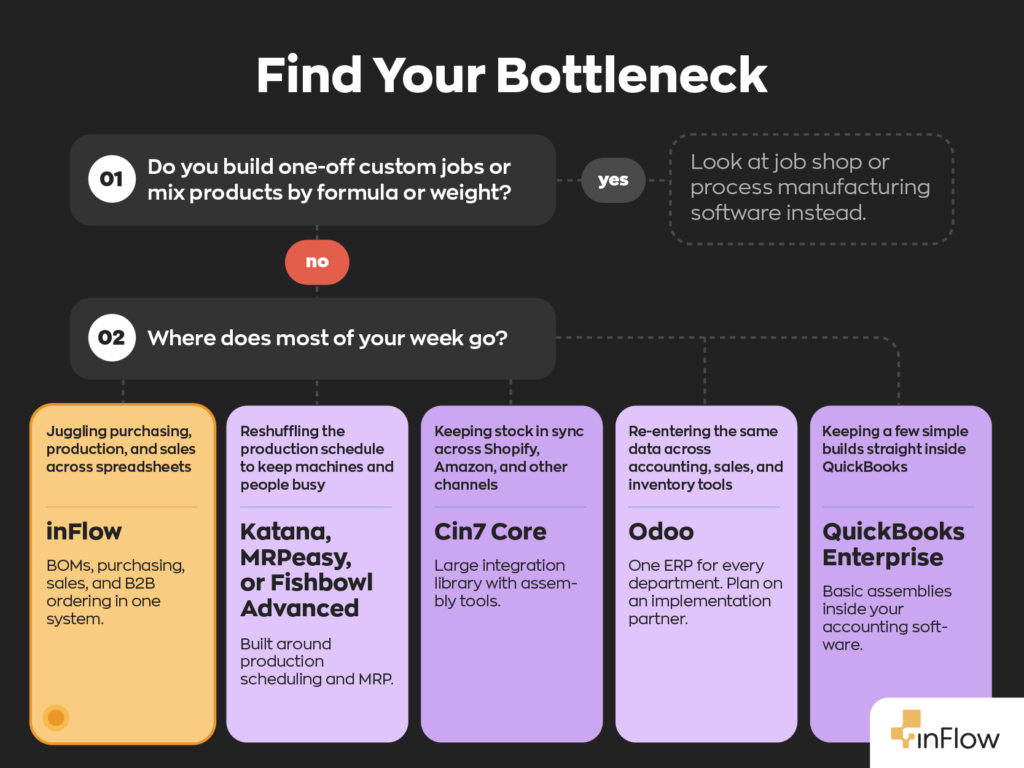
Pick the tool that matches where your bottleneck actually is: production scheduling, planning, or running the whole business.
- Map how you build. Repeatable products built from components fit every tool here. One-off custom jobs or formulas mixed by weight call for job shop or process manufacturing software instead.
- Find your bottleneck. If juggling workstations and operators is the daily pain, Katana or MRPeasy will serve you better than inFlow. If your pain is everything around production (buying parts, selling, shipping, and costing), inFlow covers more of the business.
- Count your channels. Selling on Shopify, Amazon, and to wholesale buyers at the same time points you toward inFlow or Cin7 Core.
- Decide on traceability. Food batches and serialized equipment need lot or serial tracking. MRPeasy includes lot tracking on every plan, and Katana sells it as a $249/month Traceability add-on on Core. inFlow includes it on the Expansion plan and sells it as a $39/month add-on below that.
- Check your accounting. If QuickBooks is the center of your world and your builds are simple, start with QuickBooks Enterprise assemblies. If you need MRP and still want QuickBooks, look at Fishbowl Advanced.
- Budget for the whole first year. Per-user pricing, implementation packages, and add-ons add up fast. Our inventory software cost guide covers the costs that don’t show up on pricing pages.
The bottom line
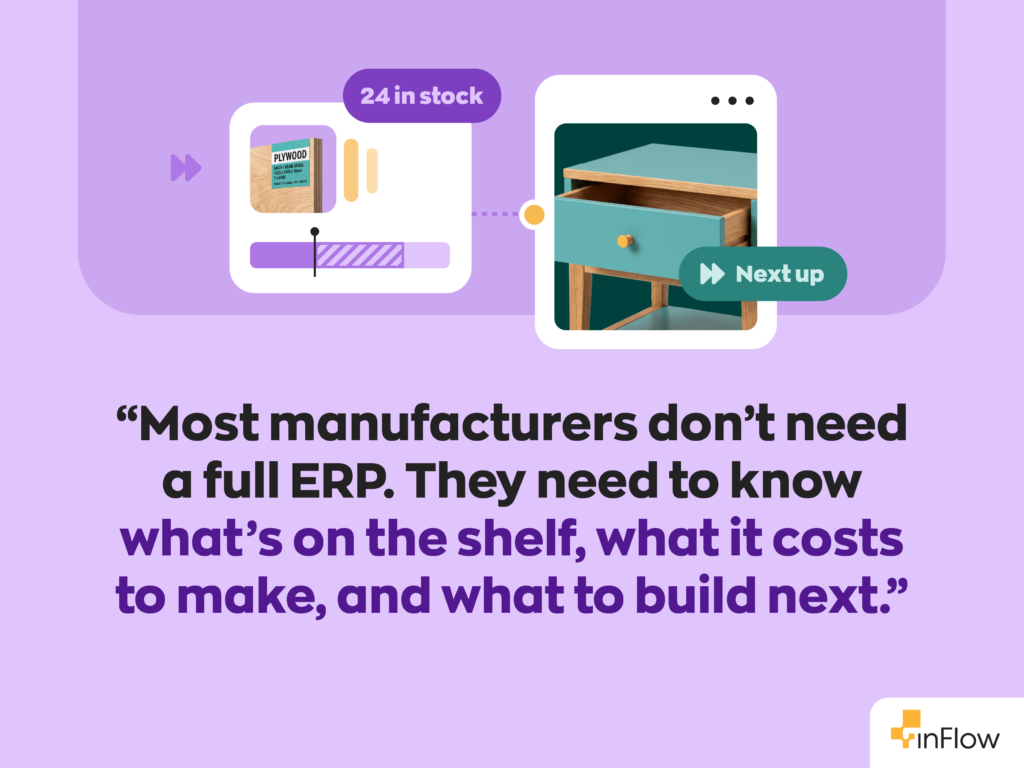
Most small manufacturers don’t need a full ERP. They need a system that builds from accurate BOMs, knows what each unit really costs, and keeps purchasing and sales in sync with the shop floor. That’s what inFlow is built for. If scheduling workstations or running MRP is your biggest challenge, Katana or MRPeasy will likely serve you better (and that’s okay).
Ready to see how it fits your workflow? Start an inFlow Manufacturing free trial or book a demo with our team.
FAQ
What is the best inventory software for small manufacturers?
The best inventory software for most small manufacturers that make and sell their own products is inFlow, because it combines multi-level BOMs, manufacture orders, purchasing, and sales in one system. Katana is a better fit for production-first shops that need workstation scheduling, and MRPeasy for teams that want a full MRP run.
What’s the difference between MRP and inventory software?
Inventory software tracks what you have, where it is, and what it’s worth. MRP (material requirements planning) software goes further by calculating which materials you’ll need, and when, based on planned production. Many small manufacturers do fine with inventory software that has BOMs and reorder points, then add MRP once production planning becomes the bottleneck.
Can QuickBooks handle manufacturing and BOMs?
QuickBooks Enterprise can handle simple manufacturing through inventory assemblies, including an option to build required subassemblies automatically. QuickBooks Enterprise’s pages don’t list manufacture orders, routing, or labor tracking. That’s usually the point where manufacturers add a dedicated inventory tool and keep QuickBooks for the books.
Is there free manufacturing inventory software?
A couple of options exist. Katana’s Free plan handles up to 30 SKUs with unlimited users, and Odoo’s One App Free plan covers a single app, such as Manufacturing, at no cost. Both are useful for testing your workflow, but a growing catalog or team will push you onto a paid plan fairly quickly.
How much does manufacturing inventory software cost?
As of October 15, 2026, paid plans here start anywhere from $49 per user/month (MRPeasy) to $675/month (Fishbowl Advanced). Per-user tools start low and grow with headcount, while inFlow Manufacturing starts at $199/month ($169/month billed annually) for 2 team members. Implementation packages and add-ons for lot tracking or MRP can add to the total.
Do small manufacturers need lot and serial tracking?
You need lot tracking if you make food, beverages, cosmetics, or anything that could face a recall, and serial tracking if you sell equipment with warranties. Most other assemblers can skip it. In inFlow, lot and serial numbers are included on the Expansion plan and available as $39/month add-ons on lower Manufacturing plans.
0 Comments