 Fellow Canadians: All inFlow plans are available in Canadian dollars





Key takeaways
- Material requirements planning (MRP) is a production planning method that calculates which materials a manufacturer needs, how many it needs, and when to order them, using three inputs: the master production schedule, the bill of materials (BOM), and current inventory records.
- MRP works by breaking a production plan down into component requirements, subtracting stock on hand and incoming orders to find what is actually short, then working backward from supplier lead times to set order dates.
- The main difference between MRP and inventory management software is that inventory software tracks what you have, while MRP calculates what you will need to meet a production plan.
- The main difference between MRP and ERP is scope: MRP plans materials for production, while ERP connects production with finance, sales, HR, and the rest of the business.
- MRP is only as accurate as the inventory data behind it. In inFlow’s 2026 survey of 400 operators, 44.8% named inaccurate inventory data as a top challenge.
- Small manufacturers that don’t need a full MRP system can cover most material planning with manufacturing software that combines BOMs, buildable quantities, reorder points, and component shortage alerts, such as inFlow Manufacturing.
Running out of one $2 part can stop a $2,000 production run cold. That’s the problem material requirements planning was invented to solve, and it’s a bigger one than ever. In the second quarter of 2026, 83.1% of manufacturers named rising raw material costs as a top business challenge, according to the National Association of Manufacturers.
We’ve previously talked about what an enterprise resource planning (ERP) system is, and how they relate to inventory management systems. Without going into too much detail, an inventory management system is a small (but important!) part of ERP systems. Material requirements planning (MRP) software is a close cousin. Both started life as pieces of the ERP puzzle, but they answer different questions: inventory software tells you what you have, while MRP tells you what you’ll need, and when.
If you’re one of those people who would rather watch and listen than read, then check out this short clip from our podcast for a brief overview of material requirements planning (MRP).
In this clip from Secret Life of Inventory, we give a quick overview of what MRP is and why manufacturers use it. The full episode goes further into BOMs, barcoding, and the difference between manufacturing software and MRP systems. Check out Episode 12: Mastering Inventory Management for Manufacturers.
Read on for a more in-depth look at what an MRP system is, how it works, who uses them, and why they’re so important.
What is material requirements planning (MRP)?
Material requirements planning (MRP) is a production planning and inventory control method that calculates the materials needed to build a product, the quantity of each, and the date each must be ordered or made so production stays on schedule. It works from three inputs: what you plan to build, what goes into it, and what you already have.
As the name suggests, MRP starts with the process businesses use to keep track of manufacturing materials that they have on hand. But tracking is only half the job. MRP takes that information and plans ahead, so you know which materials to buy and when before a shortage ever reaches the shop floor. This is usually done with some sort of MRP software, but some businesses do things the old-fashioned way. Businesses use this information to plan out their manufacturing process.
At its core, MRP answers three questions:
- What materials and components do we need?
- How many of each do we need?
- When do we need them, and when do we have to order them to get them in time?
A brief history of MRP
MRP isn’t new. IBM engineer Joseph Orlicky laid down its core principles in 1964, and Black & Decker became the first company to put the concept into production in the late 1960s, according to QAD. Orlicky’s 1975 book, Material Requirements Planning: The New Way of Life in Production and Inventory Management, sold more than 140,000 copies and became the blueprint for standardized MRP systems.
In the 1980s, MRP grew into manufacturing resource planning (MRP II), which added capacity planning and shop floor control. MRP II later grew into ERP. So when someone tells you MRP is old news, they’re half right. It’s old, but nearly every modern manufacturing system still runs on Orlicky’s logic.
How does MRP work?
MRP works in three stages: it gathers its inputs, calculates net requirements, and produces a set of planned orders. Here’s what happens at each stage.
What are the inputs of MRP?
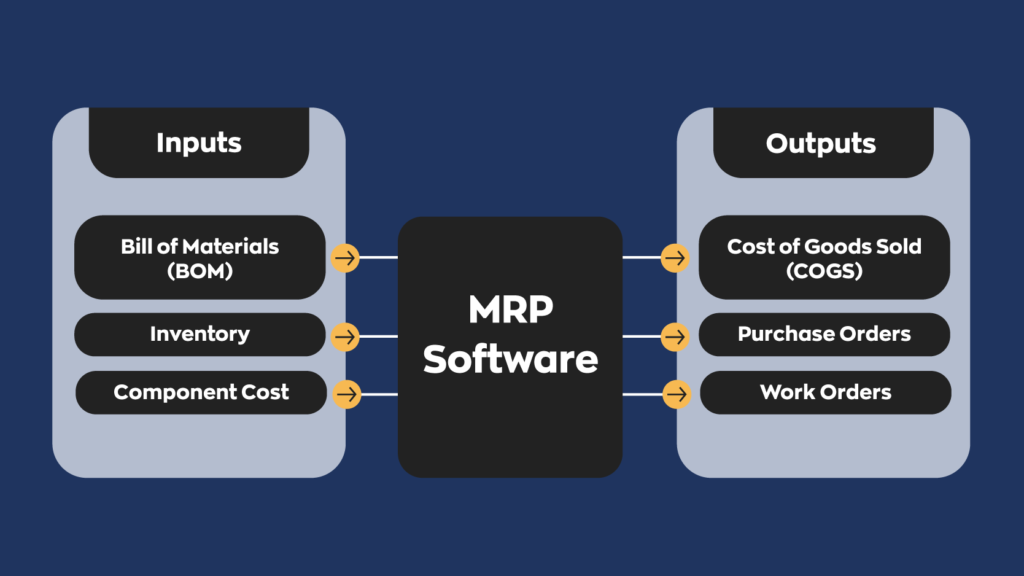
Every MRP system relies on three core inputs:
- Master production schedule (MPS): what you plan to build, how many, and when. (We’ve covered the master production schedule in depth if you want to go deeper.)
- Bill of materials (BOM): A bill of materials is really just a fancy name for “ingredient list.” It lists every component and raw material that goes into one finished product, along with the quantity of each.
- Inventory records: what you have on hand, what’s already on order, and how long each supplier takes to deliver (lead time).
How does MRP calculate material requirements?
Once MRP has its inputs, it runs the same basic calculation for every component:
- Explode the BOM. MRP multiplies each planned finished product by the components in its BOM to get the gross requirement for every part.
- Net out what you have. It subtracts stock on hand and anything already on order to find the net requirement, which is what you’re actually short.
- Offset by lead time. It works backward from the date you need each part, using supplier and production lead times, to set the date each order must be placed.
- Repeat down the levels. If a component is itself made from other parts (a subassembly), MRP runs the same steps for its components too.
What does an MRP system produce?
The output of MRP is a plan you can act on:
- Planned purchase orders for materials you need to buy
- Planned work orders (or manufacture orders) for products and subassemblies you need to build
- Reschedule notices when an existing order should move earlier or later
- Exception reports that flag shortages, late orders, or parts with no stock and no supply
MRP example: Building an MRP table for a toy truck
The easiest way to see MRP at work is with a simple product. Even if the manufacturing process is simple, there are a lot of variables to consider. How long does it take to manufacture one unit? What components does it use? Are some components used up faster than others? What is the cost of goods manufactured (COGM)?
To illustrate our point, let’s say that your company sells toy trucks. To make each truck, you need to piece together the body of the truck along with the wheels. A single truck requires one body and four wheels, so essentially, you’re using up the components at a 1:4 ratio. Not only are you using these parts at different rates, but they also cost different amounts.
Now let’s say your master production schedule calls for 100 trucks to ship in week 4. Assembly takes one week, so the parts need to be ready by week 3. Here’s how MRP works it out:
| Component | Qty per truck | Gross requirement | On hand | Already on order | Net requirement | Supplier lead time | Order by |
|---|---|---|---|---|---|---|---|
| Truck body | 1 | 100 | 20 | 0 | 80 | 2 weeks | Week 1 |
| Wheel | 4 | 400 | 150 | 50 | 200 | 1 week | Week 2 |
So MRP tells you to order 80 bodies in week 1, order 200 wheels in week 2, and release a manufacture order for 100 trucks in week 3. Notice that you’d have badly over-ordered bodies (or under-ordered wheels) if you’d just bought “enough for 100 trucks” without netting out what’s already on the shelf.
For this single example, that’s already a handful of things you have to keep track of: two components, two usage rates, two prices, two stock levels, and two lead times. And this is just for one product. Imagine keeping track of 60 products like this.
All of these variables mean that it’s really (really) hard and really time-consuming to figure things out on your own. Even if you’re good at math, chances are MRP software is better.
What does MRP software do?
MRP software automates the calculation above and keeps it current as orders, stock levels, and schedules change. Here’s what that looks like day to day:
- Track input and output: The law of manufacturing is simple. Put something in, get something out. That might be an oversimplification, but there’s some truth to it. If the input and output aren’t monitored, something could fall through the cracks, leading to a net loss.
- Track material supplies: Most products are made of more than one component. If you’re not careful, you may find yourself in a position where you might have one part but not another, forcing you to halt production. Keeping track of supplies ensures that you won’t run into this problem.
- Calculate potential output: Because most products are made out of more than one component, there are more variables to consider. This makes it difficult to figure out how much of a product you can produce at any given time. For a human, at least. MRP software can calculate whether or not you have the required components on hand to fulfill a bill of materials.
- Generate purchase and work orders: Instead of guessing what to buy, MRP software turns net requirements into suggested purchase orders and work orders, timed to supplier lead times.
- Consolidate information: A recurring theme within the business industry. Remaining informed is an important part of running a business. If you scatter information across many different places, it’s difficult to get a clear picture of what’s going on at any given time. MRP software keeps things organized, offering a clear report at a moment’s notice.
- Manage the bill of materials (BOM): Rather than a task, this is the foundation of MRP. A BOM lists the required materials and calculates the cost of those materials to reach a certain output.
What are the benefits of MRP software?
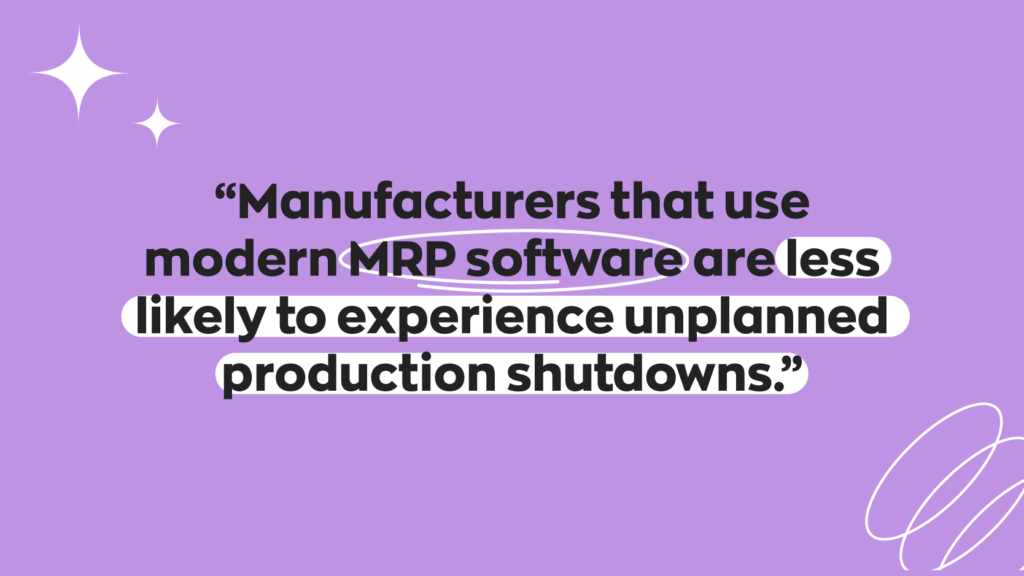
The main benefits of MRP are fewer production stoppages, less cash tied up in inventory, better-timed purchasing, and more accurate costing. As with other systems, it’s important that MRP is implemented correctly. This is arguably even more important for MRP because of how many variables it deals with. If something doesn’t work right or breaks somewhere down the line, it can cause long-lasting damage.
With that said, good material requirements planning brings these benefits:
Fewer production stoppages
With MRP software, you can spot component bottlenecks before they become an issue. This allows you to create manufacturing plans without worrying about a component shortage. That matters: in inFlow’s 2026 survey of shoppers who hit a stockout, 41% of the 365 business buyers said the shortage slowed or stopped their production.
Less cash tied up in inventory
Because MRP orders only what the plan calls for, you’re not stockpiling “just in case.” That adds up fast. In the State of Inventory Management 2026, 54% of operators reported holding costs above 10% of inventory value. On $500,000 of stock at 12%, that’s $60,000 a year just to keep it on the shelf.
Better-timed purchasing
Raw materials are the most important part of the manufacturing process, and knowing exactly when to buy them protects your margins. Software can help you with reorder points so you always have what you need. This is especially useful while lead times are stretching: in August 2026, 53% of electronics manufacturers said supplier lead times got longer in Q2 compared to Q1, according to the Global Electronics Association.
More accurate production costing
When every component in the BOM carries a cost, MRP software can roll those costs up into an accurate cost per finished unit, which feeds straight into pricing and profit decisions.
What are the limitations of MRP?
MRP is powerful, but it isn’t magic. We’re not trying to be the bringers of doom and gloom, but it’s worth knowing where classic MRP falls short:
- It’s only as good as your data. MRP trusts your inventory counts and BOMs completely. If your records say you have 150 wheels and you really have 90, the plan is wrong before it starts. In the State of Inventory Management 2026, 44.8% of operators named inaccurate inventory data as a top challenge, and inventory accuracy was their top area for improvement.
- It assumes unlimited capacity. Classic MRP plans materials, not machines or people. It will happily schedule more work than your shop can handle, which is why MRP II added capacity planning.
- It assumes fixed lead times. If a supplier quotes two weeks and delivers in five, MRP doesn’t know until you update it.
- It can be complex and costly. Full MRP systems take real setup time, clean data, and training before they pay off.
MRP vs. MRP II vs. ERP vs. inventory management software
MRP software and inventory management software might be similar to each other, but they have different use cases, and rarely would one replace the other. The purpose of MRP is similar to an ERP system: optimize business operations. That’s a broad statement, though, and it’s important to note that MRP systems operate on a much smaller scale. Here’s how the most common systems compare:
| System | What it answers | Scope | Typical user |
|---|---|---|---|
| Inventory management software | What do we have, and where is it? | Stock levels, locations, purchasing, sales | Distributors, retailers, small manufacturers |
| MRP (material requirements planning) | What materials do we need, how many, and when? | Material planning for production | Manufacturers with multi-component products |
| MRP II (manufacturing resource planning) | Can our people and machines actually build the plan? | MRP plus capacity, labor, and shop floor scheduling | Mid-size manufacturers |
| ERP (enterprise resource planning) | How does production connect to the rest of the business? | MRP II plus finance, HR, sales, and supply chain | Large or multi-entity companies |
| MES (manufacturing execution system) | What is happening on the shop floor right now? | Real-time production tracking and quality | Plants that need live production monitoring |
If you want the deeper version of any of these, we’ve written guides on ERP systems, manufacturing execution systems, and materials management, the broader discipline MRP belongs to.
How do companies choose between MRP and ERP?
Most companies choose based on size and complexity. If your main headache is getting the right parts on time, MRP (or manufacturing software with MRP-style features) is usually enough. If you need production, accounting, HR, and multiple entities running off one database, that’s ERP territory, along with an ERP price tag and implementation timeline.
Who needs MRP software?
MRP is for businesses that build their own products out of components or raw materials. It’s important to keep in mind that not every business that needs an inventory management system needs MRP.
Broadly speaking, every business that sells products falls into one of two categories. They either purchase and resell products, or they are one of the growing manufacturers that produce their own. Businesses that manufacture goods in-house face their own unique issues, which is why they use an MRP system. Whether you make to order or make to stock changes how you plan, but either way you need the right parts at the right time.
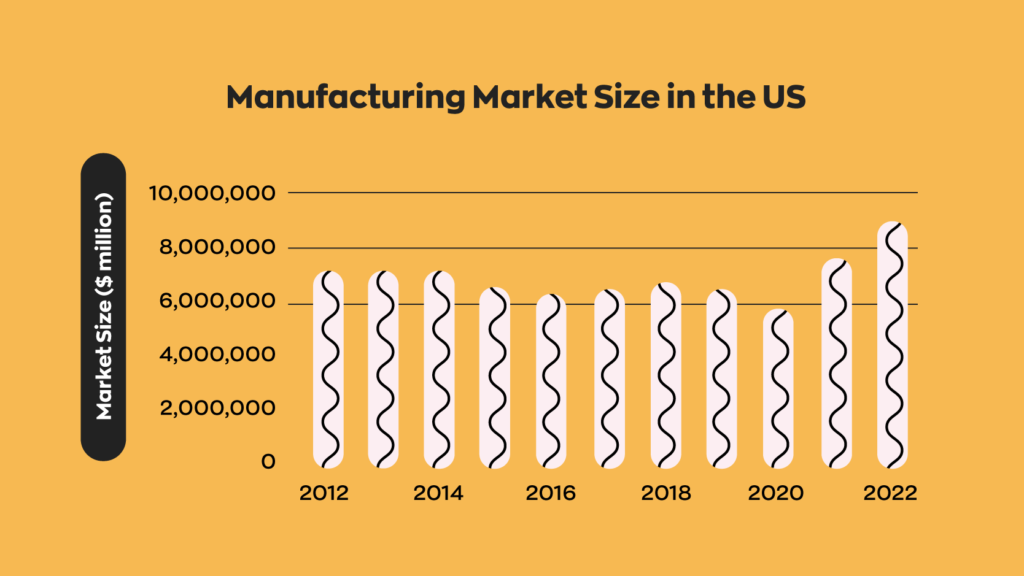
And most of those manufacturers are small. In 2022, there were 239,265 manufacturing firms in the United States, and all but 4,177 of them had fewer than 500 employees, according to the National Association of Manufacturers. That’s a lot of businesses doing material planning without an enterprise budget.
Signs you need MRP, not just better inventory tracking
You probably need MRP (or MRP-style features) when:
- Your products have multiple components or subassemblies, and you regularly have one part but not another
- Production stops or slips because a component ran out
- You buy materials on gut feel or “enough for the next batch” rather than from a production plan
- Your spreadsheet can’t keep up with how many products, components, and suppliers you manage
If you mostly buy and resell finished goods, good inventory software with reorder points and safety stock will probably do the job. If you’re still on spreadsheets, you’re far from alone: 84.8% of operators in the State of Inventory Management 2026 track inventory in spreadsheets. But in inFlow’s own customer feedback, the spreadsheet breaking point usually arrives with growth, and manufacturers start asking questions like, “Does it count how many you’ll need soon?” That question is MRP in a nutshell.
How to choose MRP software for a small manufacturer
The best MRP software for a small manufacturer is the one that matches the complexity of your products, not the one with the longest feature list. Look for:
- BOM management, including multi-level BOMs if you build subassemblies
- Shortage visibility, so you can see which components are short for an order before production starts
- Reordering tied to real usage, including reorder points that account for components consumed in production, not just sales
- Purchase and manufacture order generation from shortages in a click or two
- Barcode scanning to keep inventory counts accurate, since MRP depends on them
- Costing that rolls materials and labor into the cost of each finished product
- Integrations with your accounting and ecommerce tools
How much does MRP software cost?
MRP software costs vary widely, from free open-source tools to enterprise systems with six-figure implementations. The biggest cost drivers are the number of users, whether you need full MRP II or ERP features, and implementation and training. For reference, inFlow Manufacturing starts at $169 USD per month billed annually, with a one-time onboarding package required on most plans.
How inFlow Manufacturing supports material planning
MRP systems can typically be broken into two parts: inventory management and production planning. While these two factors are arguably of equal importance, MRP requires having an accurate inventory count. So make sure you have a good inventory management system!
inFlow Manufacturing isn’t a classic time-phased MRP engine, and we’d rather be upfront about that. What it does is handle the material side of planning that most small manufacturers actually need:
- Bills of materials with subassemblies, so inFlow knows every component (and component of a component) that goes into a product
- Buildable quantities, which show how many finished products you can make right now from the components you have available
- Component reservations, which set aside raw materials as soon as you add a manufactured product to a sales order, before you even create the manufacture order
- Shortage flags on manufacture orders, with one-click reordering by purchase order, stock transfer, or another manufacture order
- Reorder points by location, plus a Recommended Reorder Point report that uses past sales and manufacturing usage, supplier lead time, and safety stock
- Low stock email alerts for anything that drops below its reorder point
- Labor and material costing through operations and timesheets, rolled into each finished product’s cost
- Materials variance and work-in-progress cost reports to compare what the BOM planned against what was actually used
And because accurate counts are what make all of this work, inFlow includes a built-in, all-in-one barcoding system, so components are scanned in and out rather than typed by hand.
FAQ
What does MRP stand for in manufacturing?
In manufacturing, MRP stands for material requirements planning, a method for calculating which materials are needed for production, in what quantities, and when. MRP II stands for manufacturing resource planning, which adds capacity and labor planning.
What are the key components of an MRP system?
An MRP system has three key inputs and one core output. The inputs are the master production schedule (what to build and when), the bill of materials (what goes into each product), and inventory records (stock on hand, stock on order, and lead times). The output is a set of planned purchase orders and work orders, timed so materials arrive before production needs them.
What three questions does MRP answer?
MRP answers three questions: what materials are needed, how many of each are needed, and when they are needed. It answers them by combining the production schedule with the bill of materials and current inventory, then subtracting what’s already in stock or on order and working backward from supplier lead times to set order dates.
What is the difference between MRP and ERP?
MRP focuses only on planning materials for production. ERP is a much broader system that connects production with accounting, sales, purchasing, HR, and supply chain in one database. MRP is usually a module inside an ERP. Small and mid-size manufacturers often start with MRP or manufacturing software and move to ERP only when they need company-wide integration.
What are the main benefits of implementing MRP?
The main benefits of MRP are fewer production stoppages from component shortages, lower inventory and holding costs, better-timed purchasing, and more accurate product costing. Because MRP orders only what the production plan calls for, it reduces both stockouts and excess inventory. The catch is that MRP depends on accurate BOMs and inventory counts to deliver those benefits.
How do you know if you need MRP or just better inventory tracking?
You likely need MRP if you build products from multiple components, regularly run short of one part while others sit on the shelf, or plan purchases without a production schedule. If you mostly resell finished goods, inventory software with reorder points and safety stock is usually enough. Many small manufacturers sit in between and use manufacturing software with BOMs and shortage alerts.
Can you do MRP in Excel?
Yes, for a handful of products with simple BOMs. You can list components, multiply by planned output, and subtract stock on hand. The trouble starts as products, components, and suppliers multiply, because every number has to be updated by hand. Spreadsheets also can’t reserve stock, flag shortages, or generate purchase orders automatically, which is where errors creep in.
What MRP software works best for small manufacturers?
The best MRP software for a small manufacturer matches the complexity of its products. Look for BOM management with subassemblies, shortage alerts, reorder points that account for production usage, barcode scanning, and cost tracking. Tools like inFlow Manufacturing cover these needs without the cost and setup time of a full ERP, starting at $169 USD per month billed annually.
0 Comments