





For HVAC, plumbing, and electrical contractors running 2 to 20 trucks, the best field service inventory management software is inFlow, because it tracks every truck as its own stock location, builds restocking transfers from the shop when a van runs low, and works alongside the scheduling app you already use. ServiceTitan is the stronger choice if you want dispatch, invoicing, and inventory in one platform. Sortly suits small crews that want simple, photo-based tracking, and Ply fits teams that want truck stock tools plugged into their current field service app.
Quick question: do you know what’s on each of your trucks right now? Not what should be on them, but what’s actually rolling around in van #4? If the answer is “kind of,” you’ve got company. The U.S. Census Bureau’s 2023 County Business Patterns counts more than 190,000 plumbing, HVAC, and electrical contracting businesses, and a lot of them still track truck stock on spreadsheets or pen and paper. That matters, because a part nobody can find turns into a second trip, a lost afternoon, and an unhappy customer.
Full disclosure: this guide is published by inFlow. We make inventory software, not dispatch software, so you’ll see us send you elsewhere when scheduling is the bigger problem to solve.
Field service inventory software compared
Here’s how the six tools line up. Prices are in US dollars and reflect each vendor’s lowest published plan (or note when a vendor only quotes).
| Software | Best for | Starting price | Key field service feature | Free trial or plan |
| inFlow Inventory | Contractors with 2 to 20 trucks | $129/mo ($99/mo billed annually); Core for fleets $379/mo ($299/mo billed annually) | Each truck as its own location, with per-truck reorder points | 14-day free trial |
| Sortly | Small crews that want simple tracking | Free; paid from $49/mo ($24/mo billed annually, first year) | Photo-based items with QR code labels | Free plan, 14-day trial |
| QuickBooks Online Plus | One-truck owner-operators | $140/mo | Parts quantities that live in your bookkeeping file | 30-day free trial |
| ServiceTitan | Large contractors wanting one platform | Quote-based | Truck replenishment based on materials used on invoices | Demo |
| FieldPulse | Growing shops wanting all-in-one software | Quote-based | Inventory hubs with automatic purchase orders | Demo |
| Ply | Teams keeping their field service app | Quote-based, priced per stock location | Truck stock tracking that plugs into major FSM apps | Free trial |
Pricing verified as of October 21, 2026. Your actual bill depends on how many trucks, users, and add-ons you need, so see our inventory software cost guide for the fees a pricing page leaves out.
What is field service inventory management?
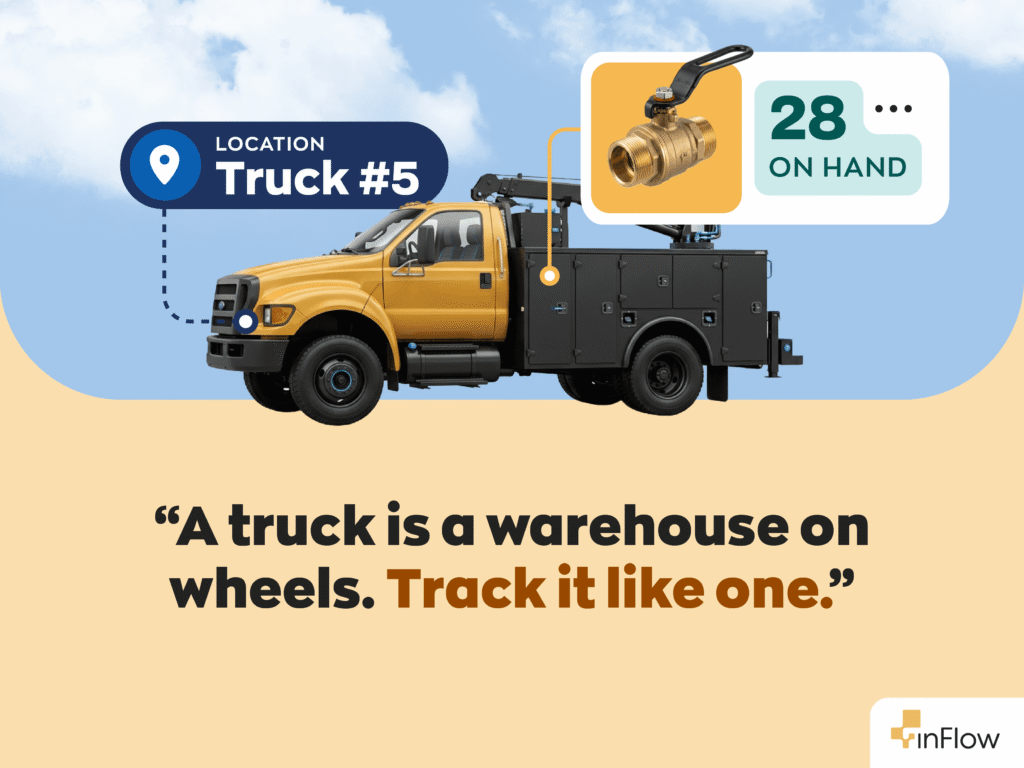
Field service inventory management means keeping track of parts, equipment, and supplies across your shop and every vehicle in your fleet, then restocking those vehicles so technicians show up to each job with what they need. Unlike a retail stockroom, field service inventory drives around all day, and you only count it when someone makes time for it.
In practice, field service inventory software records stock by location (each truck counts as one), moves parts between the shop and trucks with transfers, deducts materials as jobs get done, and creates purchase orders when the shop runs low. Moreover, the need is growing, too. Bureau of Labor Statistics projections published on O*NET OnLine put employment for plumbers, pipefitters, and steamfitters at 510,600 in 2025, growing 7% by 2035, with about 42,000 openings a year. More techs means more trucks, and more places for parts to quietly disappear.
What features should field service inventory software have?
Good field service inventory software tracks each truck separately, restocks trucks against set minimums, scans parts from a phone, ties parts to jobs, and handles purchasing and accounting.
Trucks and vans tracked as their own stock locations
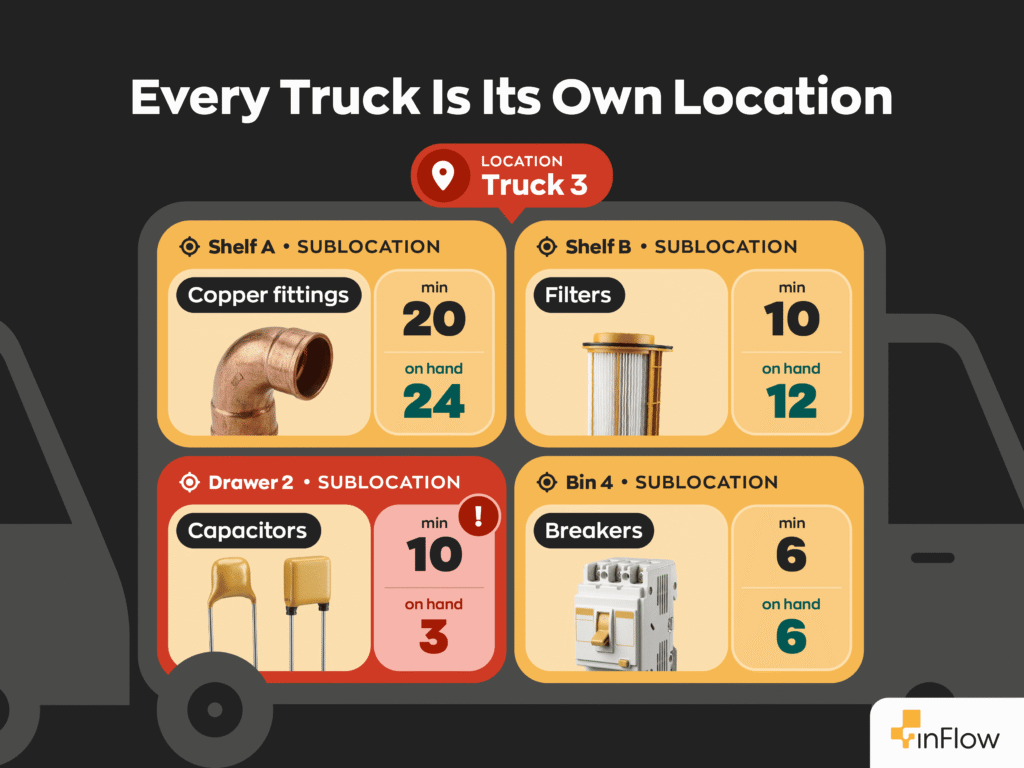
This is the big one. If your software rolls everything into one “on hand” number, you can’t tell 12 capacitors on the shop shelf from 12 scattered across six vans. So, set up each vehicle as its own location, ideally with sublocations for the bins inside it. Then, when a tech runs out of 3/4″ copper fittings, you can see whether truck 3 (two miles away) has some before anyone drives to the supply house. (Our multi-location inventory guide covers setup.)
Truck restocking: per-truck reorder points and stock transfers
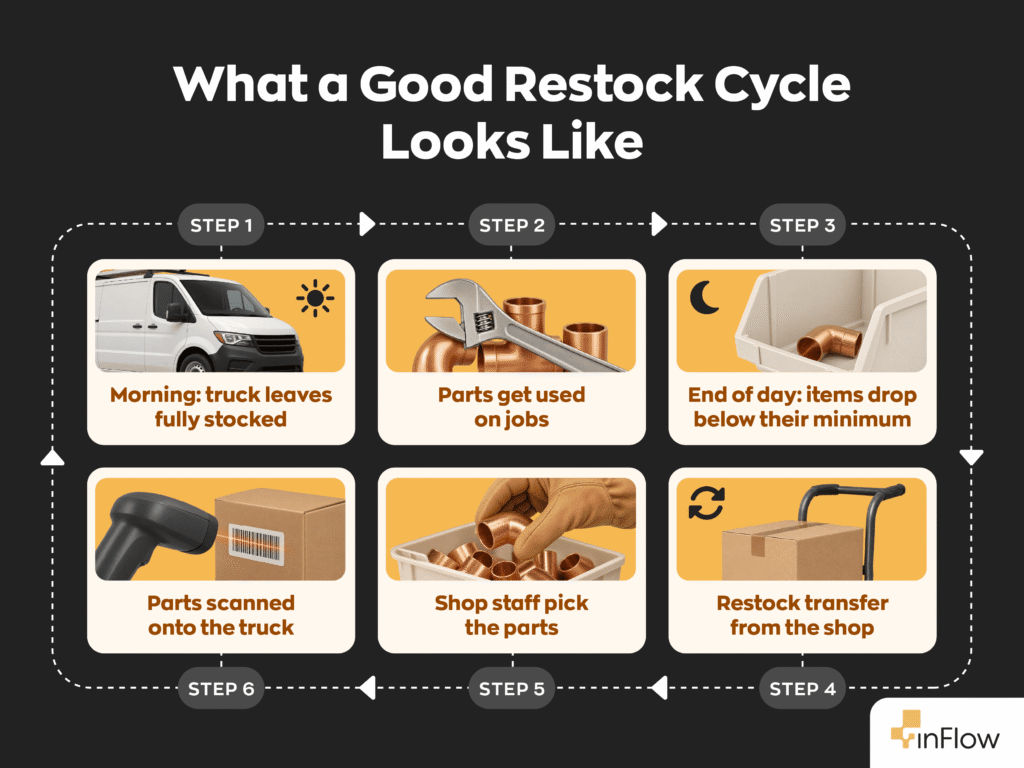
Every truck should carry a standard load, and every item in it needs its own minimum. A reorder point set per truck (not just per business) shows what each van is short at the end of the day. The best tools turn that shortfall into a stock transfer from the shop, so restocking becomes a pick list instead of a guessing game.
Also ask when restocking can happen. One plumbing contractor told our sales team their system couldn’t build a restock report until techs closed out their jobs, which delayed restocks by days.
Mobile barcode scanning in the field
Your techs aren’t going to sit at a desk to log a part. If it takes more than a few taps, your techs won’t do it, and your counts will drift. For that reason, look for an iOS and Android app that scans barcodes with the phone’s camera and records transfers on the spot.
Connecting parts to jobs (field service app integrations)
Most contractors already schedule and invoice in an app like Jobber, ServiceTitan, or Housecall Pro, so your inventory system needs to talk to it. A solid integration pulls in each job and deducts the parts used, so nobody types anything twice. Check which direction the sync runs and whether prices and taxes come across.
Purchasing and accounting integration
Trucks restock from the shop, but the shop restocks from your suppliers. Because of that, you’ll want purchase orders you can send straight to a supplier, reorder points for your trucks and warehouse, and an accounting integration that keeps the value of your parts on hand in sync with your books. For contractors who buy a lot of tools and supplies, purchasing is often where you’ll save the most hours (more on that below).
The 6 best field service inventory management software for 2026
This list mixes inventory tools (inFlow, Sortly, and QuickBooks Online) with field service platforms and add-ons built for the trades (ServiceTitan, FieldPulse, and Ply) on purpose. After all, that’s the real decision most contractors face: pair an inventory tool with your scheduling app, or run everything in one system. Either way, each entry follows the same format, ours included.
1. inFlow Inventory: best for contractors who want a live count of every truck
Overview: inFlow is an inventory and purchasing system for growing small businesses. Field service teams use it to track stock in the shop and on every truck, restock vans, and order from suppliers, while scheduling stays in their field service app.
Key features:
- Each truck as its own location, with sublocations for shelves and bins (not available on Lite).
- Per-location reorder points with “stock transfer” as the reorder method, so the Reorder Stock screen builds a restocking transfer from the shop for any truck below its minimum.
- Barcode-scanned transfers in the inFlow mobile app, plus the Stockroom app ($39/month extra) for quick scan-in and scan-out.
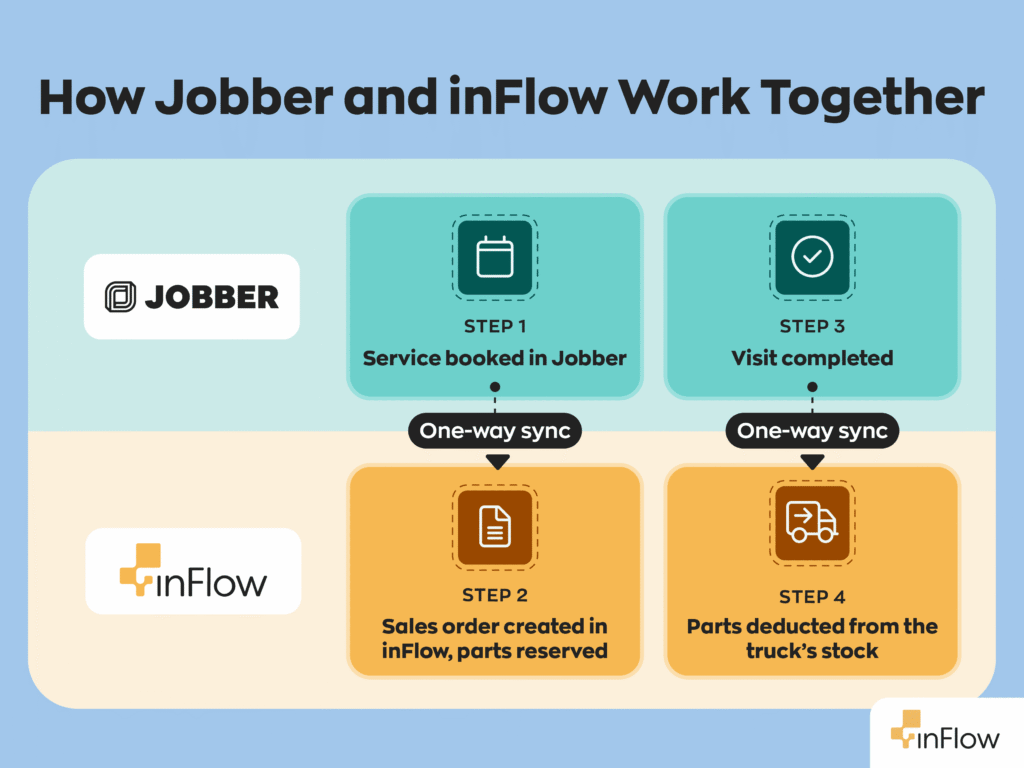
- A Jobber integration (beta) that turns each Jobber visit into an inFlow sales order, reserves parts when work is booked, and deducts them once it’s done. Accounting syncs to QuickBooks Online or Xero.
Pricing: Lite is $129/month ($99/month billed annually) with 1 location and 2 team members, which fits a single van. However, most fleets land on Core at $379/month ($299/month billed annually) for 5 locations and 5 team members, or Pro at $629/month ($499/month billed annually) for 10 team members and unlimited locations. In addition, Advanced access rights (restrict by location and sales rep) cost $69/month extra on Core and come with Pro and Max. Serial numbers for installed equipment cost $39/month extra on Lite, Core, and Pro, and come with Max. Core and up require onboarding ($499, one-time). Finally, the 14-day trial doesn’t ask for a card.
Pros:
- Per-truck reorder points show what each van is missing before it leaves the yard.
- Advanced access rights can limit each tech to their own truck and the shop.
- Serial numbers follow installed equipment like furnaces and water heaters from the purchase order to the customer’s sales order, which makes warranty claims easier.
Cons:
- No scheduling, dispatch, or job management, so you’ll still need a field service app alongside it.
- The Jobber integration is in beta and one-way, without prices, taxes, or payments. ServiceTitan and Housecall Pro users would connect through the API ($49/month extra on Lite and Core).
- Lite covers just one location and no sublocations, so any business with more than one truck starts on Core, where $499 onboarding is required.
Best for: HVAC, plumbing, electrical, and appliance-repair contractors with 2 to 20 trucks who already have a scheduling app they like.
Not ideal for: businesses that want scheduling, invoicing, and inventory in one app, or very large fleets that need detailed job costing.
Running an HVAC company? See our HVAC inventory software page and inventory software buyer’s guide for HVAC contractors.
2. Sortly: best for small crews that want simple, photo-first tracking
Overview: Sortly is a mobile-first inventory app built around photos and QR code labels. Trades businesses often start with it because it’s simple, and it’s the only tool here with a free-forever plan.
Key features:
- Item records with photos, custom fields, and folders you can organize by truck or shop.
- QR code and barcode scanning, plus label creation, from the mobile app.
- Purchase orders from the Ultra plan up and a QuickBooks Online integration on Premium.
Pricing: Sortly Free includes 100 items and 1 user. Advanced is $49/month ($24/month billed annually in year one) for 500 items and 2 users, Ultra is $149/month ($74/month) for 2,000 items and 5 users, and Premium is $299/month ($149/month) for 5,000 items and 8 users. However, after year one, the annual discount drops from 50% to 20%. Also, paid plans come with a 14-day trial (credit card required).
Pros:
- A short learning curve, even for techs who don’t love new software.
- Photos make it easy to tell look-alike parts apart.
- The mobile app supports offline work, which helps on sites with spotty service.
Cons:
- Item caps (500 on Advanced) fill up fast once you add every fitting, filter, and breaker.
- Purchase orders start on Ultra, and QuickBooks Online requires Premium.
Best for: crews of a few people tracking a modest parts list across a couple of vehicles.
Not ideal for: contractors with thousands of SKUs or many techs who each need a login.
Compare: inFlow vs. Sortly
3. QuickBooks Online: best for one-truck operators who want parts tracked in their accounting
Overview: QuickBooks Online is best known for bookkeeping, but the Plus and Advanced tiers also track inventory quantities. For a one-truck operation, keeping parts where you already invoice can be enough for a while.
Key features:
- Inventory quantity tracking on Plus and Advanced.
- Purchase orders you can send to suppliers.
- Class and location tags (up to 40 combined on Plus).
Pricing: Plus lists at $140/month and Advanced at $340/month. Intuit offers new customers either a 30-day trial or an introductory discount.
Pros:
- One less login for a small office.
- Parts costs land where your accountant already works.
Cons:
- Location tags label transactions but don’t keep a separate count for each truck.
- No stock transfers between the shop and your vehicles.
- Most contractors outgrow it past a truck or two.
Best for: owner-operators with one van and a short parts list.
Not ideal for: anyone who needs to know what’s on each truck.
4. ServiceTitan: best for larger contractors that want dispatch, invoicing, and inventory in one platform
Overview: ServiceTitan is a field service management platform for residential and commercial contractors, covering scheduling, dispatch, invoicing, and reporting. When it comes to inventory, its tools are built around trucks and warehouses.
Key features:
- Trucks and warehouses as inventory locations, with technicians assigned to trucks.
- Replenishment based on the materials used on each invoice.
- Purchase orders by vendor or by truck, plus transfers between locations.
Pricing: ServiceTitan doesn’t publish pricing. Rather, plans are quoted after a sales demo, and you can’t sign up for a trial on your own.
Pros:
- Scheduling, invoicing, and inventory share one system.
- Truck replenishment is built into the invoicing workflow.
Cons:
- ServiceTitan’s own help documentation says it doesn’t track real-time on-hand inventory; it shows what needs restocking based on invoiced materials.
- When a tech switches trucks, their stock has to be moved in the system too, which contractors tell us is easy to get wrong.
- Quote-only pricing and a heavier rollout than anything else here.
Best for: established contractors with large fleets and an office team to run the platform.
Not ideal for: small shops that only need to fix truck stock.
5. FieldPulse: best for growing shops that want job management with inventory built in
Overview: FieldPulse is field service management software for trades businesses, with scheduling, estimates, invoicing, and inventory in one app. In other words, it’s a lighter all-in-one alternative to ServiceTitan.
Key features:
- Multiple inventory hubs (locations), with automatic replenishment set per hub.
- Purchase orders emailed to suppliers and created automatically when stock reaches its reorder level.
- Inventory in the same app as jobs, estimates, and invoices.
Pricing: FieldPulse doesn’t list prices publicly. You’ll get a quote after a demo.
Pros:
- One app for the office and the field.
- Automatic purchase orders cut manual reordering.
Cons:
- Comparing costs takes a sales call.
- Purchase orders have to be enabled on your account.
- Its help docs don’t specifically mention trucks, so ask how it handles vans in your demo.
Best for: growing contractors shopping for a new field service app with inventory included.
Not ideal for: contractors who love their current scheduling app and only need better truck stock.
6. Ply: best for contractors who want truck stock tracking inside their FSM app
Overview: Ply is inventory software made specifically for trades and field service businesses. Rather than replacing your scheduling app, it plugs into it, with integrations for ServiceTitan, Jobber, Housecall Pro, FieldEdge, and ServiceM8.
Key features:
- Truck and fleet stock tracking on every plan.
- “Smart” purchase orders drafted automatically from low stock.
- Barcode and receipt scanning in the iOS and Android app.
Pricing: Ply doesn’t publish dollar amounts. Instead, its Starter, Plus, and Enterprise plans are priced by the number of stock locations (trucks and warehouses), billed monthly or annually at a discount, with unlimited users on every plan. Ply also offers a free trial.
Pros:
- Unlimited users, so adding techs doesn’t raise the bill.
- Connects to most of the major field service apps.
Cons:
- No published pricing.
- Cost grows with every truck or warehouse you add.
- Custom location setups are limited to the Enterprise plan.
Best for: contractors who like their field service app and want truck stock fixed.
Not ideal for: businesses that want to compare costs online before talking to sales.
How do you choose field service inventory software?
It comes down to three questions: how many trucks you run, whether you’re keeping your scheduling app, and what you need to track beyond quantities.
How many trucks are you running? With one van and a garage, QuickBooks Online Plus or Sortly’s lower plans can carry you for a while. At 2 to 20 trucks, you need a count for each vehicle and a fast way to restock it, which points to inFlow (Core or Pro) or Ply. On the other hand, large fleet with a dedicated office team? ServiceTitan is built for that scale.
Are you keeping your scheduling app? If your team already lives in Jobber, ServiceTitan, or Housecall Pro, add an inventory tool instead of switching. inFlow connects to Jobber (in beta) and to other apps through its API, and Ply integrates with most major field service apps. Shopping for a new field service app anyway? FieldPulse or ServiceTitan puts inventory in the same system.
Do you need serial numbers for installed equipment? Furnaces, condensers, and water heaters often carry warranties tied to a serial number, so make sure the tool records serials when a unit arrives and carries them through to the job. inFlow tracks serial numbers through purchasing, transfers, and sales ($39/month extra below Max, included on Max). For the other tools here, ask to see a serialized unit move from receiving to a job during your trial or demo.
Whichever tools make your shortlist, set up two real trucks during the trial and run one full restock cycle from the shop. Twenty minutes of that beats any feature list (this one included).
How Southern Electric saves 30+ hours a month on purchasing with inFlow
Southern Electric Corporation is an electric utility construction company in Mississippi with 100+ crews and nearly 2,000 pieces of equipment. Its tool department runs purchasing through inFlow, placing roughly $250,000 in tool orders each month and saving more than 30 hours a month on purchasing work.
“I have streamlined everything with purchasing since taking over this position, and it has made me a pillar of the company,” says Samuel Kupihe, Tool Manager at Southern Electric.
It’s a purchasing story more than a truck-stock one, but it shows what happens when the shop side gets organized.
Picking a system your techs will actually use
There’s no single winner for every contractor. A 60-truck commercial HVAC company with a dispatch team needs something different than a three-van plumbing shop where the owner still answers the phone. All six tools let you try before you commit (through a free plan, a trial, or a demo), so put two of them through a real week of restocking before you decide.
If you want truck-level counts, per-truck restocking, and purchasing in one place without giving up the scheduling app your team knows, that’s the job inFlow was made for.
FAQ
What is the best inventory software for field service businesses?
inFlow is the best field service inventory software for most contractors with 2 to 20 trucks, because it tracks each truck as its own location, restocks trucks from the shop, and handles purchasing in one system. ServiceTitan suits large contractors that want an all-in-one platform, and Sortly works for very small crews on a budget.
Do ServiceTitan, Jobber, and Housecall Pro have inventory management?
ServiceTitan does, with truck and warehouse stock, purchase orders, and restocking based on invoiced materials, though its help docs note it doesn’t track real-time on-hand inventory. Jobber and Housecall Pro focus on scheduling, quoting, and invoicing, and Housecall Pro’s help center points users to QuickBooks Online for quantity tracking. Most contractors on either app connect a separate tool, like inFlow (Jobber integration in beta) or Ply.
Is there free field service inventory software?
Yes, with tight limits. Sortly’s Free plan covers 100 items and 1 user, which can work for a single owner-operator. Beyond that, free options get thin, because tracking several trucks means several locations, which is almost always a paid feature. Use a free plan to test the workflow, then budget for a paid one.
How much does field service inventory software cost?
Published prices on this list run from free (Sortly) to $629/month (inFlow Pro, billed monthly), as of October 21, 2026. inFlow starts at $129/month ($99/month billed annually), and its multi-truck Core plan is $379/month ($299/month billed annually). ServiceTitan, FieldPulse, and Ply all quote pricing, and Ply prices by the number of trucks and warehouses. Our inventory software cost guide lays out setup, hardware, and add-ons as well.
Should technicians be limited to their own truck’s stock?
Usually, yes. Limiting each tech to their own truck and the shop keeps counts accurate and stops parts from being “borrowed” off another van with no record. In inFlow, this is done through Advanced access rights, which cost $69/month extra on Core and come with Pro and Max. Keep a manager or dispatcher on full access so they can still find parts across the fleet.
Can you track serial numbers for equipment you install?
Yes, though tools handle it differently. Serial tracking follows a specific furnace or water heater from your supplier to the job, which helps with warranty claims and recalls. inFlow offers serial numbers for $39/month extra on Lite, Core, and Pro, and includes them on Max. Ask each vendor whether serials carry through purchasing, transfers, and sales, not just receiving.
0 Comments