 Fellow Canadians: All inFlow plans are available in Canadian dollars





If you’re reading this, you’re likely trying to figure out which inventory system actually makes sense for your HVAC business. This guide is here to help you do exactly that.
We’ll walk through what actually matters when choosing inventory software, how different systems work, where they tend to fall short, and what you should be paying attention to based on how your HVAC business operates.
We’re not going to pretend we don’t have a horse in this race; we make inventory software after all, but the goal here is to help you make a clear, informed decision. Here’s what you’ll find in this guide:
- Real challenges facing HVAC contractors (based on data we collected from actual HVAC businesses)
- Unbiased feature requirements according to people working in the HVAC industry.
- A step-by-step process for choosing the right solution
- Honest pros and cons of different approaches
By the end of this guide, you’ll feel confident in why one option fits your business better than another. You’ll be able to spot gaps, ask better questions during product demos, and avoid getting pulled in by fancy features you don’t need.
For a quick TLDR, check out the video below.

Who this buyer’s guide is for
This buyer’s guide is specifically designed for:
- HVAC contractors managing inventory across multiple trucks and warehouses.
- Service managers struggling with parts visibility and technician accountability.
- Business owners tired of stockouts, excess inventory, and manual tracking.
- Operations teams looking to streamline mobile job site workflows.
Who this isn’t for: Large enterprise HVAC companies with dedicated IT teams and custom ERP systems already in place.
Inventory challenges for HVAC businesses
Before diving into features and comparisons, let’s address some common inventory challenges HVAC businesses face.
Balancing inventory levels to prevent stockouts and overstocking
Proper demand forecasting in HVAC can be tricky. The same part that sits untouched for weeks can suddenly be needed for every job once the weather shifts. If you’re not carrying enough, you risk a stockout and cause delays. If you carry too much, you tie up cash flow and increase your risk of lost or damaged items.
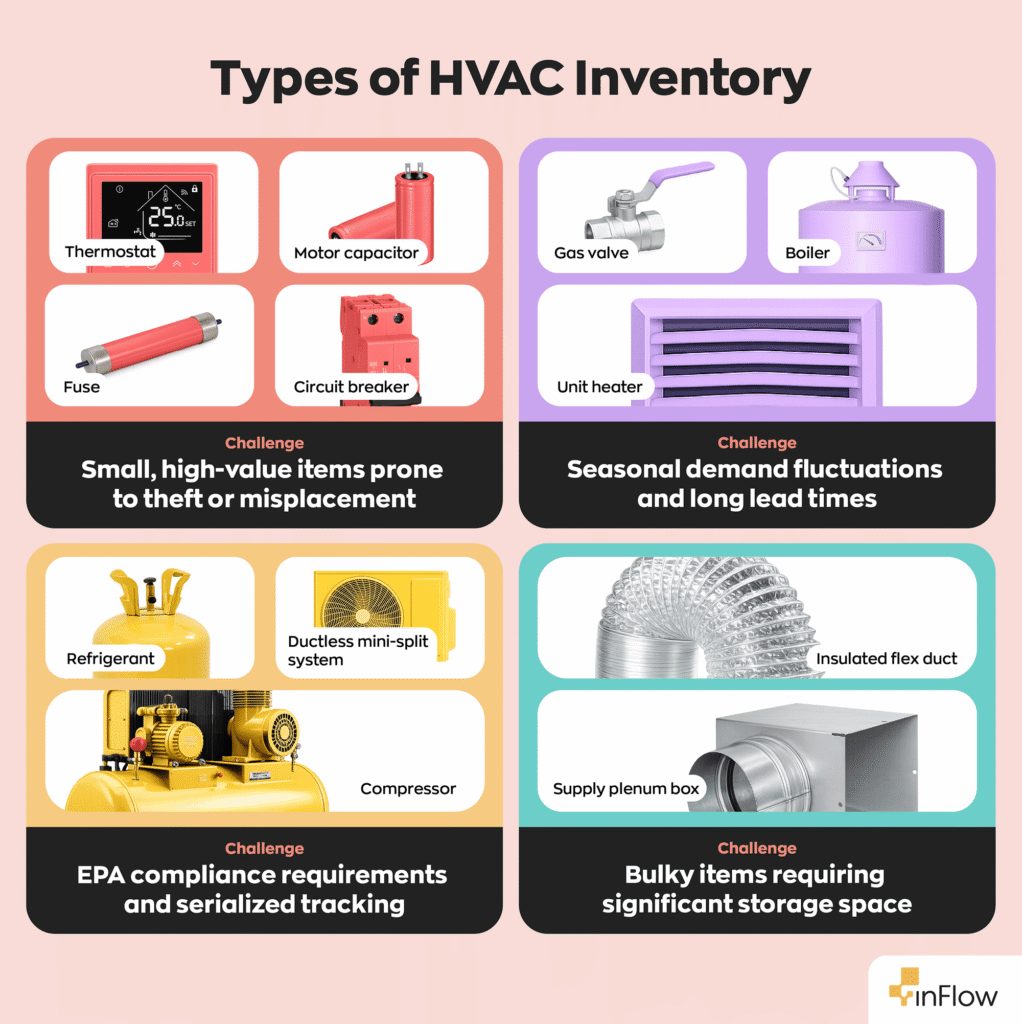
The inventory specific to HVAC companies also comes with its own set of tracking challenges. Here are some examples:
- Thermostats, motor capacitors, circuit breakers and fuses
- Challenge: Small, high-value items prone to theft or misplacement
- Gas valves, unit heaters, and boilers
- Challenge: Seasonal demand fluctuations and long lead times
- Refrigerant charges, compressors, and ductless mini-split systems
- Challenge: EPA compliance requirements and serialized tracking
- Insulated flex duct, supply plenum boxes
- Challenge: Bulky items requiring significant storage space
Balancing stock levels is about accounting for how each type of inventory actually behaves. Without that, you’re left constantly reacting to shortages or overstock instead of staying ahead of demand.
Tracking inventory across multiple locations
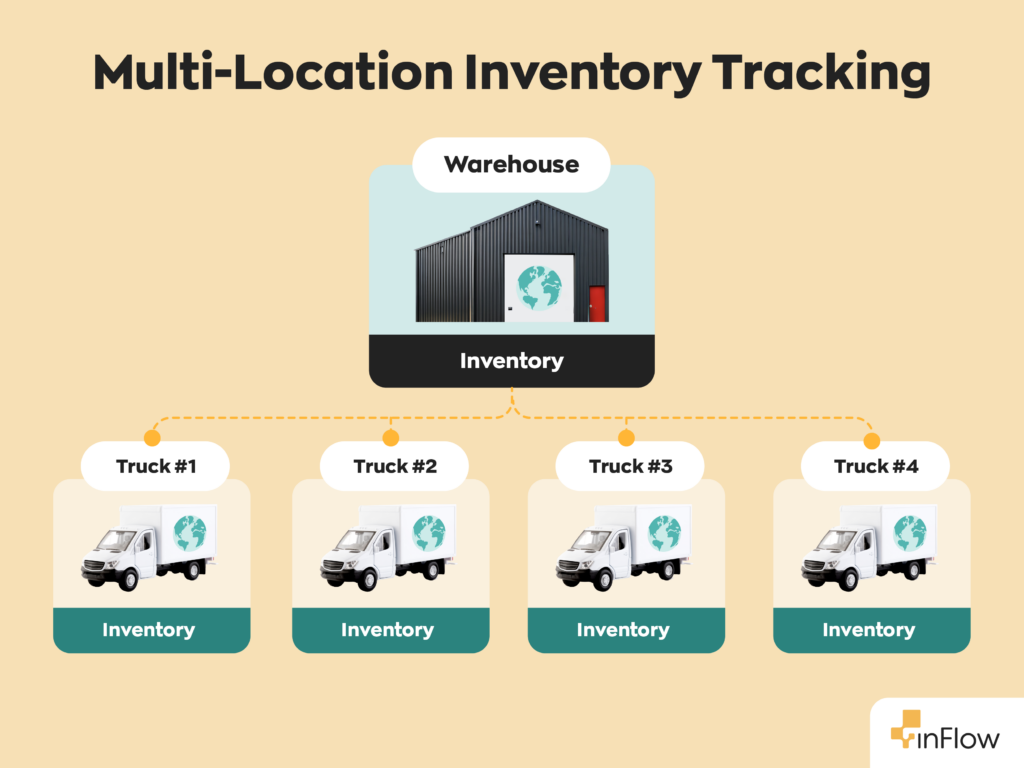
Your service vehicle is more than just a way to get from job site to job site. It’s a warehouse on wheels that carries vital tools and components you need to do your job. If just one critical component is missing, it can mean costly delays and frustrated customers.
Despite this, many inventory systems focus on the main warehouse and treat trucks as an afterthought. The reality is, every vehicle in your fleet should be treated as its own separate location.
Staying up-to-date with compliance and regulatory requirements
HVAC businesses are subject to strict EPA regulations, especially regarding refrigerant handling. Therefore, every company needs to track refrigerant usage, maintain logs for compliance, and generate reports for audits. Manual tracking methods simply can’t handle these industry-specific requirements.
Missing logs, incomplete tracking, or relying on memory can quickly turn into costly fines or failed inspections. As your business grows, the volume of regulated materials will naturally grow along with it. This makes it even harder to stay compliant without a system that captures, organizes, and reports on this data.
Essential features every HVAC contractor needs
When evaluating inventory software, certain features aren’t just nice-to-have, they’re necessities for HVAC operations. Below are some features that you can’t live without.
Multi-location inventory management
In HVAC, your inventory is spread across your warehouse, your trucks, and wherever your team is working that day. This mobile jobsite workflow requires a system that supports inventory tracking across multiple locations. If you can’t see what’s available at each location, it’s easy to overstock in one place while running short in another.
What to look for:
- Real-time visibility across all locations
- Easy stock transfers between warehouse and trucks
- Location-specific reorder points
- Mobile access for technicians in the field
Without support for multi-location tracking, all your inventory will be lumped together, leading to delays in the field and excess stock sitting where it’s not needed.
Mobile functionality with real-time updates
Technicians don’t work much behind a desk; they work in the field. Since HVAC technicians are constantly moving between job sites, their inventory software needs to offer mobile functionality and real-time updates. If your system doesn’t support that workflow, inventory quickly becomes outdated or inaccurate.
What to look for:
- Native mobile app (not just responsive web design)
- Barcode scanning that is compatible with scanners and smartphone cameras
- Quick stock adjustments between locations
- Real-time tracking that updates as components are used and replenished on service vehicles
Strong mobile support prevents updates from being delayed or skipped entirely, which will lead to gaps between what your system says you have and what’s actually on hand.
Advanced reorder management
Running out of a small, inexpensive part while out in the field can delay an entire job. A single missing $15 capacitor could cost you a return visit and an unhappy customer, damaging your business reputation.
What to look for:
- Customizable reorder points by location
- Automated purchase order generation
- Vendor management and lead time tracking
- Recommended reorder points based on historical sales data and vendor lead times
With smarter reorder management, you can make proactive decisions instead of reactive ones, keeping critical parts in stock while avoiding tying up capital in inventory you don’t actually need.
Serial number and lot tracking
Certain HVAC components need more than just quantity tracking. Equipment tied to warranties, regulated materials like refrigerants, and parts with a shelf life all require detailed tracking for compliance purposes.
What to look for:
- Dedicated field for serial number tracking
- Warranty lookup via sales order history and serial number tracking
- Lot and batch tracking for applicable components, such as chemicals
- Traceability reporting through serial and lot number history
If you can’t trace where a specific unit came from or where it was used, you open yourself up to issues with audits, recalls, and warranty claims.
User access rights and permissions
Managing inventory isn’t just about what you have, it’s also about who can access and use it. Without user access rights and permissions in place, high-value items can be used without oversight, and mistakes or misuse can go unnoticed until it’s too late.
What to look for:
- Role-based access controls
- Purchase order approvals with value-based limits per user
- Location-based access restrictions per user
- Audit trails for inventory movements
Without these controls in place, accountability breaks down, making it difficult to track usage, prevent loss, and understand where inventory is going.
Integration capabilities
Whichever system you choose, chances are it won’t be operating in isolation. You’ll likely have other tools that are an integral part of your business, like accounting software, for example. This makes software integration key.
What to look for:
- Accounting software connectivity (QuickBooks & Xero)
- Payment processing integration for invoicing and collections
- Zapier connectivity for automating workflows with existing tools
- Open API for connecting to FSM, CRM, or other business software
Strong integrations create a connected system that prevents duplicate data entry, inconsistent data, and inefficiencies across your operations.
Inventory software evaluation: A step-by-step process
Now that you know what to look for, let’s walk through the evaluation process. The goal here is to gather as much information as possible so you can make the right choice when selecting the perfect fit for your HVAC business.
Step 1: Assess your current workflow and requirements
Before you even think about booking a demo take the time to document your existing workflow and pain points:
- How many locations do you operate from?
- How many trucks/technicians do you have?
- What’s the carrying costs on unsold, idle inventory?
- How often do you experience stockouts?
- What compliance requirements do you face?
- Are you experiencing significant inventory shrinkage?
Step 2: Define your must-have features
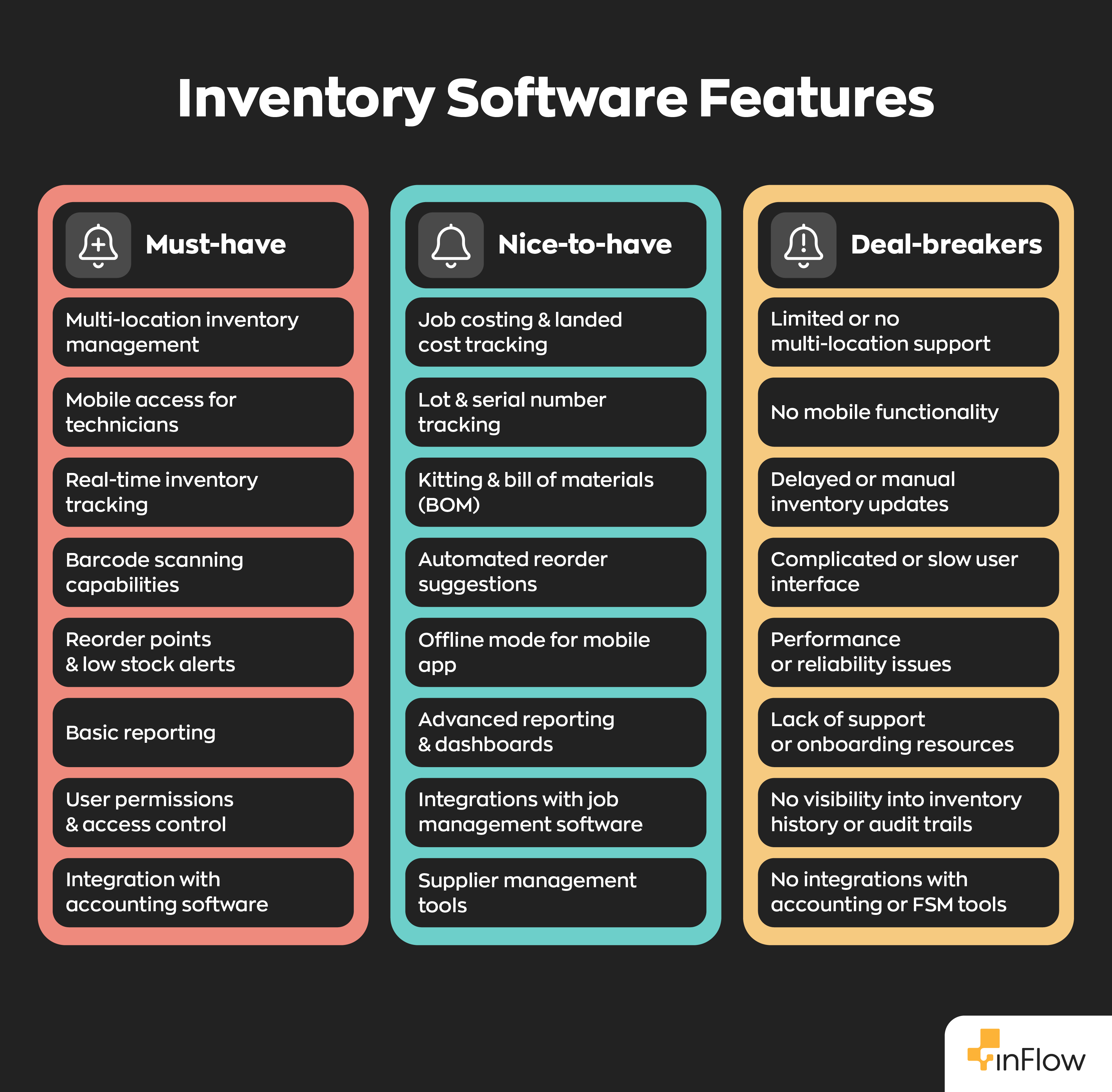
Not every solution is going to check every box, so it helps to break your requirements into three clear categories:
- Must-have: Features you absolutely cannot operate without
- Nice-to-have: Features that would make life easier but aren’t critical
- Deal-breakers: Limitations that would make the software unusable
Step 3: Research and shortlist software options
Now that you have all your data it’s time to start shopping around. Some criteria to look out for:
- Proven experience in field service industries
- Strong mobile capabilities
- Integration options with your existing software
- Responsive customer support
- Support your must-have features with none of your deal-breakers
Step 4: Request demos that showcase your specific workflow
Don’t settle for a generic demo. Instead, ask the sales representative to tailor the demo to your specific workflow:
- How do technicians check parts availability while on a service call?
- What’s the process for transferring inventory from warehouse to truck?
- How does the software handle serial and lot tracking?
- What reporting capabilities are there for inventory analysis?
- Does the system offer user access rights?
- What core integrations are offered and what functionality do they offer?
Step 5: Evaluate total cost of ownership and implementation
This is the most obvious thing you’ll be evaluating when looking into new software. When thinking about cost, consider these factors:
- Monthly/annual subscription fees
- Cost per user
- Implementation and setup costs (on-boarding fees)
- Training requirements
- Hardware needs (scanners, printers, mobile devices, etc)
- Integration costs
- Cost per sales order or transaction
- Contract flexibility
- Ongoing support costs
Step 6: Request references and case studies
Once you’ve created a short list of potential software solutions, take the extra time to vet your decisions. Ask for references and case studies from other HVAC businesses that currently use the software and ask specific questions such as:
- What was the implementation timeline?
- Were there any challenges they faced during implementation?
- What ROI did they achieve?
- What limitations were discovered after implementation?
Step 7: Check publicly available reviews and testimonials
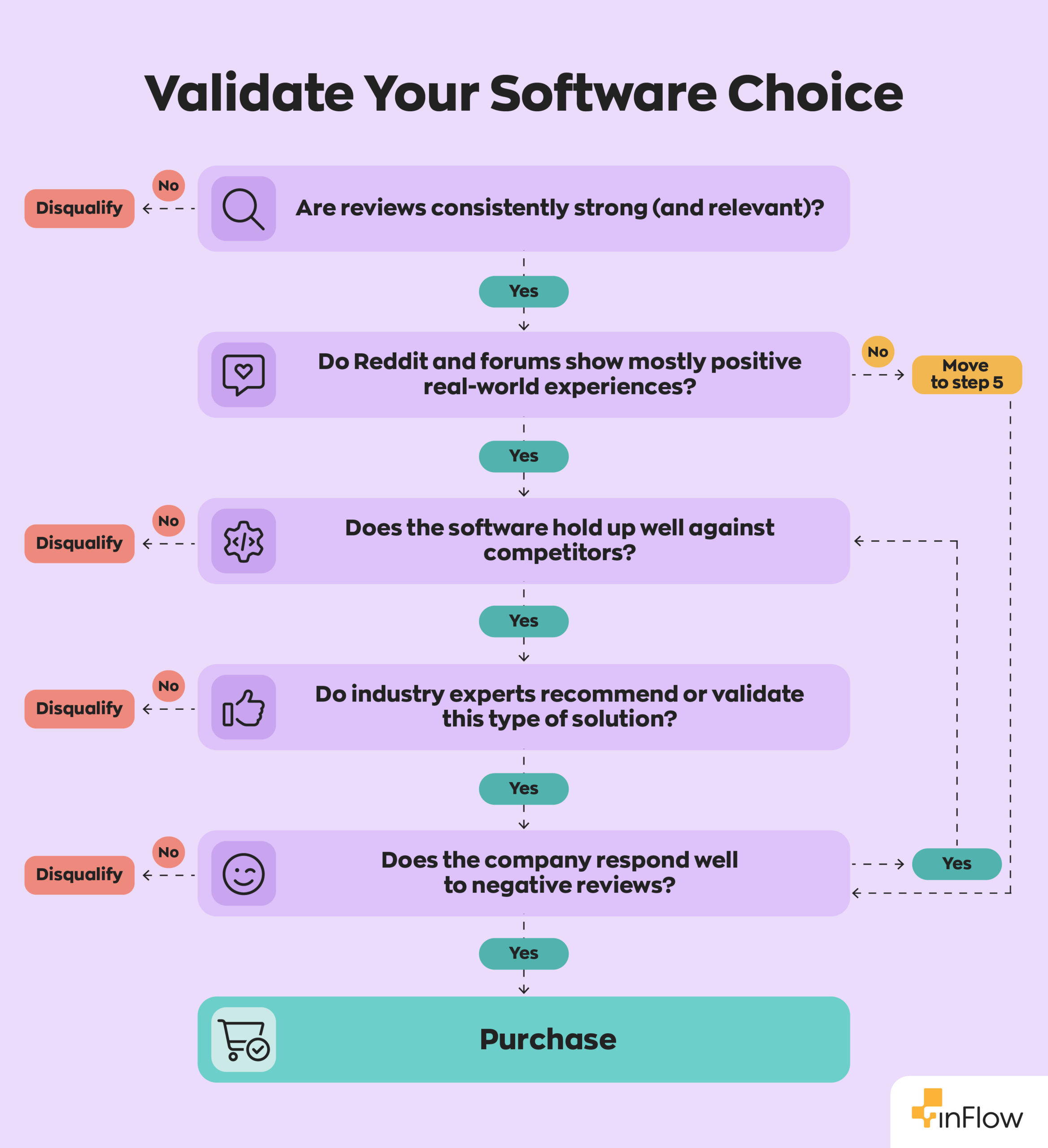
Finally, it’s time to validate your final choice through social proofing. You can do this by checking reviews and testimonials from various sources:
- Check reviews from popular sites like Capterra and G2
- Search Reddit threads to see how real users talk about the software
- Take a look at comparison pages to see how software solutions stack up.
- Look at reviews or recommendations from industry experts
- Pay attention to how the company responds to negative reviews
Implementation and rollout
At this stage, you’ve now settled on the product that suits your business needs, and it’s time to plan your rollout. It’s best to follow a phased approach for this in order to ensure everything gets implemented correctly.
We should note that the 12-week timeline we offer below is a minimum. Larger more complex operations should plan for 3-6 months before full implementation.
Data migration best practices
Switching to a new system can feel daunting, and if it’s handled poorly, it’ll create more problems than it solves. The good news is you can avoid most of these issues with careful data migration.
When it comes to migration, preparation is everything. A little extra effort upfront can save you from hours of cleanup down the road. Here are some best practices to keep things running smoothly:
- Set up your location structure before migrating any data
- Clean up your existing parts list before migration
- Standardize part numbers and descriptions
- Verify vendor information and pricing
- Conduct a cycle count to establish accurate opening stock quantities
- Test the migration with a small subset first
In short, this first step is all about creating a strong foundation. The cleaner and more organized your data is from the beginning, the smoother everything will run once you’ve made the switch.
When everything is in order, it’s time to begin the rollout.
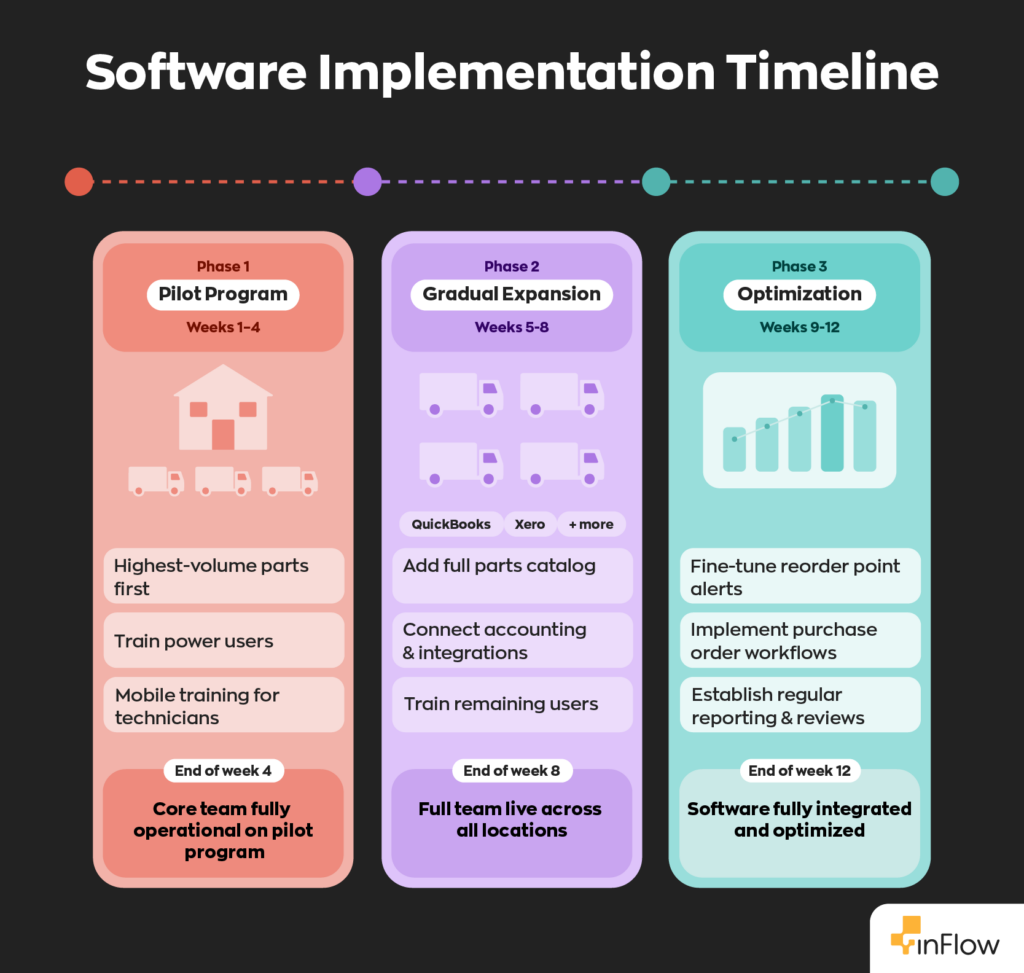
Phase 1: Pilot Program (Weeks 1-4)
- Start with your main warehouse and 2-3 trucks
- Focus on your highest-volume parts
- Train a small group of power users
- Field technicians should receive separate training focused on mobile workflows
Phase 2: Gradual Expansion (Weeks 5-8)
- Add remaining trucks and locations
- Expand to the full parts catalog
- Connect accounting and other integrations (QuickBooks, Xero, etc.)
- Train all technicians and staff
Phase 3: Optimization (Weeks 9-12)
- Fine-tune reorder point alerts based on actual usage
- Implement purchase order workflows
- Establish regular reporting and review processes
Training your team
A new system only works if your team actually uses it. That’s why getting buy-in from day one is so important. And that starts with training. When your team understands how the software works, they’re far more likely to stick with it and use it consistently. Therefore, a good training program would look something like this:
- Provide hands-on training, not just documentation
- Create role-specific training materials
- Establish internal champions to help with adoption
- Plan for ongoing training as you add new features
How inFlow meets HVAC-specific needs
Hundreds of field service and contractor businesses, including HVAC companies, rely on inFlow to manage their inventory, and there’s a good reason for that. It’s built to handle the challenges you face every day.
In fact, it checks most, if not all, of the boxes for what HVAC businesses need from their software. To illustrate, here’s a closer look at how inFlow works into your workflow:
Multi-location support
Our software supports multi-location inventory tracking which makes it perfect for a mobile job site workflow. You can set up each truck and warehouse as separate locations, then easily transfer stock between them as needed. Technicians can update inventory on the go using our mobile app, scanning items with either a barcode scanner or their smartphones as they use parts on service calls.
Accurate job costing with real-time inventory tracking
Get precise landed costs for your supplies by tracking the actual value of the materials used. Your inventory updates in real-time even when your technicians are out in the field, so nothing slips through the cracks. This means accurate job costing based on actual usage, not rough estimates, so you can price jobs with confidence.
Built-in barcode system
Reduce errors and speed up inventory processes with inFlow’s complete barcode system. With inFlow, you can generate, print, and scan barcodes all within the platform, no third-party plug-ins required. Track everything from small electrical components to large HVAC units with ease.
Lot and serial number tracking
Handle warranty claims and compliance requirements effortlessly. inFlow provides users with dedicated fields to track lot and serial numbers, and purchase dates, making it easy to manage product histories and generate reports to address warranty claims and compliance issues.
Recommended reorder points
Never run out of critical parts while out on a job again. Set location-specific reorder points and receive automated notifications when it’s time to restock. inFlow recommends reorder points based on historical sales data and vendor lead times, so you can identify usage patterns and optimize inventory levels.
Robust user permissions
Maintain control over your inventory with role-based user permissions. Greatly reduce inventory shrinkage by restricting technician access to prevent unauthorized use while still allowing them to update usage in real-time.
Seamless integrations
inFlow connects directly with accounting software like QuickBooks Online and Xero, and through Zapier, you can automate workflows with thousands of other apps. As a result, you can sync your inventory data with your accounting system and eliminate double data entry. You can even take advantage of our two-way payment sync with QuickBooks Online to reduce friction even more.
Manufacturing and kitting features
For larger HVAC companies that assemble their own components, inFlow Manufacturing includes bill of materials, manufacturing orders, and kitting capabilities to manage complex assemblies and subassemblies.
Final word
Overall, the right inventory software for your HVAC business should save you time, reduce parts shortages, and give you the visibility you need to run a tighter, more profitable operation. The key is to take your time and be thoughtful about both your decision and your implementation.
Whether you’re managing a single warehouse and a few trucks or running a multi-location operation with a full fleet, you need software that meets you where you are and grows with you.
FAQ
Do I really need specialized inventory software, or will Excel work?
While Excel might work for smaller operations just starting, it quickly starts to become unmanageable as you grow. For instance, tracking inventory across multiple locations is challenging; there are no automated reorder alerts and no meaningful barcode support.
How long does it typically take to implement inventory software?
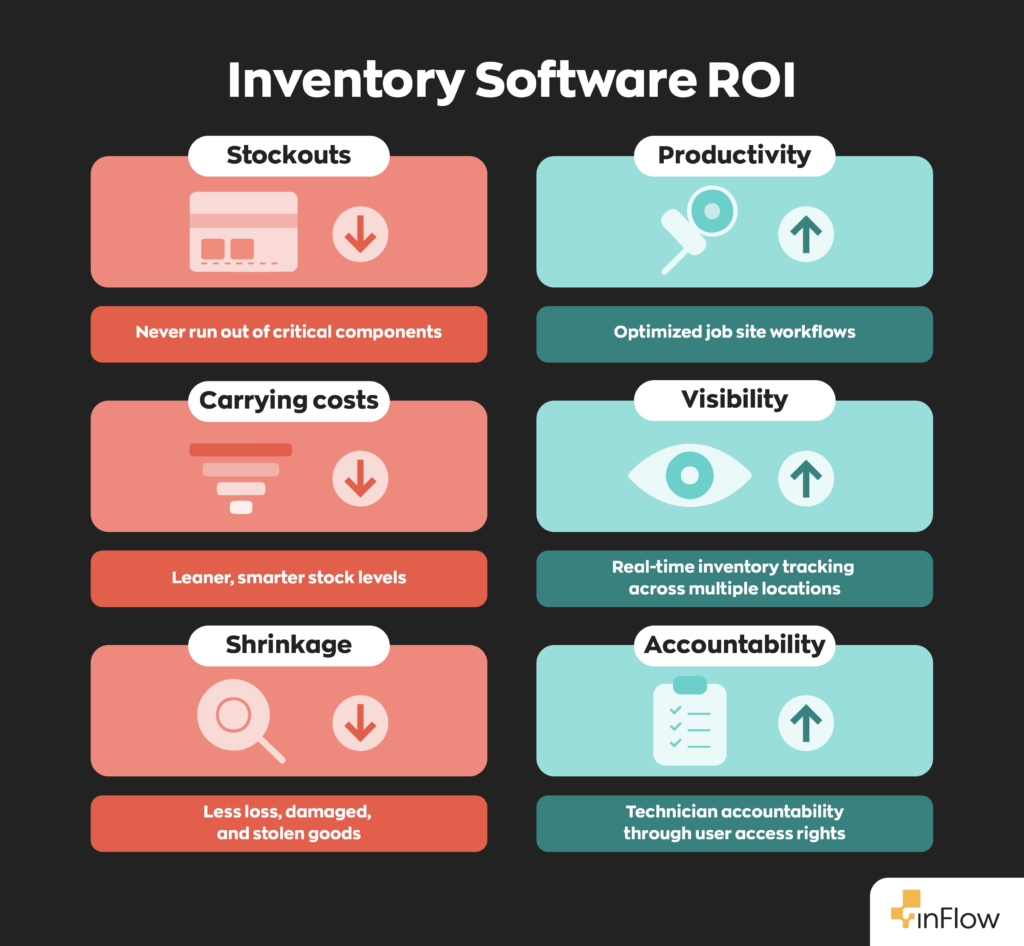
For most HVAC contractors, a realistic timeline for full implementation is 3–6 months. This includes data migration, system setup, and team training. Starting with a pilot program can help you identify and resolve issues before rolling out company-wide.
What’s the ROI of inventory management software for HVAC contractors?
Most contractors see ROI within 6-12 months through reduced stockouts, lower carrying costs, decreased inventory shrinkage, and improved productivity. However, the exact ROI depends on your current inventory value and operational efficiency.
Can inventory software help with EPA compliance?
Yes, quality inventory software should track refrigerant usage, and have the capability to generate reports for EPA audits. This is particularly important given the increasing regulations around refrigerant handling and environmental compliance.
What if my technicians resist using new technology?
Change management is crucial. Therefore, start with your most tech-savvy technicians to spearhead the initiative, provide thorough training, and emphasize how the system makes their jobs easier (no more paperwork, faster parts lookup, etc.). Resistance will fade once workers start to see the benefits.
How much should I budget for inventory management software?
For small- to mid-sized HVAC businesses, expect to pay $100 to $700+ per month. Keep in mind that most platforms offer tiered plans, so your actual cost will depend on which plan fits your needs and any required add-ons. Factor in any one-time onboarding costs, as well as hardware such as barcode printers or scanners.
0 Comments