 Fellow Canadians: All inFlow plans are available in Canadian dollars





Key takeaways
- Barcode label printers can be separated into two main categories: stationary and portable. Stationary printers remain in a fixed location and require a power source, and portable printers are handheld or wearable and are suitable for mobile tasks.
- When you choose a barcode label printer, you should assess the environment in which it will be used; for instance, warehouse staff may benefit more from portable devices, while office settings might favor stationary printers.
- In demanding environments, investing in industrial-grade printers that are resistant to drops, heat, and water can be cost-effective over time despite their higher initial price.
- You should consider size, placement, and color when designing your barcode labels.
- You can create barcodes for your barcode labels by using a font, an online barcode generator, or barcoding software. Those who require registered barcodes for retail environments can purchase barcodes from GS1.
- A barcode label printer is just one piece of the puzzle when it comes to a complete barcoding system. You’ll also need barcode scanners, barcode software, and, of course, the barcodes themselves.
Barcodes are important. That’s no secret. Even in 2025, with seemingly everything moving towards a digital format, barcodes continue to stand the test of time. Even more “advanced” devices like RFID tags have failed to replace barcodes entirely. But the barcodes themselves are just one part of a complete system. You’ll need a few things to start, and one major component is a barcode label printer. But what is a barcode label printer, and why do you need one?
On top of there being different types of barcodes, there’s also different types of barcode label printers. So, which barcode label printer is best for you? What factors should you consider when selecting a barcode label printer? Moreover, what should you keep in mind when barcode printing, and how to choose a barcode printer that meets those needs?
With those questions in mind, let’s get into our barcode printer buying guide.
[If you want to learn everything there is to know about barcodes, check out our Ultimate Barcoding Guide.]
Types of barcode label printers: stationary, portable, and wearable barcode printers
Broadly speaking, there are two types of barcode printers: stationary and portable. As their names suggest, stationary barcode label printers need to stay in one place and require their own power source. Portable barcode printers, on the other hand, are smaller devices that you can carry around. Within these two groupings, however, there are differences to consider.
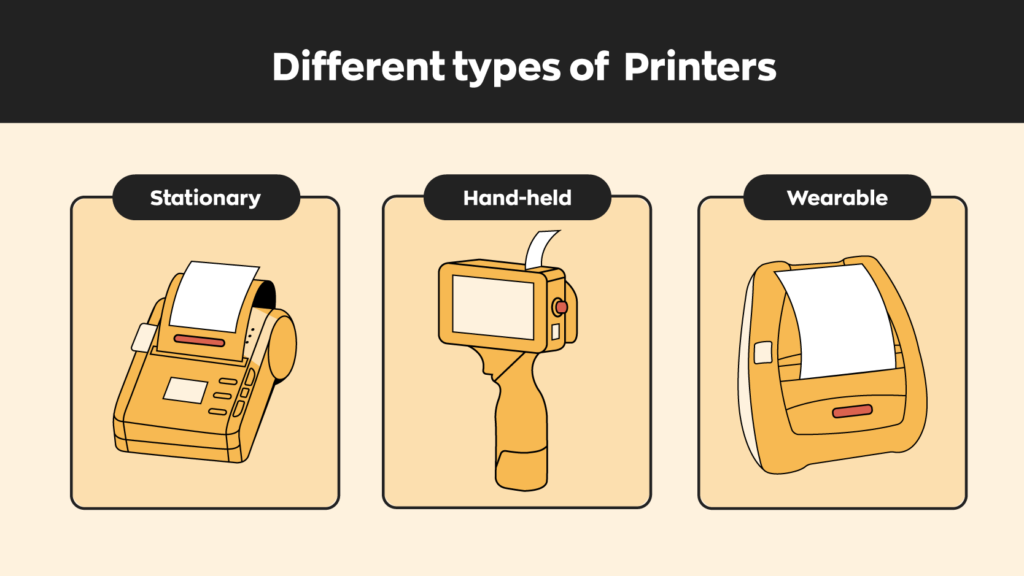
Stationary printers: fixed-location printers for offices, workstations, and warehouses
Stationary barcode label printers are built for fixed locations where you need reliable, consistent printing. This category includes basic desktop printers, which are compact and office-friendly, and industrial barcode printers, which are larger, more rugged machines designed for harsh, unpredictable environments.
Desktop barcode printers work best for low- to medium-volume jobs such as retail labeling, office inventory, and shipping labels. They’re typically easier to use, take up less space, and are more budget-friendly.
Industrial printers are designed for durability and continuous use in tough environments. They can handle higher print volumes, wider labels, and harsher conditions like heat, dust, and moisture.
Best use cases:
- Office inventory management
- Retail stockroom
- Warehouse packing stations
- Manufacturing lines
Key advantages:
- Reliable power source
- Faster print speeds
- Higher volume capacity
Hand-held printers: mobile printers for warehouses and job sites
Portable label printers are designed for mobility, so workers can print labels wherever the job takes them. These printers are battery-powered, lightweight, and usually connect to your devices wirelessly through Bluetooth or Wi-Fi.
They enable on-demand printing wherever the user needs it, reducing trips back and forth to a workstation. They’re often used alongside mobile apps and handheld scanners to support faster, more flexible workflows.
Best use cases:
- Warehouse picking and receiving
- Field service operations
- Delivery and logistics
- Retail floor
Key advantages:
- Point-of-use accuracy
- On-demand label printing
- Improved workflow speed
Wearable printers: Hands-free labeling for fast-moving workflows
Wearable barcode printers are specialized mobile devices designed for hands-free use. They’re usually worn on the arm or belt, or integrated into a wearable system. These printers are most useful in environments where workers need to keep both hands free for safety or speed.
They’re often paired with ring scanners (yes, they make scanners you can wear like a ring) and wearable devices that integrate with inventory software. Compared to handheld devices, wearable printers offer greater flexibility when handling products and help workers stay focused on the task at hand.
Best use cases:
- High volume picking and packing
- Hazardous environments
- Manufacturing and assembly lines
- Safety-critical operations
Key advantages:
- Increases workflow speed
- Improves safety
- Continuous task execution
Key factors in choosing a barcode printer
Choosing the right barcode printer is all about the environment you’re working in and how your team operates. So before you start comparing models, it helps to take a step back and look at three key areas: where you’re using the printer, how durable it needs to be, and technical specs that actually matter to your day-to-day workflow.
Operating environment: warehouse vs office usage and mobility needs
The first thing to consider is where your printer will live and how it will be used. If your team is constantly on the move, like warehouse pickers or field service technicians, a mobile setup is a non-negotiable. Portable or handheld printers let workers print labels on the spot, eliminating the need to walk back and forth to a fixed station.
On the flip side, if you’re working at a desk or packing station, a stationary printer is usually the better choice. It’s always within reach, doesn’t need charging, and can handle more consistent workloads.
Durability and ruggedness: industrial models built for tough environments
Not all barcode printers are built the same, especially when it comes to durability. In office environments, a standard desktop printer will usually do the job just fine. But once you move into warehouses, production floors, or job sites, things change quickly. Drops happen. Dust builds up. Temperatures fluctuate.
That’s where industrial-grade printers come in. These barcode printers are designed to withstand the toughest conditions. They feature drop resistance, sealed components, and continuous operation without overheating.
Yes, they come with a higher upfront cost. But if you’re constantly repairing or replacing cheaper printers, the more rugged option will often save you money (and frustration) over time.
Technical specs: label size, quality, speed, and power options
When looking at technical details, start with your label requirements. What size labels do you need? How detailed do they have to be? Higher DPI matters if you’re printing small barcodes, and will help prevent blurry barcodes.
Then there’s print speed. High-volume operations, like shipping or manufacturing, will benefit from faster printers that can keep up with demand without creating bottlenecks.
Finally, consider connectivity and power. Stationary printers are typically wired and integrate directly with warehouse management software. Wireless barcode printers rely on battery power and connect via Bluetooth or Wi-Fi, making them more flexible but also dependent on battery life.
It’s all about trade-offs. The key is to match the specs to your actual workflow, not just go for the most advanced option.

Other barcode system components: scanners & software
As valuable as barcodes (and their printers) are, they’re just one piece of the puzzle. You’ll still need two other components to build a complete barcode system.
Barcode scanners (wired vs wireless)
Having barcode labels won’t do you much good if you don’t have a way of reading them. For this, you’ll need a barcode scanner. These come in many shapes and sizes, and much like barcode printers, deciding on a barcode scanner will depend on your needs.
For example, a wired barcode scanner would work fine if you’re scanning at one designated location. But you should probably consider a wireless Smartphone Scanner if you need mobility, like for warehouse picking.
Barcode labeling software
Barcodes are machine-readable data. The computer will interpret the lines and spaces in a barcode and translate them into an alphanumeric code. The computer would then locate the information connected to that code stored inside a software system. If there’s nothing to match it to, the data itself is meaningless.
It’s an oversimplification, but you can consider a barcode system as a data bank. The barcodes represent information stored inside that data bank, and barcode scanners match the product in question to that information.
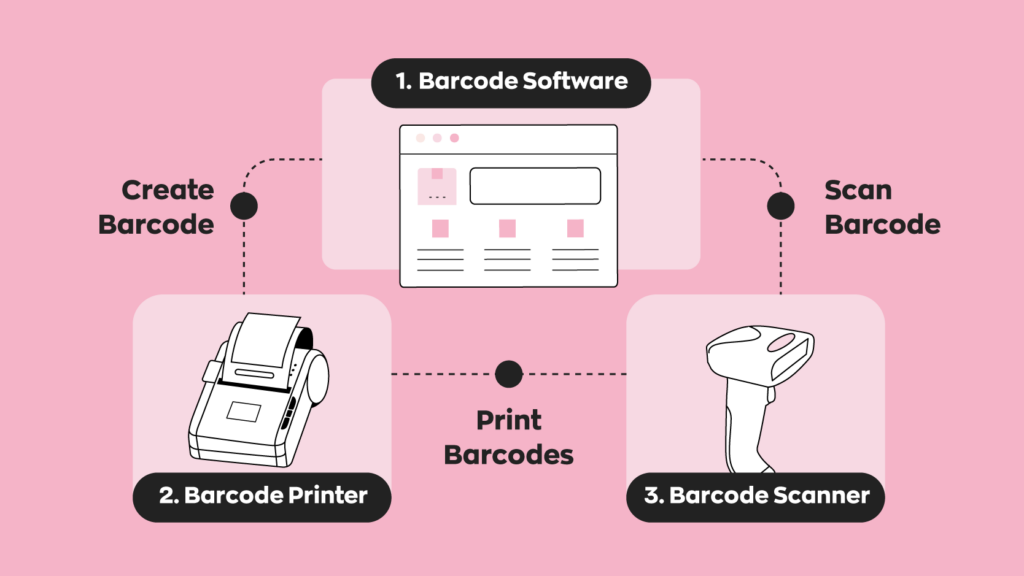
Today, inventory management software like inFlow has a built-in barcode system. Of course, inventory management software isn’t a strict requirement. But if you want to get the most out of your barcodes, it doesn’t make sense not to have one.
Generating and registering barcodes (GS1 vs Custom)
So, how do you actually create barcodes? You’ve got two options here. You can either buy official GS1 barcodes or generate your own for internal use. The right choice depends on where and how you plan to use them.
Official barcodes (UPC/EAN)
If you plan to sell your products through retailers, marketplaces, or other external partners, you’ll need officially registered GS1 barcodes.
GS1 is the global authority that issues GTINs (Global Trade Item Numbers), which are used to create UPC and EAN barcodes. These are unique to your product and recognized worldwide, which is essential for retail distribution.
There is a cost involved. Typically, GS1 charges an upfront fee plus an annual renewal based on how many barcodes you need. That said, they also offer single GTINs for a one-time fee, which can be a good option if you only have a handful of products. In fact, we’ve partnered with GS1 to sell their official barcodes through our inFlow GTIN Barcode Shop.
DIY barcode generation
Learning how to create barcode labels is straightforward with the right tools. If your barcodes are only used internally, you don’t need to go through GS1. Most inventory systems (including inFlow) let you create unique barcodes for free. These codes are unique within your business and work perfectly for tracking inventory, picking orders, and managing stock.
If you’re not currently using inventory software, you can also use a barcode generator. These are free online tools that let you create barcodes quickly and easily. You could also use a barcode font. These work the same as any other font and let you type the barcodes you want.
The trade-off is that these barcodes aren’t registered globally. That means other businesses won’t recognize them outside your operation. The key is choosing barcodes that align with how your business actually operates.
Barcode label printing best practices
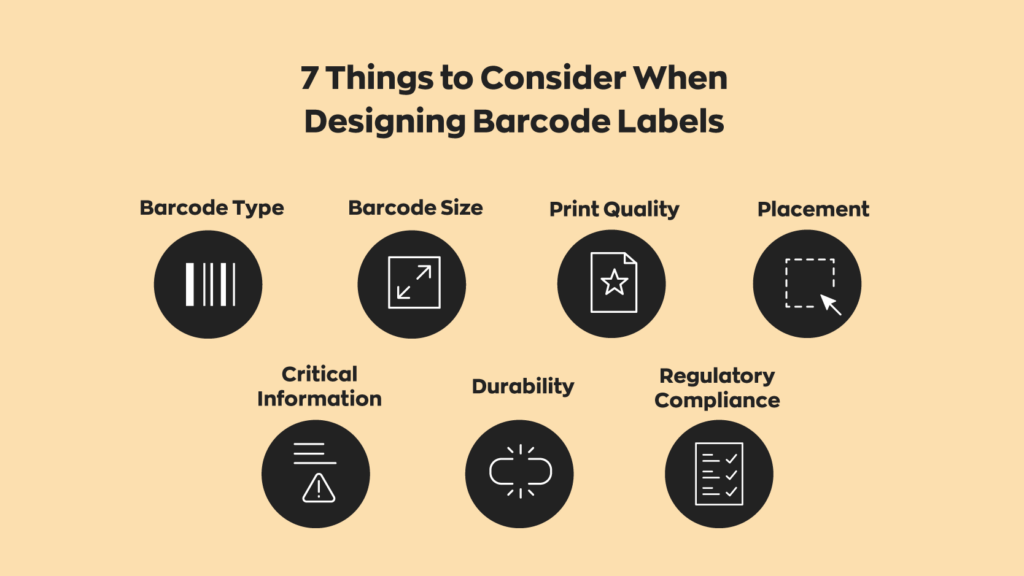
Purchasing the right printer is really only half the battle. Understanding barcode printing best practices ensures you make the most of it. Here are some label design tips when designing, printing, and applying your barcode labels.
Size and placement
The bigger, the better, but bigger means you’ll run through paper faster. Try to find a balance between size and readability. In that same vein, it’s also important to figure out a suitable placement and then standardize that placement. If barcodes end up in different places on the same product, your workers will end up wasting time looking for labels. It’s best to place barcodes somewhere easy to find but where they won’t be easily destroyed or disfigured.
Color & contrast
While it might be tempting to create visually appealing barcodes, there’s a reason that most places stick with black-and-white: contrast. If there’s not enough contrast between the two colors, the machines might be unable to read the barcodes. For this reason, it’s best to stick with black-and-white barcodes and use colors elsewhere on your labels.
Human-readable vs. machine-readable text
This one is more complex. If you walk into any major retailer and look at a random barcode, you’ll probably see numbers and letters under the stripes. That’s the human-readable portion of the barcode. Because we humans can’t read barcodes (at least, not yet), human-readable text is placed at the bottom in case something goes wrong. You can go without it, but it’s best to have it as a contingency.
How can inFlow help?
We’ve been preaching the benefits of barcodes since the inception of inFlow. We not only have a built-in barcoding system in our software, but also the hardware to match.
If your workflow requires mobile printing, such as on the warehouse floor or at a job site, the inFlow Portable Printer is a compact and rugged solution. It prints labels wirelessly, pairs seamlessly with the inFlow Smartphone Scanner and mobile app, and is designed to withstand the demands of warehouse life.
Barcodes are a crucial part of any business that handles inventory. And while they haven’t changed much over time, the software surrounding them has seen many improvements. inFlow, for example, serves as an all-in-one platform for your barcoding needs. Along with built-in barcode generation, inFlow’s mobile app turns any mobile phone into a scanner, enabling work on the go.
FAQ
What are the different types of barcode label printers?
Barcode label printers fall into two main categories: stationary and portable. Stationary printers, including desktop and industrial models, are fixed in one location and best suited for offices, packing stations, and manufacturing lines. Portable printers are battery-powered, designed for mobility, and come in handheld or wearable forms. The right type depends almost entirely on where your team works and how they move throughout the day.
What is the best barcode label printer for a small business?
For most small businesses, a desktop barcode printer works perfectly. They’re compact, budget-friendly, and can handle low- to medium-volume jobs like retail labeling, shipping labels, and office inventory without breaking a sweat. If your team is constantly on the move, think warehouse picking or field service, a portable Bluetooth printer is a much better call. Match the printer to your workflow, not the other way around.
What’s the difference between a handheld and a stationary barcode printer?
The core difference is mobility. Stationary printers remain plugged into a fixed workstation and are better suited for high-volume, consistent printing. Handheld printers are battery-powered and connect wirelessly via Bluetooth or Wi-Fi, letting workers print labels on the spot without returning to a workstation. Handheld models improve workflow speed and point-of-use accuracy, but they do require regular charging and tend to have lower print volumes.
What features should I look for in a portable barcode printer?
Start with battery life and wireless connectivity. Bluetooth and Wi-Fi are standard, but reliability matters in busy environments. From there, consider durability. If your team works in a warehouse or job site, look for drop resistance and sealed components. Print quality (DPI) is also worth checking, especially if you’re printing small or detailed barcodes. And make sure it integrates with your inventory software so everything stays connected.
Do I need special software to print barcode labels?
Yes, barcodes are only useful if there’s a system to match them to. Without software, a scanned barcode is just a string of characters with no context. Most inventory management platforms, including inFlow, have built-in barcode generation and printing support. If you’re not ready for full inventory software, free online barcode generators and barcode fonts are a workable starting point for internal use.
What is the difference between GS1 barcodes and custom barcodes?
GS1 barcodes are officially registered and globally recognized. These are required if you plan to sell through retailers or external marketplaces. They come with an upfront cost and an annual renewal fee through GS1. However, you can purchase these individually with no renewal fee. Custom barcodes, on the other hand, are generated internally and work perfectly for tracking inventory within your own business. If you’re only using barcodes in-house, custom barcodes through your inventory software are free and more than sufficient.
Hello
Labcorp is seeking a formal quotation for the following hardware and consumables to support our laboratory operations.
Please provide a detailed quote for the items listed below:
Barcode Printers: 220 units
Barcode Scanners: 250 units
Labeling Machines: 190 units
Printer Ribbons: 100 units
Label Rolls: 2000 rolls
To assist in providing an accurate quote, please note the following requirements:
Compatibility: All equipment must be compatible with a standard enterprise-level laboratory information management system (LIMS) environment.
Specifications: Please include the specific make and model for all hardware being quoted.
Thank You.
Hey Allen,
I’ve sent you an email to discuss your needs further.
Cheers,
Jared