 Fellow Canadians: All inFlow plans are available in Canadian dollars




Key takeaways
- The types of barcodes can be categorized into linear barcodes, also called one-dimensional (1D), and two-dimensional (2D) barcodes.
- 1D barcodes include formats like UPC and EAN. These barcode types are commonly found on retail products. They are read horizontally and can store up to 85 characters.
- Examples of 2D barcodes are QR codes and Data Matrix codes. They can store more information than 1D barcodes and are readable both horizontally and vertically. These are commonly used to encode website URLs.
- Selecting which barcode type should you should use for inventory tracking depends on factors such as the amount of data to encode, the size of the item, and the scanning environment.
- To start using barcodes, you will need barcodes, barcoding software, a barcode printer, and a barcode scanner.
It’s no secret that barcodes are a massive part of our daily lives. We see them on products in grocery stores; restaurants use them to display their menus, and so on. To the uninitiated, however, all these barcodes are likely just that: barcodes. So, it may come as a surprise to hear that there are many different types of barcodes. There’s Code 128, UPC (Universal Product Code), data matrix, QR code, etc.
Many of these barcodes have overlapping uses, but for the most part, each one fulfills a different purpose. So, how many different barcode types are there? How do they differ from one another? Should your business be using a specific type of barcode? We’ll be answering these questions today, along with a few others.
Types of Barcodes: 1D (linear) vs 2D (matrix)
The different types of barcodes fall into two main categories. One-dimensional (1D, also known as linear) or two-dimensional (2D). To us, they don’t look much different. They’re all just seemingly random collections of stripes, dots, squares, and potentially other symbols. But to computers, there’s a big difference between 1D vs 2D barcodes.
1D barcodes (linear)
Most people probably think of these types of barcodes when they hear the term “barcode.” These vertical black and white stripes are present on almost every retail product out there. We call these 1D barcodes because they only read horizontally. This type of barcode can store up to 85 characters. Here are some of the most common 1D barcode entries you’ll see on a barcode symbology list.
EAN/UPC retail barcodes (UPC-A, UPC-E, EAN-13, EAN-8)
EAN and UPC barcodes are used by retailers worldwide to authenticate their products. They track sales, manage inventory, and handle shipping. If you’re comparing the difference between UPC vs EAN, it mostly comes down to geography and format.
UPC (Universal Product Code) is used in the United States and comes in two formats:
- UPC-A: 12 digits (the standard for most retail products)
- UPC-E: 6 digits (a compressed version used for smaller packaging)
EAN (European Article Number) is more widely used internationally, especially in Europe. It also has two formats:
- EAN-13: 13 digits (the global standard for retail)
- EAN-8: 8 digits (used for smaller items with limited space)
Functionally, they do the same thing. Both identify products at the point of sale and throughout the supply chain. If you’re planning to sell retail products, you can purchase these barcodes through GS1 to ensure they’re globally recognized and tied directly to your business.
Code 39 (internal tracking; ISO/IEC 16388)
Code 39 is a widely used barcode format for internal tracking, and it follows the ISO/IEC 16388 standard. It’s especially useful because it supports both letters and numbers, making it a flexible option for labeling parts, assets, and inventory. You’ll often see Code 39 barcodes used in industries like automotive manufacturing and government operations (including the US Department of Defense).
The name “Code 39” comes from its original limitation of 39 characters. That said, modern implementations can store up to 43 characters. One thing to keep in mind: Code 39 is best suited for internal use.
Code 128 and GS1-128 (shipping/traceability; ISO/IEC 15417)
Code 128 is a high-density barcode commonly used in shipping and logistics, and it follows the ISO/IEC 15417 standard. It can encode a wide range of characters from the American Standard Code for Information Interchange (ASCII) set, making it far more versatile than simpler formats like Code 39. Much like Code 39, these types of barcodes are only useful internally unless you get GS1-128 barcodes.
GS1-128 is a standardized version of Code 128 designed specifically for supply chains to communicate externally. It builds on Code 128 by adding structured data (like batch numbers, expiration dates, and shipping details).
2D barcodes (matrix)
Even if you’ve never heard of a 2D barcode, chances are you probably use them often. QR (quick response) codes, for example, are a type of 2D barcode. 2D barcodes use more than just stripes to store data. They use a combination of stripes, squares, hexagons, and other symbols to store data. We call these 2D barcodes because they store information both horizontally and vertically. They also require a 2D imager to read. That sounds scary (and expensive), but it’s actually very accessible– most modern phones these days include a 2D imager. 2D barcodes can hold up to 7,089 characters. Here are some of the most commonly used 2D barcodes.
QR Code (consumer engagement + URLs; ISO/IEC 18004)
The QR code is the most commonly used 2D barcode. This is because they’re open domain– free for anyone to create and use. Businesses can use them for all sorts of reasons. Marketing teams, for example, put them on flyers, billboards, video ads, and even magazines. They have a high tolerance to error, which makes them popular, but a laser cannot read them.
Data Matrix (small items + industrial/healthcare; ISO/IEC 16022)
When comparing Data Matrix vs QR code, you’ll find Data Matrix symbols are generally smaller in size. Their tiny size makes them ideal for placement on small products, and the logistics industry often utilizes them. Their design makes them machine-legible in low resolution, making them ideal for hard-to-scan positions.
Aztec Code (tickets/transport; ISO/IEC 24778)
Airlines commonly used Aztec barcodes for boarding passes. Unlike other barcodes, these don’t require a blank space around them. They can also hold massive amounts of data and have better information correction than other 2D barcodes.
How to choose the right barcode for your business
Choosing a barcode isn’t just about picking a random format and calling it a day. You need to consider how your business operates, who you’re selling to, and what kind of information you need to track.
If you sell through retailers or marketplaces: GS1 and GTIN
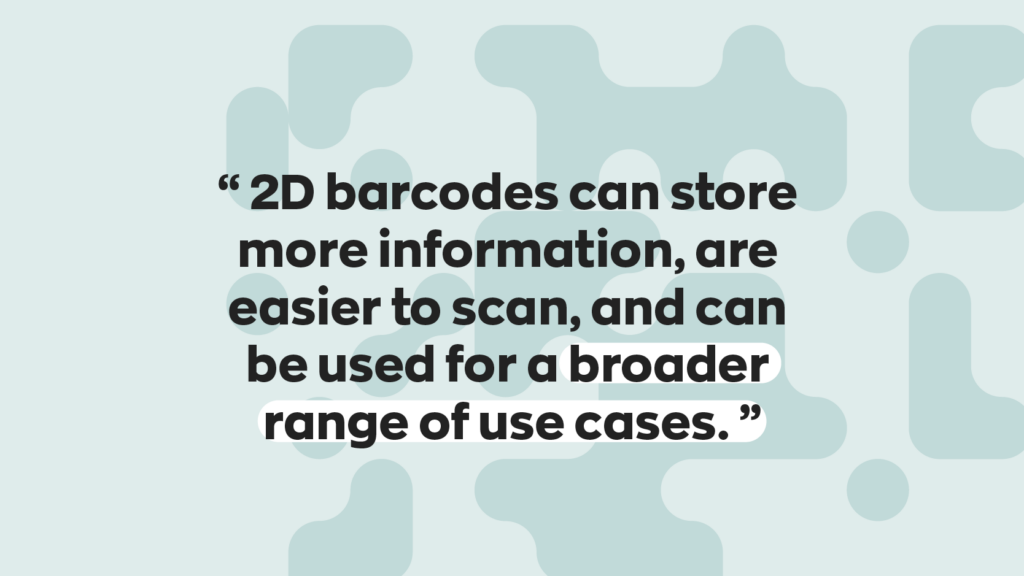
If your products need to be recognized outside your business (think retailers, distributors, or online marketplaces), you’ll need GS1-registered barcodes. That usually means UPCs or EANs tied to a GTIN (Global Trade Item Number). Without GS1 barcodes, your products may not even be accepted.
The good news is you can purchase these directly from GS1. We even partnered with GS1 to make it easier for our customers to purchase these barcodes from our inFlow GTIN Barcode Shop commission-free. This means you pay the same whether you buy them from us or directly from GS1.
If you only need internal tracking: Code 39 and Code 128
If your barcodes are staying inside your business, you’ve got a lot more flexibility. This is where formats like Code 39 or Code 128 are perfect, because when you create these barcodes, they don’t need global recognition. You control how they’re created and used, focusing on what works best for your workflow.
Constraints: size, data, environment, scanners
Of course, your choice isn’t just about the use case. There are some real-world constraints to think about, too. For example:
- Label size: Smaller products may require compact formats like UPC-E or EAN-8
- Data needs: More complex tracking may require high-density barcodes like Code 128 or QR codes
- Environment: Dust, temperature, moisture, and wear and tear can impact long-term readability
- Scanner compatibility: Not all scanners read every barcode type
So before you commit, take a step back and really assess where this barcode will live, and how it will be used day to day. When implementing barcodes, remember that they store information, not just product information.
Future-proofing: Sunrise 2027 and 2D barcodes
Barcodes may seem like old technology, but they’re evolving all the time. So much so that GS1 is implementing a new initiative, Sunrise 2027, to accelerate the wider adoption of 2D barcodes (such as QR codes), which can store much more information. The change won’t happen overnight, but it is coming. So if you’re setting up a barcode system today, it’s worth thinking ahead. Choosing flexible tools and systems now can save you a ton of headaches later.
What you need to start barcoding
If you want to implement barcodes into your business, you’ll need four things for a fully functional barcode inventory system. Let’s walk through them.
Barcodes
I mean, this one is a no-brainer. You’ll obviously need barcodes, but as we mentioned, how you get them depends on how you plan to use them. If you need barcodes for retail, purchase them through GS1; if you’re using barcodes internally, choose any barcode type you like. You can generate formats like Code 39 or Code 128 using a font or barcode generator.
Barcode printers
Once you’ve got your barcodes, you’ll need to print them. Technically, any printer can do the job. But if you’re planning to use barcodes regularly, a dedicated label printer is worth the investment. They’re faster, more reliable, and built for warehouse environments.
If you’re looking for something compact, wireless, and warehouse-ready, the inFlow Portable Printer is a solid option.
Barcodes scanners
Now that everything is labeled, you need a way to scan your barcodes. The good news is you might already have a barcode scanner in your pocket. A modern smartphone can handle basic scanning just fine. However, if you scan a high volume of products daily, you’ll want a dedicated scanner.
Laser scanners are faster, more accurate, and built for extended use. There are plenty of options out there, but we’re big fans of the inFlow Smartphone Scanner (for obvious reasons).
Inventory software
This last piece of the puzzle is often overlooked, but it might be the most important part of all. Barcodes don’t actually store your product information; they act as a reference to where to find the data in a database. Without software acting as a database, barcodes are really just a string of numbers and characters.
With the right inventory system in place, every scan can trigger all kinds of actions, such as:
- Receiving stock
- Updating inventory levels
- Tracking assets in real time
- Managing orders and workflows
- Order fulfillment
Wrapping up
When implementing barcodes, remember that they store information, not just product information. You can use them in many different ways with a bit of creativity. For example, you can place larger barcodes on shelves and store information for every product present. Companies needing asset tracking can put them on equipment to keep track of them while they’re on the move. The possibilities are endless.
So, if barcodes are something that can help your inventory management, consider giving inFlow a try. We made our software with barcodes top of mind. You can generate 1D and 2D barcodes, design labels, print them, and scan them all right inside inFlow!
FAQ
What are the main types of barcodes?
Barcodes fall into two main categories: one-dimensional (1D) and two-dimensional (2D). Common 1D barcodes include UPC, EAN, Code 39, and Code 128. These barcodes store data horizontally using vertical stripes. Common 2D barcodes include QR codes, Data Matrix, and Aztec codes. These barcodes store data both horizontally and vertically, allowing them to hold significantly more information in a smaller space.
What is the difference between 1D and 2D barcodes?
The biggest difference is data capacity and readability. 1D barcodes store up to 85 characters and are read horizontally. They’re ideal for retail products and simple tracking. 2D barcodes store up to 7,089 characters and are readable in multiple directions, making them better suited for URLs, detailed product info, and applications where space is limited but data needs are high.
What are the different barcode formats and when should you use them?
The most common formats are UPC-A and EAN-13 for retail products, Code 128 for shipping and logistics, Code 39 for internal asset tracking, and QR codes for marketing and consumer-facing applications. The right format depends on whether your barcodes need to be recognized externally (requiring GS1 registration) or are strictly for internal use, in which case you can generate them in-house.
How do barcode scanners work?
Barcode scanners use a light source, either a laser or a camera-based imager, to read the pattern of a barcode and convert it into data. Laser scanners work well for 1D barcodes, while 2D imagers are needed to read QR codes and Data Matrix symbols. Most modern laser scanners and smartphones include a built-in 2D imager, so they can scan both barcode types without any additional hardware.
How do you choose the right barcode for your business?
Start by asking whether your barcodes need to work outside your business. If you’re selling through retailers or online marketplaces, you’ll need GS1-registered barcodes like UPCs or EANs. If you’re tracking inventory or assets internally, Code 39 or Code 128 gives you flexibility without the cost. Also consider label size, scanning environment, and whether your scanners support the format you choose.
0 Comments