




Key takeaways
- The difference between GTIN vs UPC: A GTIN (Global Trade Item Number) is a unique identifier for a product, and a UPC (Universal Product Code) is a type of barcode format used to encode a GTIN.
- GTINs come in several formats, but the most popular are GTIN-12 (UPC) and GTIN-13 (EAN). UPCs are 12-digit codes while EANs are 13-digit codes.
- Businesses selling internationally should use EAN to ensure global compatibility, while U.S. and Canadian retailers typically use UPC.
- To get a valid GTIN/UPC, businesses must purchase them through GS1 to ensure global recognition. If you use third-party sellers, it may lead to issues.
- GTINs/UPCs are only necessary if you require your barcodes to be recognized outside of your organization. For internal inventory tracking, you can create your own custom barcodes using a barcode font or barcode generator.
- Proper use of GTINs ensures barcode accuracy, improves inventory tracking, and is required by most major retailers and online marketplaces.
When it comes to barcodes the most common thing we hear is “what’s the difference between GTIN and UPC?” So with that in mind, we decided to write this quick and easy guide on GTIN vs UPC, EAN, and beyond.
If you want to learn more than just GTIN vs UPC be sure to check out our Ultimate Barcoding Guide which covers everything there is to know about barcodes.
GTIN vs UPC at a glance
If you’ve found yourself asking what’s the difference between GTIN vs UPC, you’re not alone. To put it simply when you purchase a barcode from an organization like GS1, you’re not actually buying a barcode. Instead, you’re buying a global trade item number– or GTIN– which is then encoded into a barcode. Once you have your GTIN, you can choose to encode it into many different barcode symbologies depending on your needs and location. UPC (Universal Product Code), and EAN (European Article Number), are a couple of examples.
We know– that’s a lot of acronyms, so let’s break them down into more detail.
What is a GTIN?
As mentioned above a GTIN is a number that’s associated with a barcode, but it’s not just any number. As the name suggests, it’s a globally recognized number that’s tied to a specific product. GTINs are usually 8, 12, 13, or 14 digits long, and you can purchase them from GS1– more on that later.
Official GTIN formats
The important takeaway is that “GTIN” is an umbrella term for different number strings offered by GS1. Each format serves a different packaging level, region, or retail use case.
GTIN-8
GTIN-8 is the shortest official GTIN format. It contains 8 digits and is designed for very small retail products where a standard barcode would not physically fit on the packaging.
You’ll typically see GTIN-8 used on items like:
- Cosmetics
- Small confectionery products
- Compact retail packaging
- Travel-size items
GTIN-8 identifiers are encoded using the EAN-8 barcode format. Because the numbering capacity is limited, businesses cannot create GTIN-8 numbers on their own. Instead, they must be assigned and approved by GS1.
GTIN-12 and UPC
GTIN-12 is the 12-digit GTIN format most commonly associated with UPC barcodes in North America.
When people refer to a “UPC,” they’re usually talking about a GTIN-12 encoded in a UPC barcode symbol. This is the standard barcode format used on most retail products sold in the United States and Canada.
A GTIN-12 identifies:
- A specific product
- A specific brand owner
- A specific packaging configuration
Because of its widespread adoption, GTIN-12 is commonly scanned throughout the retail supply chain. This includes grocery stores, retail checkout counters, warehouse receiving stations, and marketplace fulfillment centers.
GTIN-12 codes are globally recognized through the GS1 system, making them essential for businesses selling through major retailers, ecommerce marketplaces, and distribution networks.
GTIN-13 and EAN or JAN
GTIN-13 is the 13-digit GTIN format most commonly associated with EAN barcodes used internationally.
Outside North America, retailers typically use EAN-13 barcodes instead of UPC-A, which is why many sellers compare EAN vs UPC when planning international distribution. In Japan, this same format is commonly referred to as JAN, which stands for Japanese Article Number.
GTIN-13 identifiers are widely used for:
- International retail distribution
- Cross-border ecommerce
- Export packaging
- Global marketplace listings
Because the GTIN system is globally standardized, many retail scanners and POS systems can read both UPC and EAN barcode formats interchangeably. This helps businesses sell products across different countries and retail environments without needing separate identification systems.
GTIN-14
GTIN-14 is the 14-digit GTIN format primarily used for grouped packaging and higher supply chain levels.
Unlike GTIN-12 or GTIN-13, which are typically assigned to individual retail products, GTIN-14 is commonly used to identify:
- Cases
- Cartons
- Inner packs
- Pallets
- Logistics units
This allows warehouses, distributors, and retailers to track inventory at packaging levels above the individual consumer item. For example, a single product may have its own GTIN-12, while the master case containing 24 units uses a separate GTIN-14.
GTIN-14 identifiers are commonly encoded using ITF-14 and GS1-128 barcodes. These barcode formats are designed for supply chain and logistics environments where larger packaging and higher scanning reliability are required
The difference between GTIN and UPC
Many people use the terms GTIN and UPC interchangeably, but they are not technically the same thing. Understanding the difference matters for barcode ownership verification.
Product identifier vs barcode symbol
A GTIN is the product identifier itself, even though many sellers still ask, is GTIN a barcode? A barcode is a machine-readable symbol that encodes the identifier for scanners.
You can think of it like this:
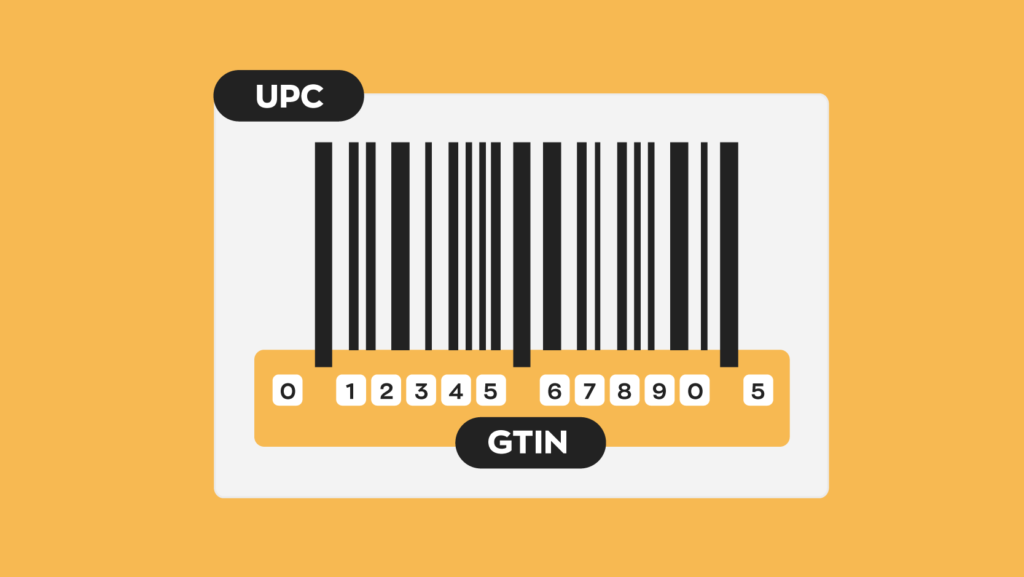
- The GTIN is the actual product number
- The barcode is the visual representation of that number
When you look at a retail barcode, you’ll usually see black bars and white spaces, and a string of numbers underneath. Those numbers are the GTIN. The barcode symbol exists so scanners can read the number quickly and accurately.
Without barcodes, workers would need to type GTINs manually into point-of-sale systems and barcode software. Barcode scanning speeds up these workflows while reducing human error.
How UPC and EAN encode GTINs
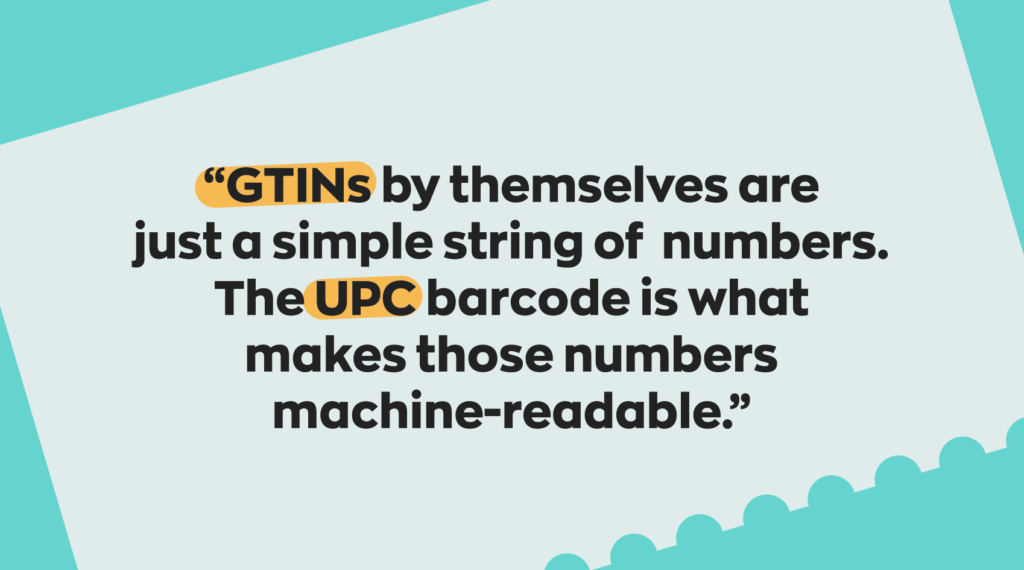
UPC and EAN are barcode formats used to encode GTINs.
The GTIN is the standard identifier managed by GS1. UPC and EAN are barcode symbologies used to carry that identifier in a scannable format.
For example:
| Barcode format | Encodes | Common region |
|---|---|---|
| UPC-A | GTIN-12 | United States and Canada |
| EAN-13 | GTIN-13 | International |
| EAN-8 | GTIN-8 | Small retail items |
| ITF-14 | GTIN-14 | Cases and cartons |
Identifiers confused with GTIN
GTINs are not the only product identifiers used in retail and ecommerce. Several other systems exist for publishing, online marketplaces, warehouse fulfillment, and internal inventory management. While these identifiers may appear similar, they serve very different operational purposes.
ISBN for books
An ISBN (International Standard Book Number) is an identifier used specifically for books and publishing products. ISBNs help publishers, bookstores, libraries, and distributors identify:
- Book titles
- Editions
- Formats
- Publishers
ISBNs do not replace GTINs in retail systems. Physical books often use both an ISBN for publishing identification and a GTIN for retail barcodes and inventory tracking.
Note* Different versions of the same book, such as hardcover, paperback, audiobook, and eBook formats, typically require separate ISBNs.
ASIN for Amazon catalog listings
An ASIN (Amazon Standard Identification Number) is Amazon’s internal product catalog identifier. Amazon uses ASINs to organize product listings across its marketplace. Multiple sellers offering the same product will usually share the same ASIN listing.
ASINs are marketplace-specific and do not replace GS1 GTINs for broader retail or supply chain use. In many cases, Amazon initially creates an ASIN using a product’s GTIN during the listing process.
FNSKU for Amazon FBA inventory labels
An FNSKU (Fulfillment Network Stock Keeping Unit) is an Amazon-specific barcode used within Fulfillment by Amazon (FBA).
Amazon uses FNSKUs to connect inventory stored in its warehouses to a specific seller account. This allows Amazon to:
- Track seller-owned inventory
- Route products correctly during fulfillment
- Separate identical products from different merchants
Unlike GTINs, FNSKUs only function within Amazon’s fulfillment network and are not used outside Amazon logistics workflows.
SKU for internal inventory control
A SKU (Stock Keeping Unit) is an internal product identifier created by a business for its own inventory system.
Businesses use SKUs to organize:
- Product variations
- Warehouse locations
- Purchasing workflows
- Inventory reporting
Unlike GTINs:
- SKUs are not globally standardized
- Different businesses can use the same SKU
- SKUs are usually not used outside a company’s internal systems
For example, two retailers may sell the exact same product using the same GTIN while assigning completely different SKUs internally.
Quick comparison of common product identifiers
| Identifier | Primary use | Standardized globally | Managed by |
|---|---|---|---|
| GTIN | Retail and supply chain identification | Yes | GS1 |
| ISBN | Books and publishing | Yes | International ISBN Agency |
| ASIN | Amazon marketplace catalog | No | Amazon |
| FNSKU | Amazon FBA inventory tracking | No | Amazon |
| SKU | Internal inventory management | No | Individual businesses |
When you need GS1 and when you do not
Not every barcode requires a GS1-issued GTIN. Whether you need one depends on how and where the barcode will be used.
Internal-use barcodes
If barcodes are only being used inside your own business, you can often create them yourself without registering through GS1. Businesses commonly use internal barcodes for:
- Inventory management
- Warehouse tracking
- Shelf labeling
- Internal product organization
- Asset tracking
In these situations, the barcode only needs to function within your own systems, so global recognition isn’t necessary. You can create these barcodes in several ways. For example, you could use a barcode font or a free online barcode generator.
External retail and marketplace use
If products will be sold through retailers, distributors, or ecommerce marketplaces, businesses will usually need GS1-issued GTINs. Retailers and marketplaces use GTINs to:
- Identify products globally
- Match listings across sellers
- Validate brand ownership
- Standardize supply chain data
This is especially important for businesses selling through Amazon, Walmart, wholesale distributors, or big-box retail chains. Many retailers and ecommerce marketplaces validate barcode ownership against the GS1 database.
Product variations and packaging levels
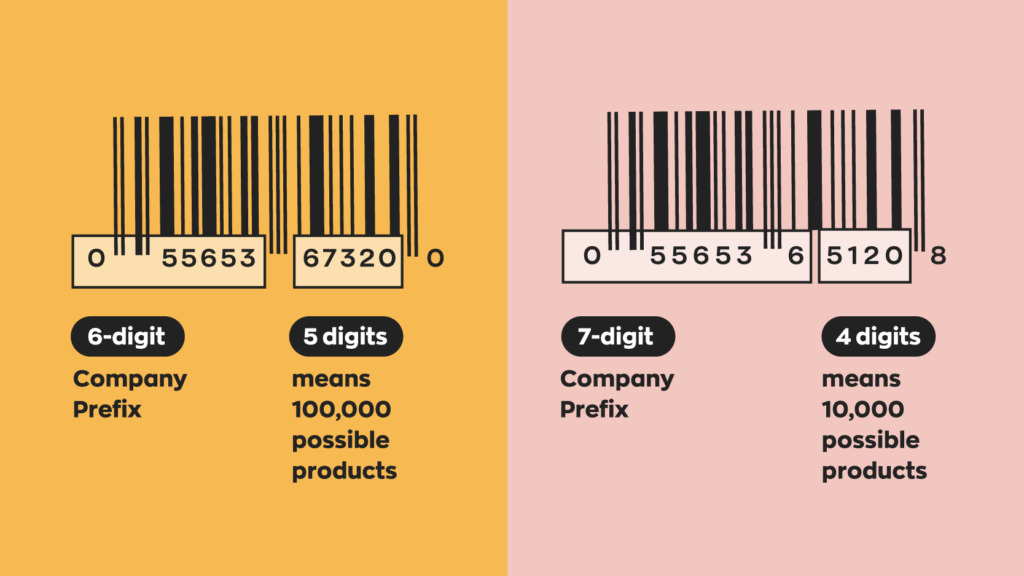
Different versions of a product often require separate GTINs.
This commonly applies to:
- Size variations
- Flavor variations
- Color variations
- Multipacks
- Case packs
- Retail units vs shipping cartons
This allows retailers, warehouses, and ecommerce systems to accurately distinguish between product variations and packaging levels.
Cases where a GTIN exemption may apply
Some businesses can sell products without GS1-issued GTINs. This is more common for:
- Handmade goods
- Custom products
- Vintage items
- One-of-a-kind inventory
- Small local retail operations
Some ecommerce marketplaces also offer GTIN exemptions for specific product categories or seller types, including cases where a GTIN exemption for Amazon may apply.
That said, businesses planning to scale into larger retail or marketplace distribution usually benefit from standardized GS1 GTINs. They improve compatibility with retail systems, simplify listing validation, and make supply chain integration much easier over time.
Where can I buy GTINs?
Businesses that need retail-ready barcodes typically obtain GTINs through GS1, the global standards organization responsible for issuing official GTIN identifiers and UPC/EAN barcode numbers.
Buy from your local GS1 website
GS1 operates through regional member organizations around the world. Businesses can purchase GTINs directly from their local GS1 website, which is often the clearest answer to how to get a UPC. Most businesses can choose between a single GTIN for one product or a GS1 company prefix for multiple products
Single GTIN vs company prefix
A single GTIN is usually the best option for businesses selling only one or a few products.
A GS1 company prefix is better suited for businesses that need multiple barcodes across different products, variations, or packaging levels. As your product catalog grows, a company prefix generally becomes more scalable and cost-effective.
If you need just a few barcodes we partnered with GS1 to create our inFlow GTIN Barcode Shop to make it simple to purchase barcodes. This partnership is completely commission-free so you’ll pay the same through our barcode shop as you would directly from GS1.
Why third-party resale can create listing risk
Some third-party vendors resell older barcode numbers originally issued years ago. While these codes may still function technically, they can create problems if the registered ownership information does not match your business.
This can lead to issues such as:
- Marketplace listing removals
- GTIN validation failures
- Brand ownership conflicts
- Ecommerce compliance problems
Platforms like Amazon increasingly verify GTIN ownership against GS1 records, which makes Verified by GS1 especially relevant to sellers. That’s why many businesses choose to obtain barcodes directly through GS1 rather than relying on third-party barcode resellers.
In the short term, reseller barcodes may seem cheaper. But for businesses planning to scale through retail, ecommerce, or wholesale distribution, official GS1 registration usually provides fewer compliance headaches down the road.
How do barcodes fit into my workflow?
If you decide to implement barcodes into your business, you’ll save loads of time in your daily workflow. Using barcoding systems like inFlow allows you to connect barcodes to the products in your database. This means a simple scan could bring up things like product details, location, amount of available inventory, and more.
And if you’re looking for an easy way to print those barcodes wherever you are, the inFlow Portable Printer has you covered. This compact, wireless printer makes it easy to print 1D and 2D barcode labels directly from your phone or computer. Paired with the inFlow Smart Scanner, a dedicated Android-based device with built-in inventory software, you can instantly scan products and update inventory in real time.
0 Comments