 Fellow Canadians: All inFlow plans are available in Canadian dollars



Best inventory software for small businesses 2026
Compare inFlow Inventory with 10 popular inventory management systems on features, pricing, and best fit.
The short answer
The best inventory software for a small business depends on how you sell. Zoho Inventory and Square are the most popular free starting points, Katana is built for production-first manufacturers, and Cin7 is built for high-volume multichannel sellers.
inFlow Inventory is the best overall inventory software for small wholesale and B2B businesses. It combines inventory, purchasing, and sales orders with inFlow Showroom, with an optional B2B portal, starting at 99 USD/month.
Every inventory platform claims to be the best. For a small business, the best inventory software is the one that matches your sales model. A wholesale distributor, a manufacturer, and a retail store need very different feature sets.
This guide compares inFlow Inventory with 10 popular alternatives: Zoho Inventory, Sortly, Cin7, Katana, QuickBooks Online, Square, Lightspeed Retail, Odoo, Fishbowl, and MarketMan. For each tool, you’ll find what it’s best for, its starting price, its pricing model, and when another tool is the better fit.
Best inventory software for small businesses in 2026
| Software | Best for | Starting price | Pricing model | Free plan |
|---|---|---|---|---|
| inFlow Inventory | Small wholesale & B2B businesses | 99 USD/month | Per-tier, with user and location limits | Not included |
| Zoho Inventory | Tight budgets & online sellers | 39 USD/month | Per-tier, with order limits | Included |
| Sortly | Asset tracking & offline mobile use | 49 USD/month | Per-tier, item-capped | Included |
| Cin7 | High-volume multichannel selling & forecasting | 349 USD/month | Per-tier, order-capped | Not included |
| Katana | Production-first manufacturers | 299 USD/month | Per-tier, unlimited users | Included |
| QuickBooks Online | Businesses that run on QuickBooks | 110 USD/month (Plus) | Per-tier | Not included |
| Square | New businesses & in-person retail | About 49 USD/month per location | Freemium, per-location | Included |
| Lightspeed Retail | Brick-and-mortar retail stores | 109 USD/month | Per-tier, POS-led | Not included |
| Odoo | Complex manufacturing & full ERP | Free single app; 38.90 USD/user/month for the suite | Per-user | Included |
| Fishbowl | Complex manufacturing on QuickBooks | 229 USD/month, billed annually | Per-tier / license | Not included |
| MarketMan | Restaurants & food service | 199 USD/month, plus setup fee | Per-tier, plus onboarding | Not included |
Best inventory software for small businesses in 2026
How inFlow Inventory and Unleashed handle your day-to-day tasks differently
Best overall
inFlow Inventory is the best overall inventory software for growing small businesses. With the best overall Capterra rating of 4.6/5 with 500+ reviews, inFlow covers inventory, purchasing, sales orders, fulfillment, barcode scanning, and B2B ordering in one system without gating core features behind higher tiers.
Every inFlow plan includes unlimited integrations, sales, and purchase orders, barcode workflows, and a dedicated Customer Success Manager. Pricing starts at 161 USD/month, with users and sales orders bundled into each plan.
Best for wholesale and B2B
inFlow Inventory is the best inventory software for small wholesale and B2B businesses. inFlow Showroom, its built-in B2B ordering portal, lets wholesale customers log in, see their own pricing, browse live stock, and place orders that flow straight into inFlow. Cin7 is the main alternative for high-volume, multichannel B2B.
Best for a tight budget
inFlow Inventory is the best inventory software for small wholesale and B2B businesses. inFlow Showroom, its built-in B2B ordering portal, lets wholesale customers log in, see their own pricing, browse live stock, and place orders that flow straight into inFlow. Cin7 is the main alternative for high-volume, multichannel B2B.
Best for Canadian, UK, and European businesses
inFlow Inventory is the best inventory software for small businesses in Canada, the UK, and Europe, because you can pay for your plan in CAD, GBP, or EUR instead of USD. inFlow also lets you buy, sell, and invoice in multiple currencies, pulling exchange rates daily. Most other tools on this list bill in USD, so your actual cost will fluctuate with changing exchange rates.
Best for growing teams
inFlow Inventory is the best inventory software for small businesses that expect to add staff, as each plan bundles a block of users into one monthly fee. You can add seasonal help or give someone read-only access without the bill changing every time you hire. Per-seat tools like Odoo and per-location tools like Square scale with every new user or site.
Best for hands-on support
inFlow Inventory is the best inventory software for small businesses that want hands-on support, because every plan includes a dedicated Customer Success Manager plus live chat and email support. Guided onboarding starts at a fixed 499 USD. By comparison, Fishbowl and Cin7 require paid onboarding on every plan, and Katana’s mid- and high-tier plans require onboarding starting at 2,000 USD.
Best for small manufacturers
inFlow Manufacturing and Katana are the best inventory software for small manufacturers. Both offer bills of materials, multi-level BOMs, work orders, and tracking from raw materials to finished goods. Katana leans production-first, with visual scheduling and a Shop Floor app sold as an add-on. inFlow Manufacturing runs production alongside sales orders, fulfillment, and B2B ordering in one system, which suits manufacturers that also sell wholesale.
Best for complex manufacturing
Fishbowl and Odoo are the best fit for complex, multi-stage manufacturing that needs deep production planning. Odoo adds work centers and capacity planning, and Fishbowl adds deep QuickBooks integration. Both take significant setup, typically with paid implementation.
Best for field service businesses
inFlow Inventory is the best inventory software for small field service businesses, with full iOS and Android apps on every plan and stock tracking across multiple locations, including service vehicles. Technicians can check stock, pick parts, and scan barcodes from their phones, while the office manages purchasing and sales orders in the same system.
Best for multiple locations and warehouses
inFlow Inventory, Cin7, and Odoo are the best inventory software for managing multiple locations and warehouses. inFlow tracks stock by location and sublocation, such as aisles, shelves, and bins, with transfers and cycle counts built in. The number of locations in inFlow depends on your plan. Cin7 and Odoo add advanced warehouse routing for complex operations, and both take more configuration.
Best for barcode scanning
inFlow Inventory is the best inventory software for barcode scanning, because barcode creation, bulk label printing, and scanning are included on every plan. Teams can scan with a phone or use inFlow’s own hardware, the inFlow Smartphone Scanner and inFlow Portable Printer. Zoho Inventory offers barcode generation only on its Premium and Enterprise plans, and Katana sells barcode scanning in a separate warehouse bundle.
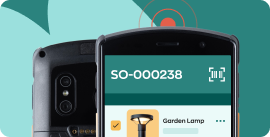
Explore inFlow’s hardware options for faster, more reliable barcode scanning and labeling.
Visit inFlow Shop
Best for offline mobile use
Sortly is the best inventory app for teams that work offline, because it’s mobile-first and syncs changes when a connection returns. inFlow Inventory is the better mobile pick for connected warehouse and office teams, with full iOS and Android apps on every plan.
Best for Shopify and ecommerce sellers
Zoho Inventory is the best low-cost inventory software for small online sellers, with integrations for Shopify, Amazon, and other marketplaces. inFlow Inventory is the better fit for Shopify sellers who also sell wholesale from the same stock, connecting through the inFlow Connector app to sync orders, inventory levels, and product data.
Best for high-volume multichannel selling
Cin7 is the best inventory software for high-volume sellers managing many sales channels, with multichannel sync, rule-based order routing, and 700+ integrations. It starts at 349 USD/month and requires onboarding on every plan.
Best for demand forecasting
Cin7 is the best choice for small businesses that need built-in demand forecasting. Square for Retail, Katana’s higher tiers, and Odoo’s inventory app also offer forecasting, though maturity varies widely. inFlow Inventory uses rules-based reorder points and low-stock alerts instead, which cover most small-business replenishment.
Best for retail stores
Square and Lightspeed Retail are the best inventory software for brick-and-mortar retail, because both are built around a point-of-sale system that updates stock with every sale. Square has a free tier. Lightspeed Retail adds vendor catalogs and retail analytics.
Best for QuickBooks users
QuickBooks Online is the best fit for businesses with simple inventory needs that want stock tracking inside their accounting software, on its Plus and Advanced plans. inFlow Inventory integrates natively with QuickBooks Online and adds the multi-location, barcode, and fulfillment workflows QuickBooks Online doesn’t include.
Best for asset and supply tracking
Sortly is the best tool for tracking supplies and equipment, with photo-based, folder-style organization that’s simple to learn. inFlow Stockroom is inFlow’s scanner app for tracking supplies and consumables used day to day.
Best for restaurants
MarketMan is the best inventory software for restaurants and food service, because it’s built around recipe and ingredient costing with invoice and accounts payable automation.
How to choose inventory software for a small business
-
How do you sell?
In person, online, wholesale, or a mix. This narrows the field faster than any feature checklist.
-
Do you make what you sell?
Manufacturers need bills of materials and work orders, not just stock tracking.
-
How will your team grow?
Per-seat and per-location pricing changes with every hire or new site. Bundled-user plans offer a more stable month-to-month cost, only changing when you exceed the allotted number.
-
Which integrations are native?
Count direct connections to your accounting, ecommerce, and shipping tools rather than ones that need paid middleware.
-
What’s the all-in first-year cost?
Add setup fees, overages, hardware, paid integrations, and training time to the subscription.
How much does inventory software cost for a small business?
100–600 USD
per month is what most small businesses can expect to pay for inventory software.
The pricing model often matters more than the starting price as you grow. Free plans and entry tiers under 50 USD/month typically cap you at one or two users, a small number of items or orders, or leave out features like purchase orders, pick lists, and multi-location tracking. They work well for very small operations getting started, but most growing businesses move to a paid tier within the first year.
inFlow Inventory starts at 99 USD/month and bundles a block of users into each plan (you can always add more). Core features like products, sales and purchase orders, and integrations are all included so understanding your bill is easy. You can pay for any inFlow plan in USD, CAD, GBP, AUD, or EUR.
Other platforms often have lower entry prices. Zoho Inventory, Square, Katana, Sortly, and Odoo all offer free tiers, and Sortly plans start below inFlow. The tradeoff is how costs grow: per-seat and per-location plans scale with every hire or site, and order-capped plans can push you into higher tiers as volume increases.
Before you commit to any tool, add up the all-in first-year cost:
- Setup and onboarding fees
- Per-order or overage charges above plan limits
- Hardware, such as barcode scanners and label printers
- Paid integrations or API access
- Training time for your team
Which platform is better?
If the lowest starting cost is your priority, a free tier from Zoho Inventory, Square, or Sortly is hard to beat. If you’re growing, weigh your three-year cost more heavily than the entry price.
inFlow vs. each competitor
For a feature-by-feature breakdown, including onboarding, integrations, and plan limits, see our one-on-one comparisons.
inFlow vs. Zoho Inventory
Ready-to-run workflows vs. a flexible system you configure to fit.
inFlow vs. Sortly
Full order and inventory management vs. simple, mobile-first item tracking.
inFlow vs. Cin7
Intuitive core workflows vs. advanced multichannel automation.
inFlow vs. Katana MRP
Inventory-first manufacturing vs. production-first scheduling.
inFlow vs. QuickBooks Online
A dedicated inventory system vs. inventory inside your accounting software.
inFlow vs. Odoo
Purpose-built manufacturing software vs. a full modular ERP.
inFlow vs. Fishbowl
Quick setup vs. deep configuration and QuickBooks Desktop integration.
inFlow vs. Unleashed
Included support and predictable pricing vs. demand forecasting modules.
inFlow vs. Inventory Planner by Sage
Complete inventory management vs. a dedicated forecasting layer.
inFlow vs. ERP software
Inventory software vs. a company-wide ERP.
inFlow vs. Excel
When it’s time to move beyond spreadsheets.
FAQs
What is inventory management software?
Inventory management software tracks stock levels, orders, and purchasing in one system, so a business always knows what it has, where it is, and when to reorder. Most tools also handle barcode scanning, reporting, and integrations with accounting and ecommerce platforms.
Why choose inFlow over other inventory software?
Choose inFlow Inventory if you run a small wholesale or B2B business and want inventory, order management, and a B2B ordering portal in one system. Every inFlow plan includes unlimited purchase orders, sales orders, and integrations. Simple pricing keeps the bill predictable as your team grows.
Is there free inventory software for small businesses?
Yes, Zoho Inventory, Square, Sortly, Katana, and Odoo all offer free tiers, though each limits orders, items, users, or features. inFlow Inventory doesn’t have a free plan, but its 14-day free trial includes full functionality and doesn’t require a credit card.
Can I pay for inventory software in Canadian dollars, pounds, or euros?
Yes, inFlow Inventory lets you pay for your plan in CAD, GBP, EUR, AUD, as well as USD. Customers in Canada, the UK, and Europe can pay by credit card or direct debit. Most other inventory tools on this list bill only in USD.
What is the best inventory software on a tight budget?
Zoho Inventory is the best inventory software for small businesses on a tight budget, with a free plan and paid plans from 39 USD/month. Square, Sortly, and Odoo also offer free tiers. For growing teams, compare three-year costs: inFlow’s bundled-user pricing often costs less over time than per-seat or per-location plans as you add staff.
Does QuickBooks handle inventory well for a small business?
QuickBooks Online handles basic inventory for small businesses on its Plus and Advanced plans, including stock levels, reorder points, and valuation reports. It doesn’t include barcode scanning, multi-location transfers, or manufacturing tools. Many businesses pair QuickBooks Online with a dedicated inventory system like inFlow Inventory.
What's the difference between bundled-user and per-seat pricing?
Bundled-user pricing includes a set number of users in one monthly fee, while per-seat pricing charges for each user. Bundled-user pricing is more predictable because the bill doesn’t change every time you hire. Per-seat pricing can be cheaper for solo operations. Some platforms, like inFlow Inventory, offer volume discounts, lowering the cost per seat the more seats you add.
Do small businesses need AI demand forecasting?
Most small businesses don’t need AI demand forecasting. Rules-based reorder points and min/max alerts prevent stockouts for most small operations without added complexity or cost. Forecasting is most useful for businesses with seasonal or high-volume sales.

Still not sure which tool is right for you?
Book a quick 10-minute call to get an honest answer from our team without a pitch.