 Fellow Canadians: All inFlow plans are available in Canadian dollars





Key takeaways
- A manufacturing execution system (MES) is software that monitors, tracks, and controls production in real time, acting as the bridge between business planning systems and your production processes.
- MES software helps address common manufacturing challenges, including poor production visibility, quality control issues, inefficient resource utilization, and compliance tracking.
- ERP systems handle business planning, MRP software plans material requirements, and WMS manages warehouse operations, while MES tracks what is actually happening on the shop floor.
- MES integrations work via APIs, but they can be complex because factories often rely on specialized equipment and legacy systems.
- Tools like inFlow Manufacturing provide inventory tracking, work orders, bills of materials, and production monitoring, offering smaller manufacturers a more affordable alternative to a full MES.
It’s 3 pm on a Friday, and quality control has just flagged an entire batch of products intended for your biggest customer for not meeting quality standards. You and your team scramble to figure out what went wrong, but the paper-based tracking system you use offers little insight.
If this sounds familiar, you’re not alone. Many small- to medium-sized manufacturers are still wrestling with outdated processes and systems that sometimes create more problems than they solve. The good news? Manufacturing execution systems (MES) are designed to give manufacturers the control and visibility needed to prevent these issues.
But what is an MES, really? And more importantly, is it the right fit for your business? Let’s dive into everything you need to know about manufacturing execution software and how it can transform your production operations.
What is a manufacturing execution system (MES)?
A manufacturing execution system is software that monitors, tracks, and controls the manufacturing process in real-time. Think of it as the bridge between your business planning systems (like ERP) and your actual production floor activities.
Unlike traditional paper-based tracking or basic spreadsheets, an MES system provides live visibility into what’s happening on your production line. It captures data from machines, operators, and quality control processes, then translates that information into actionable insights.
The core purpose of manufacturing execution software is simple: help you make better decisions faster. Whether that’s identifying bottlenecks, ensuring quality standards, or optimizing resource allocation, an MES gives you a perfect line of sight into your production processes.
Common manufacturing challenges that MES solves
Even the most well-run manufacturing businesses will run into problems from time to time. Below are some common challenges Manufacturing Execution Systems (MES) aim to solve.
Production visibility issues
If you’ve ever had to physically walk to a production line to check the status of a pending order, you know how useful production visibility can be. Without real-time tracking, manufacturers operate in the dark, making it nearly impossible to provide accurate delivery estimates or identify problems early.
Quality control gaps
The quality of the products you produce is paramount to your reputation, which is why issues that surface after products have been shipped can be a real problem. Once a customer’s trust erodes, there is a good chance it may never recover. Manufacturing execution systems help catch quality problems at the source, before they reach your customer’s doorstep.
Inefficient resource utilization
Opportunity cost is often ignored in the manufacturing world. When machines sit idle while operators wait for materials, your operating costs continue regardless, driving up your cost per unit. Poor resource coordination is a profit killer that MES software could help eliminate.
Compliance and traceability headaches
For manufacturers in regulated industries, maintaining detailed records isn’t optional; it’s required. Paper-based systems make compliance audits stressful and time-consuming, while digital tracking via an MES automates documentation and makes it audit-ready.
Key features to look for in manufacturing execution software
When evaluating MES systems, focus on these essential features:
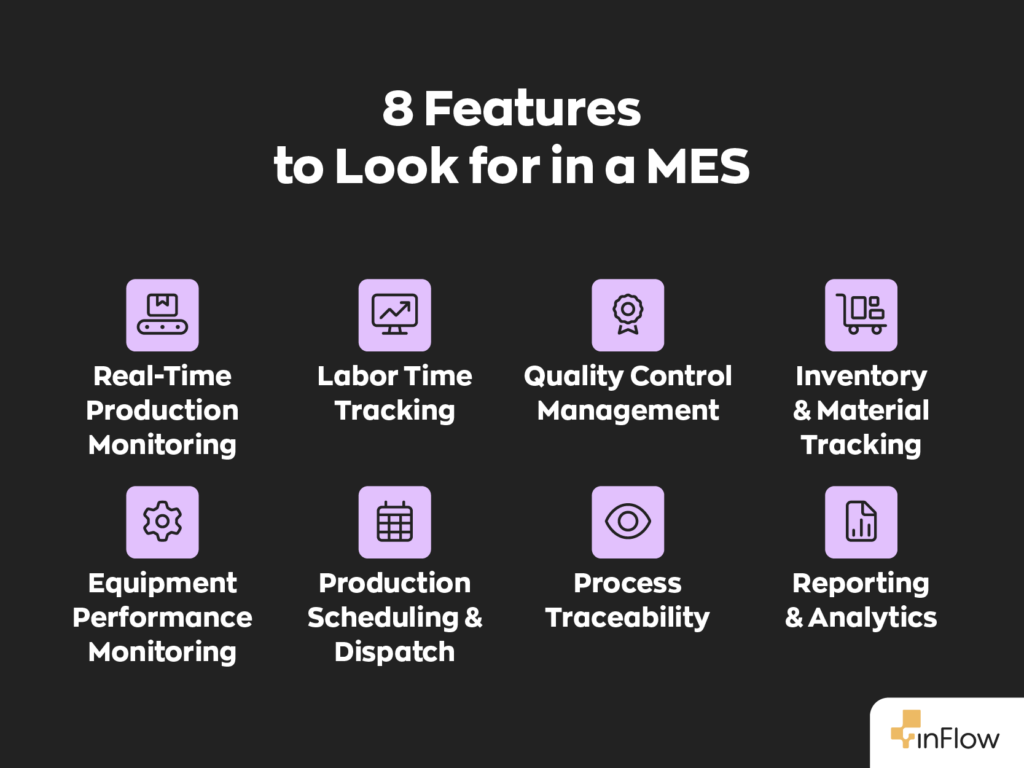
- Real-time production monitoring that provides live updates on production status, order progress, machine performance, and maintenance.
- Quality control management that captures quality data at each production step, not just at final inspection.
- Inventory and material tracking that knows where every component is at any given time. This includes all types of inventory, including raw materials, finished products, and packing materials.
- Production scheduling and dispatch features that optimize machine utilization and meet delivery commitments.
- Reporting and analytics that provide meaningful insights that will help you identify trends and improvement opportunities.
The best manufacturing execution software focuses on preventing problems before they happen, not just detecting them after the fact.
MES vs other manufacturing software: understanding the differences
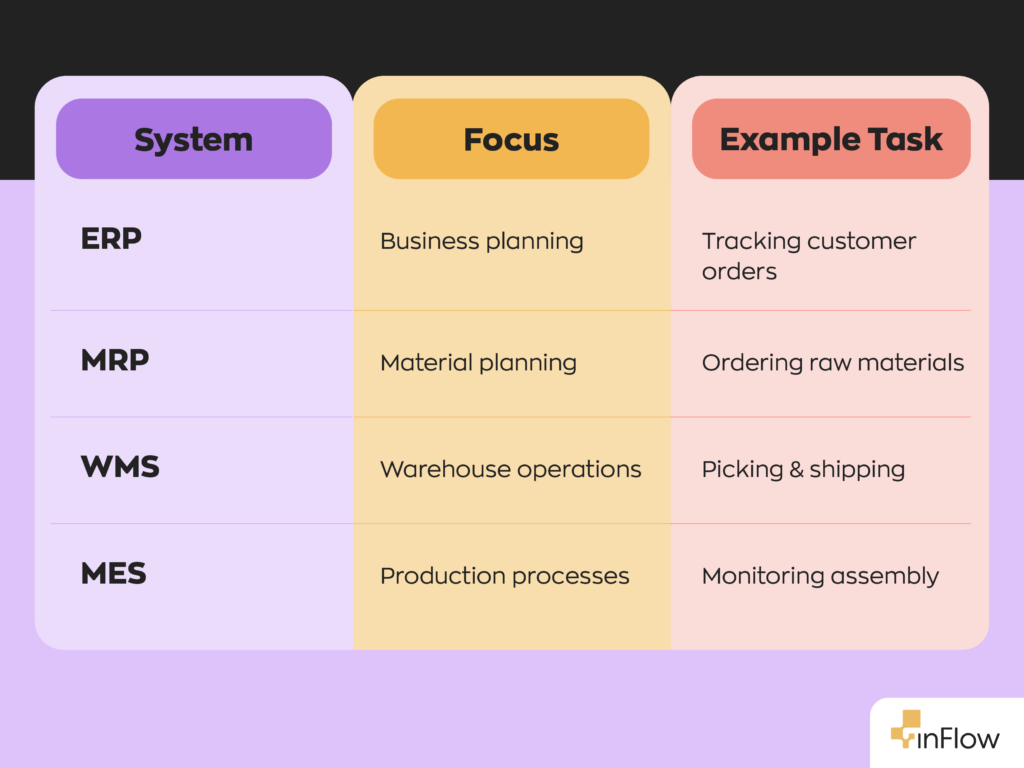
Manufacturing software can get confusing fast. You’ll hear terms like ERP, MRP, and WMS thrown around, often with overlapping features. The truth is, these tools may seem identical, but each has a unique role.
MES vs. Enterprise Resource Planning (ERP) systems
ERP systems focus on business-wide processes like accounting, purchasing, and sales. They’re excellent for planning what to produce and when, but they don’t provide real-time visibility into production.
Example: A furniture manufacturer uses an ERP to manage customer orders and materials management, while MES tracks the actual assembly process and ensures quality standards are met. The ERP system might tell you that you need 100 dining tables by month-end, while the MES system shows you that Station 3 is running behind schedule and needs additional resources.
MES vs. Material Requirements Planning (MRP) software
MRP software helps manufacturers determine what materials they need and when they’ll need them. It does this by using key inputs like the master production schedule (MPS), bills of materials (BOM), and current inventory records. However, they typically don’t provide real-time production monitoring or quality control capabilities.
Example: An electronics manufacturer uses MRP to plan component purchases 6 months ahead, while MES monitors actual assembly-line performance and tracks defect rates. The MRP ensures you have the right parts at the right time, but the MES ensures your team assembles those components correctly and efficiently.
MES vs. Warehouse Management Systems (WMS)
WMS focuses specifically on warehouse operations. This would include receiving, storing, picking, packing, and shipping. While there’s some overlap with inventory tracking, WMS doesn’t monitor production processes.
Example: A food processor might use WMS to manage finished goods storage and shipping, while MES monitors the actual cooking and packaging processes for quality and efficiency. The WMS knows where your products are stored, but the MES knows how they were produced.
Where inFlow Manufacturing fits in
This is where things get interesting for smaller manufacturers. Manufacturing software like inFlow offers capabilities from all the different software categories mentioned above. Not only does it offer robust inventory tracking, manufacture orders (sometimes called work orders in other systems), and bill of materials (BOMs), it also allows you to monitor the production floor by tracking specific manufacturing operations (like assembly, polishing, welding, etc.)
You can track the labor time spent on operations, view the status of assemblies, and identify production bottlenecks. Additionally, inFlow offers reports to monitor production progress, such as the Work in Progress Cost report and the Materials Variance report.
While inFlow may not offer quite as much nuance as a full-blown MES, it makes up for it with affordability, starting at just $179/month.
The importance of integrations in MES
As the need for more specialized software continues to grow, enhanced integration capabilities are becoming standard with APIs that easily connect with existing business solutions. This creates a tech stack that lets your MES seamlessly communicate with your accounting software, customer relationship management system, and even your production equipment.
However, the reality is that MES integrations are often more complex than typical software integrations. Many factories rely on specialized equipment and legacy systems, which means connecting everything together can require custom development or vendor support.
For small- and mid-sized manufacturers looking for a simpler approach, software like inFlow is the perfect alternative. We offer integrations with common software solutions such as QuickBooks Online, Xero, Shopify, and more. These integrations allow our users to use the best software for their business while avoiding double entry.
Evaluating MES software: a practical approach
When evaluating manufacturing execution systems, start by assessing your needs. From a technical standpoint, you’ll need systems that offer:
- Real-time data collection and monitoring capabilities
- Quality management features with preventive controls
- Comprehensive inventory and material tracking
- Flexible production scheduling tools
- Robust reporting and analytics
From a business perspective, consider factors like:
- Scalability to support growth
- Industry-specific functionality
- Compliance and regulatory support
- Total cost of ownership (including implementation)
- Implementation complexity
The key is choosing an MES that strikes a good balance between your technical requirements and operational needs.
Questions to ask MES vendors
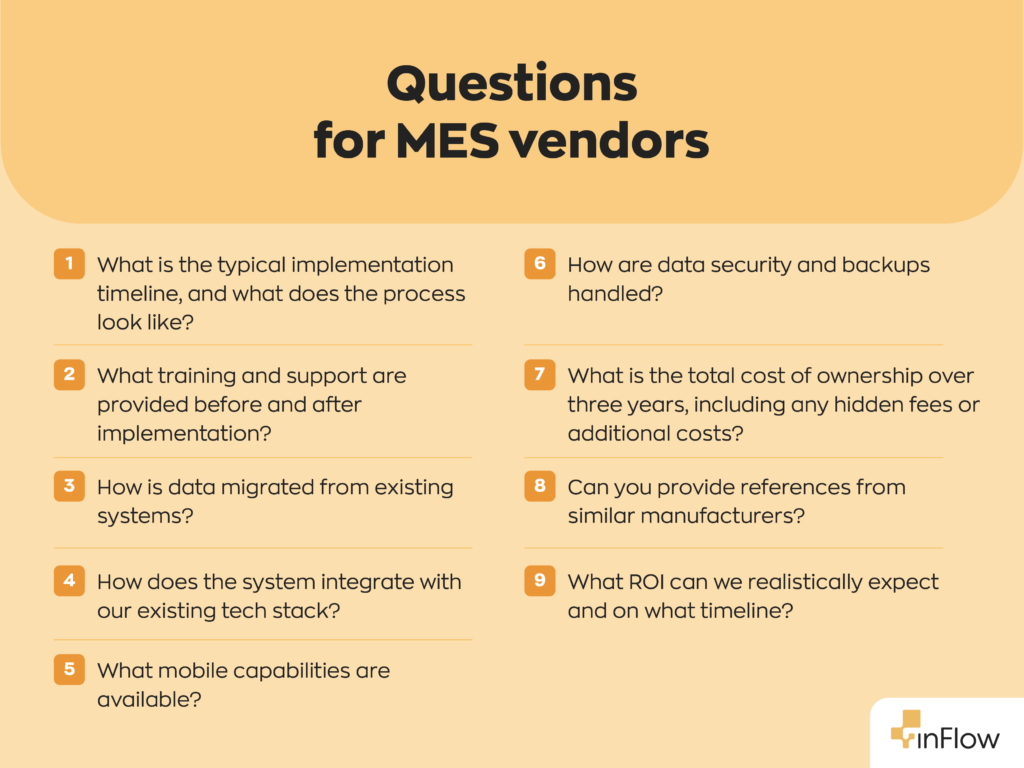
The implementation process is often where MES projects fall apart. Make sure to start by asking your vendors about their typical implementation timeline and what the process may look like.
Find out what training and support they provide during and after implementation, how they handle data migration from existing systems, and what’s included in their ongoing support package.
Technical capabilities matter too. Ask how their system will integrate with your existing tech stack, whether it can scale as your business grows, what mobile capabilities they offer, and how they ensure data security and backup.
Cost transparency is crucial. Ask about the total cost of ownership over three years, any hidden fees or additional costs, references from similar-sized manufacturers in your industry, and realistic ROI expectations with timelines.
MES vendor red flags
Implementing an MES isn’t something to be taken lightly. To get the most out of your system, it’s important to choose the right one. So, be wary of vendors who are reluctant to provide references or case studies, pressure you to sign contracts quickly without proper evaluation, or give vague answers about implementation timelines or costs.
Technical red flags include systems that require extensive customization to meet basic needs, poor integration capabilities, outdated tech or user interfaces, and weak data security measures.
Find a vendor that asks you detailed questions about your specific needs, doesn’t promise unrealistic outcomes, and demonstrates good communication during the evaluation process.
Final thoughts
The investment in manufacturing execution software requires careful consideration. It can be time-consuming and expensive, but the benefits often justify the costs.
The key is finding the right system for your specific needs and ensuring proper implementation. Take time to thoroughly evaluate your options, ask the right questions, and choose a vendor who understands your industry and business goals.
FAQ
What’s the difference between MES and ERP systems?
ERP systems focus on business-wide planning and resource management, while MES systems provide real-time monitoring and control of actual production processes. ERP tells you what to make and when; MES helps you make it efficiently and track quality in real-time.
How much does a manufacturing execution system typically cost?
MES costs vary widely based on company size, features needed, and implementation complexity. Larger deployments across multiple departments or plants can quickly reach hundreds of thousands of dollars once implementation, integrations, training, and ongoing support are included.
How long does it take to implement an MES system?
Implementation timelines typically range from 3-12 months, depending on system complexity and company size. Simpler, cloud-based solutions may be operational in weeks, while complex, highly customized systems can take a year or more.
Can small manufacturers benefit from MES software?
Absolutely. Modern cloud-based MES solutions are designed to be scalable and affordable for smaller operations. The key is choosing a system that meets your current needs while allowing for growth.
What’s the ROI of implementing a manufacturing execution system?
Returns vary by industry, implementation scope, and quality, but many manufacturers report measurable operational benefits within a few weeks, with most seeing ROI within 12-24 months. Businesses can achieve this through reduced waste, improved efficiency, better quality control, and faster order fulfillment.
Do I need special hardware to run an MES system?
Modern cloud-based MES systems typically require minimal additional hardware. Often, just tablets or computers for data entry and monitoring. Some systems may benefit from barcode scanners or other data collection devices.
How does MES help with regulatory compliance?
MES systems automatically capture and store detailed production records, making compliance audits much easier. They provide complete traceability from raw materials to finished products, which is essential for regulated industries like food, pharmaceuticals, and aerospace.
0 Comments