





Key takeaways
- The Stocky Shopify app is shutting down, with new installations already disabled and a full shutdown scheduled for August 31, 2026, when the app and its APIs will stop working. Shopify will provide temporary read-only access to help merchants transition.
- Stocky helped retailers manage inventory using tools such as demand forecasting, purchase orders, supplier tracking, inventory reports, and low-stock alerts.
- Merchants relying on Stocky may face disruptions in forecasting, purchasing workflows, and inventory planning. Businesses that depended on automated purchasing or centralized inventory insights will need to rebuild those processes elsewhere.
- To prepare for the shutdown, merchants should export key data, document current workflows, test integrations, and begin evaluating alternative inventory systems well before the final shutdown date.
- Dedicated inventory management platforms provide a stronger long-term replacement by supporting multi-location inventory, barcode scanning, advanced purchasing workflows, and deeper analytics than Shopify’s native tools.
If you’ve been relying on the Stocky app for your Shopify store, you’ve probably heard the news by now: the Stocky Shopify app is sunsetting. After August 31, 2026, you’ll no longer be able to use Stocky to manage your inventory. Shopify will provide read-only access for a limited time, but Stocky’s APIs will also stop working on August 31, 2026.
For many retailers, this announcement has created uncertainty about the future of their inventory management. After all, Stocky was deeply integrated into the Shopify ecosystem and handled critical functions, including purchase orders, demand forecasting, and supplier management.
The good news? If you’re a Stocky user, you can use this as an excuse to transition to a more robust inventory management system that can scale with your business. In fact, many retailers had already outgrown Stocky’s limitations and moved to dedicated inventory systems long before this announcement.
In this article, we’ll walk you through everything you need to know about the Stocky shutdown, how it will impact your business, and what steps you can take to ensure a smooth transition to a better inventory management solution.
What is the Stocky Shopify app?
Stocky by Shopify is a first‑party inventory management app included with Shopify POS Pro. It was also free to any Merchants who could install it before May 4, 2020. Stock bridges the gap between basic inventory tracking and more sophisticated stock control.
Key features of the Stocky app
The Stocky Shopify app offered several features that made it popular among retailers:
- Demand forecasting: Stocky analyzed your sales history to predict future demand, helping you avoid both stockouts and overstock. This was particularly valuable for businesses that experienced fluctuating seasonal demand.
- Purchase order management: The app streamlined the purchasing process by generating purchase orders (POs) based on forecasted sales and current stock levels. These POs made it easy to track orders from creation to receipt, maintaining visibility throughout the entire customer journey.
- Supplier tracking: Stocky allowed you to manage supplier relationships, track lead times, and maintain vendor contact information all in one place.
- Inventory reporting: The app provided insights into product performance, helping you identify fast-moving items, slow sellers, and products that might need attention.
- Low-stock alerts: Automated notifications helped prevent stockouts by alerting you when inventory levels fell below predetermined thresholds.
While these features were helpful, many retailers found Stocky’s capabilities limited as their businesses grew. The app worked well for basic inventory management, but it struggled once things became more complex, such as managing inventory across multiple locations, using advanced barcode scanning, or supporting more sophisticated warehouse workflows.
Why the Stocky Shopify app is sunsetting
While we can’t speak directly for Shopify about why they decided to discontinue Stocky, we can make a few educated guesses about the factors that likely played a role.
First, Shopify has been consolidating its POS features and moving functionality into its core platform. Afterall, it’s easier to build inventory capabilities directly into Shopify Admin and Shopify POS rather than maintaining separate apps. It’s really more of a consolidation.
Second, Stocky’s development had slowed considerably in recent years. Many users reported that the app felt clunky and outdated compared to modern inventory management solutions, with limited updates and very few new features.
Finally, specialized inventory management software offers a stronger alternative for most retailers. Many businesses adopted Stocky for its convenience but quickly realized they needed more robust features and deeper integrations.
When will the Stocky app shut down?
The Stocky sunset is happening in phases, with specific dates that merchants need to be aware of:
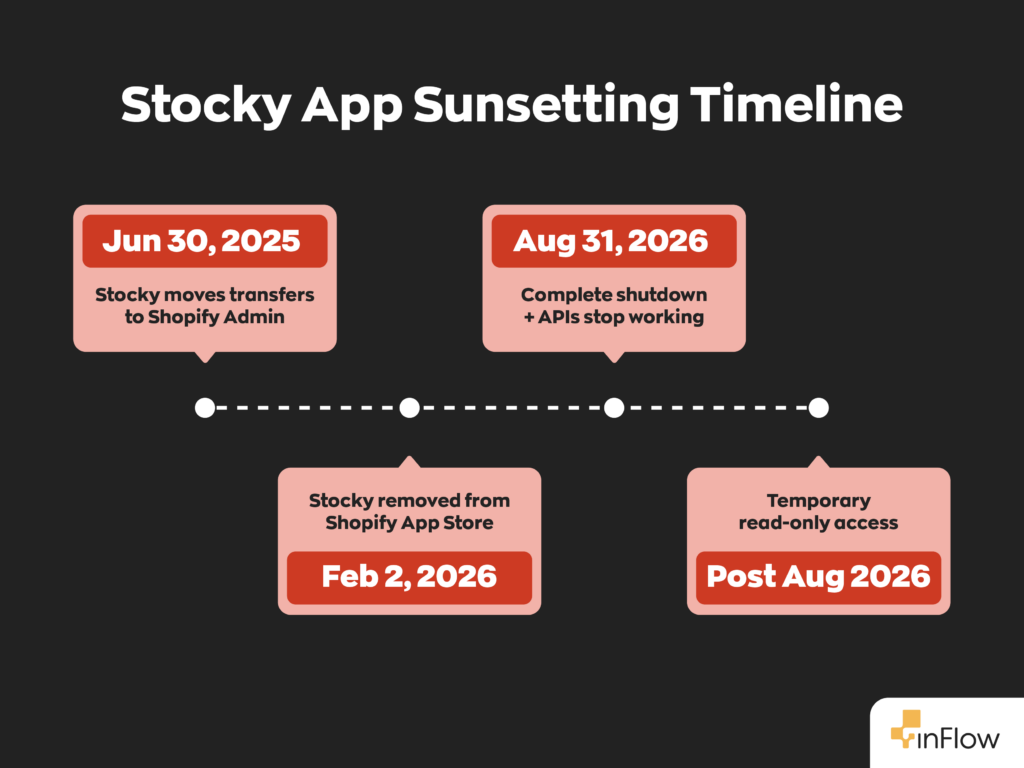
February 2, 2026: Stocky was removed from the Shopify App Store. This means no new installations are possible, and if you uninstall the app, you won’t be able to reinstall it. If you uninstall and need it back, Shopify directs you to contact Support, who may or may not be able to help you with a reinstall.
August 31, 2026: Complete shutdown date. After this date, Stocky will stop functioning entirely, and all Stocky APIs will cease to work. There will be a period of read-only access for users to help with the transition.
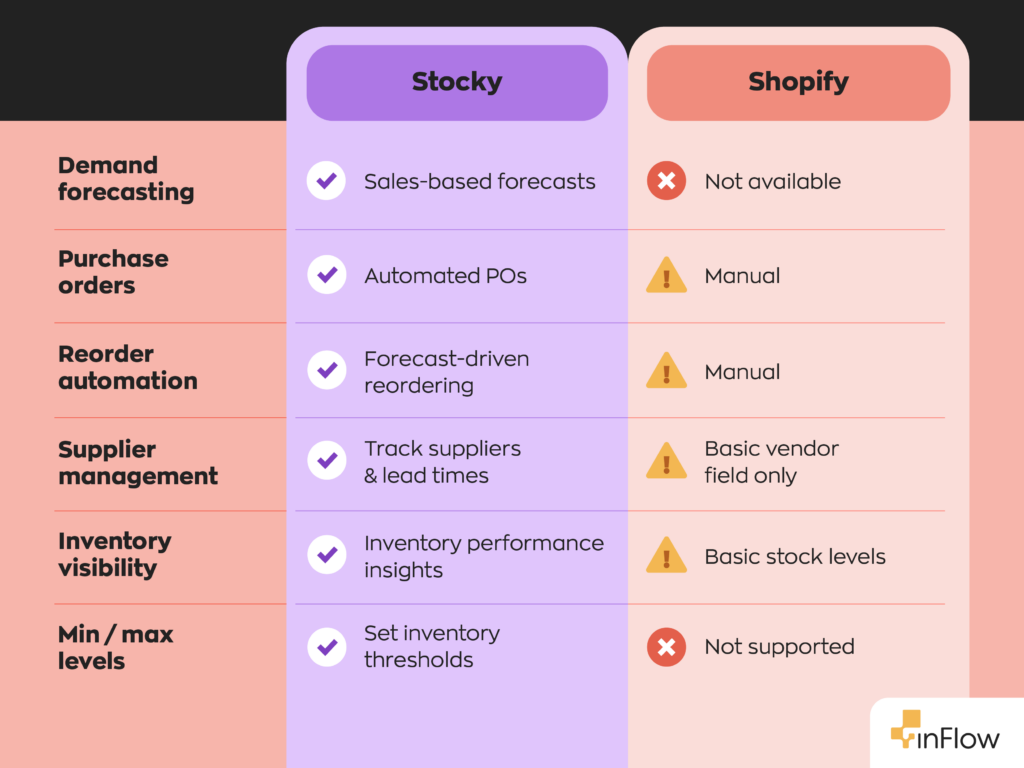
It’s worth noting that Shopify already migrated some features from Stocky. Transfer creation/management moved to Shopify Admin while historical transfers remained in Stocky until June 30, 2025. Shopify Admin transfers still lack Stocky’s replenishment workflow and don’t support setting min/max levels.
Stocky continues to document demand forecasting for purchase orders while it remains available (until Aug 31, 2026).
How the Stocky shutdown will impact Shopify merchants
The discontinuation of Stocky will affect different merchants in different ways, depending on how heavily they relied on the app’s features.
Inventory forecasting disruptions
One of Stocky’s most popular features was its demand forecasting capability. Without this tool, many merchants will lose their primary method for predicting future inventory needs.
Purchase order workflow changes
Stocky streamlined the PO process by automatically generating orders based on stock levels and forecasted demand. Merchants who relied on this automation will need to rebuild their purchasing workflows from scratch.
Inventory planning challenges
Beyond forecasting and purchasing, Stocky provided a centralized view of inventory performance across your entire catalog. Losing this visibility makes it harder to identify trends, spot problems, and make strategic inventory decisions.
How to prepare before Stocky is discontinued
To mitigate the negative impacts of your transition from Stocky, there are some proactive steps you can take:
- Export your data: Start by exporting all critical data from Stocky, including historical purchase orders, supplier information, and inventory reports. Keep in mind that supplier data cannot be exported from Stocky, so you’ll need to document this manually.
- Document your workflows: Take time to map out your current inventory processes. Understanding your existing workflows will help you evaluate alternative solutions. During this process, you may also identify inefficiencies in your workflows, allowing you to make adjustments as you transition to your new system.
- Evaluate alternatives early: Start researching inventory management software now, while you still have time to evaluate features, test integrations, and compare pricing properly. If you give yourself ample time to test different systems, you won’t be forced to make a snap decision and get stuck with software that doesn’t suit your needs.
- Test integrations: If you’re considering third-party inventory software, test the Shopify integration thoroughly. Make sure data syncs correctly and the software can handle your specific requirements.
Best Stocky alternatives for Shopify
When evaluating Stocky alternatives, you’ll find options ranging from Shopify’s built-in tools to sophisticated inventory management platforms. There’s no one-size-fits-all solution out there. The key is to evaluate your specific needs to find something right for your business.
Built-in Shopify inventory tools
Shopify’s native inventory features have improved significantly in recent years. For basic inventory tracking, simple transfers, and straightforward purchasing, Shopify Admin might be sufficient for smaller retailers.
However, Shopify’s built-in tools lack many features that Stocky users have come to rely on. For instance, there’s no automated demand forecasting, limited reporting capabilities, and minimal support for complex multi-location operations.
Dedicated inventory management software
Specialized inventory management platforms offer the most comprehensive replacement for Stocky’s functionality. These systems typically provide advanced forecasting, purchase and sales orders, detailed reporting, and support for complex operations such as omni-channel selling, kitting and bundling.
The key advantage of dedicated software is scalability. While Shopify’s native tools work well for simple operations, specialized platforms can handle thousands of SKUs, multiple warehouses, product variants, and complex purchasing workflows.
Why growing Shopify stores need more than native inventory tools
As we’ve mentioned, Shopify’s built-in inventory features are designed for simplicity rather than operational depth. As your business grows, you’ll likely encounter limitations that require dedicated inventory software.
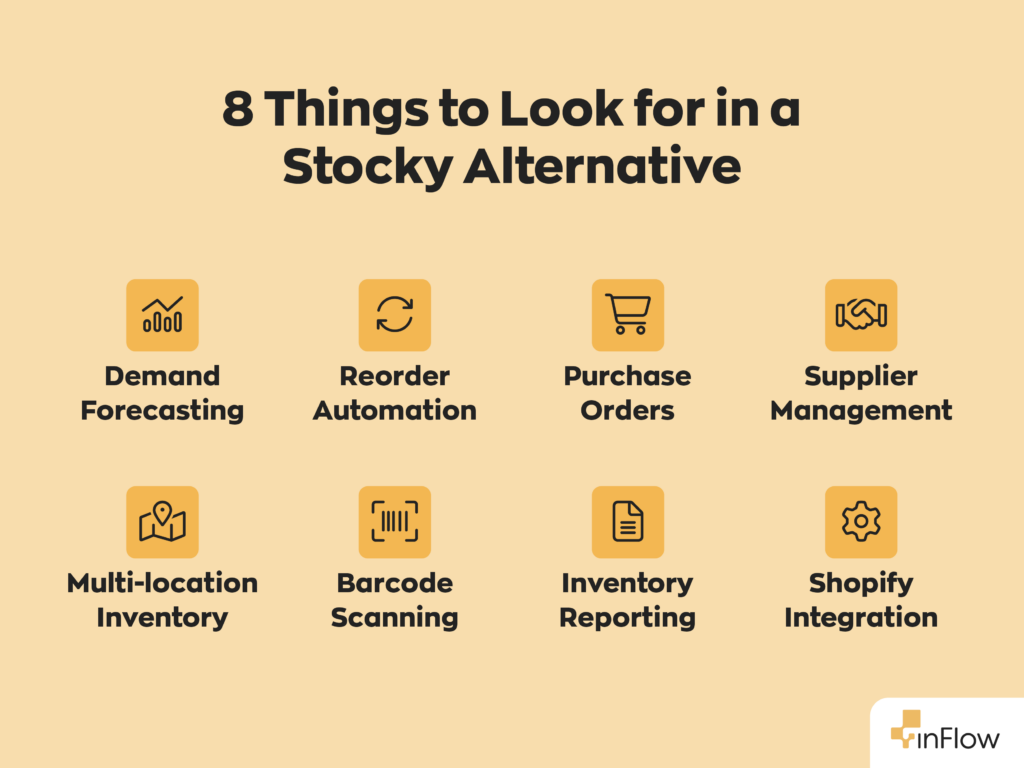
- Multi-location complexity: Managing inventory across multiple warehouses, retail locations, or fulfillment centers requires features that Shopify’s native tools don’t provide.
- Advanced purchasing workflows: Growing businesses need more than basic purchase order creation. You need tools that can analyze supplier performance, optimize order quantities, and coordinate with multiple vendors simultaneously.
- Barcode scanning and inventory management features: Efficient inventory control requires barcode scanning, pick list generation, cycle counting, and other features that aren’t available in Shopify’s native inventory tools.
- Detailed reporting and analytics: Making informed inventory decisions requires detailed reporting on product performance, supplier metrics, carrying costs, and other key indicators that Shopify’s basic reports don’t provide.
Using inFlow as a Stocky alternative
inFlow offers a comprehensive alternative to Stocky for growing retailers. Unlike basic inventory apps, inFlow provides the depth businesses need as they scale. In fact, every feature missing from Stocky can be found in inFlow.
- Purchase order management: inFlow streamlines purchase order creation by notifying you when items hit their reorder points, allowing you to batch-generate the necessary orders with a few clicks. You can manage multiple suppliers, track order status, and receive inventory directly into the system.
- Demand forecasting: Our software supports reorder-point-driven replenishment. inFlow helps you determine those reorder points by suggesting optimal levels based on your sales velocity and supplier lead times. For advanced forecasting beyond reorder-point logic inFlow integrates with StockTrim, which offers advanced AI demand forecasting.
- Barcode inventory management: We know how important barcodes are for inventory management, which is why we have a built-in barcode system, that allows you to create, print, and scan barcodes for receiving, picking, packing, and cycle counting.
- Multi-location support: Whether you have multiple warehouses, retail locations, or fulfillment centers, inFlow provides visibility and control across all locations. We also offer support for omnichannel sales fulfillment, which is especially helpful for retailers with more than just a Shopify store.
- Shopify integration: Most Stocky users were drawn to the app because it was native to Shopify. This meant no hassle of juggling multiple software solutions that would require double-entry. Thankfully, inFlow integrates seamlessly with Shopify, automatically syncing inventory levels, processing orders, and updating stock counts.
How to choose the right inventory software to replace Stocky
To find the right Stocky alternative, consider your current needs and future growth plans. Key factors to evaluate include:
- SKU count and complexity: If you manage hundreds or thousands of SKUs, you need software that can handle large catalogs efficiently.
- Sales channels: Multi-channel retailers need inventory software that can sync across all platforms, including Shopify, Amazon, eBay, and others.
- Warehouse operations: Consider your fulfillment processes. Do you need barcode scanning? Pick list generation? Cycle counting? Smaller retailers may not need these things early on, but that can quickly change.
- Purchasing complexity: Evaluate your supplier relationships and purchasing processes. Do you work with multiple vendors? Need automated reordering?
- Integration needs: Consider your current tech stack, including accounting systems and shipping software. Make sure the inventory software you choose can integrate easily with these systems.
The goal is to choose a solution that not only replaces Stocky’s functionality but also supports your business growth for years to come.
FAQs
What is the Stocky Shopify app?
The Stocky app was Shopify’s native inventory management solution designed for merchants using Shopify POS Pro. It provided demand forecasting, purchase order management, supplier tracking, and inventory reporting capabilities that went beyond Shopify’s basic inventory features.
Why is the Stocky app shutting down?
Shopify is discontinuing Stocky as part of a broader consolidation of POS features and a shift toward building inventory capabilities directly into Shopify Admin. The app had also seen limited development in recent years.
When will the Stocky Shopify app be discontinued?
Stocky was removed from the Shopify App Store on February 2, 2026, and will completely shut down on August 31, 2026. After this date, the app will stop functioning entirely.
What are the best alternatives to Stocky?
The best Stocky alternatives depend on your business needs. Options include Shopify’s built-in inventory tools for basic operations, or dedicated inventory management software like inFlow for more complex requirements.
Does Shopify have built-in inventory forecasting?
Shopify provides analytics and guidance to help you forecast order volume and trends, but it doesn’t include the automated demand forecasting capabilities that Stocky offered.
Can you still use Stocky with Shopify POS?
No, Stocky is no longer available for new installations as of February 2, 2026, and will completely stop working on August 31, 2026.
How do I export my data from Stocky before it shuts down?
You can export most data from Stocky through the app’s export features, including historical purchase orders and inventory reports. However, supplier data cannot be exported, so you’ll need to manually document vendor relationships before the shutdown.




0 Comments