 Fellow Canadians: All inFlow plans are available in Canadian dollars




Key takeaways
- 1D barcodes are visual representations of data that consist of vertical lines of varying widths. These images can be read by a machine and interpreted as text.
- How you create barcodes for your business will depend on whether or not you use them internally or externally.
- You can generate free barcodes for internal use with an online barcode generator or a free barcode font.
- To generate barcodes that are globally recognized, you are required to purchase GS1-registered barcodes.
- A barcode system consists of 4 main components: barcodes, a barcode printer, a barcode scanner, and barcoding software.
- Creating your own barcodes for internal use is generally very inexpensive. In contrast, obtaining GS1-registered barcodes will involve fees associated with registration and annual renewals.
It’s been 17 years since we first released inFlow. Since then, we’ve spoken with tons of small businesses about how they can improve their workflow. One of our biggest easy wins has always been teaching them how to create barcodes for their products or inventory.
So, for this article, we’ll be doing just that! This post will cover three major subjects:
- An overview of barcodes, including how computers read them.
- How to create barcodes with a barcode font or barcode generator for internal use.
- How to create barcodes through GS1 for external use.
We wanted to keep things simple, so we’ve boiled everything down as much as possible. If you want a more in-depth look at how to start barcoding your small business, check out our Ultimate Barcoding Guide. It covers everything in this article and more! You can also watch our podcast about barcodes below. Otherwise, read on!
Barcode Basics
After speaking with hundreds of small business customers about barcoding, we’ve realized that one of the most valuable things we can show them is how to create barcodes for their products or inventory. But, before we get into how to actually create and use barcodes, let’s go back to basics to give you a full understanding of what barcodes are and how they work.
What is a barcode?
While you may not have made barcodes yourself, chances are you’ve seen them in stores. Who hasn’t had the experience of going to the store and hearing that iconic beep as your item passes through the checkout? Instantly, the computer populates with the name and price of that item. This shared experience can cause the misconception that the barcode itself actually had all of that information embedded within it.
The truth is that 1D barcodes (a.k.a. one-dimensional or linear barcodes) are really just a series of vertical lines in varying widths. These barcodes, commonly used at European and North American retailers, don’t actually store much information about products.
Note* For the sake of simplicity, we’ll be focusing on 1D barcodes in this article, not QR codes.
What happens when you scan a barcode?
When you scan a barcode, the computer interprets the string of vertical lines and then outputs it as text.
The barcode system can recognize that string of numbers and will know to bring up specific details such as product name and price.
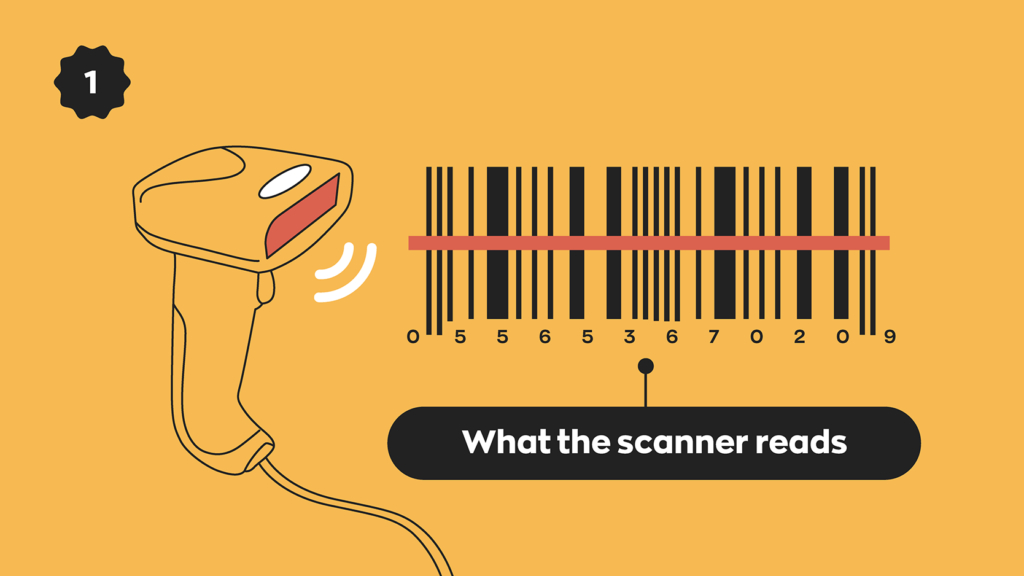
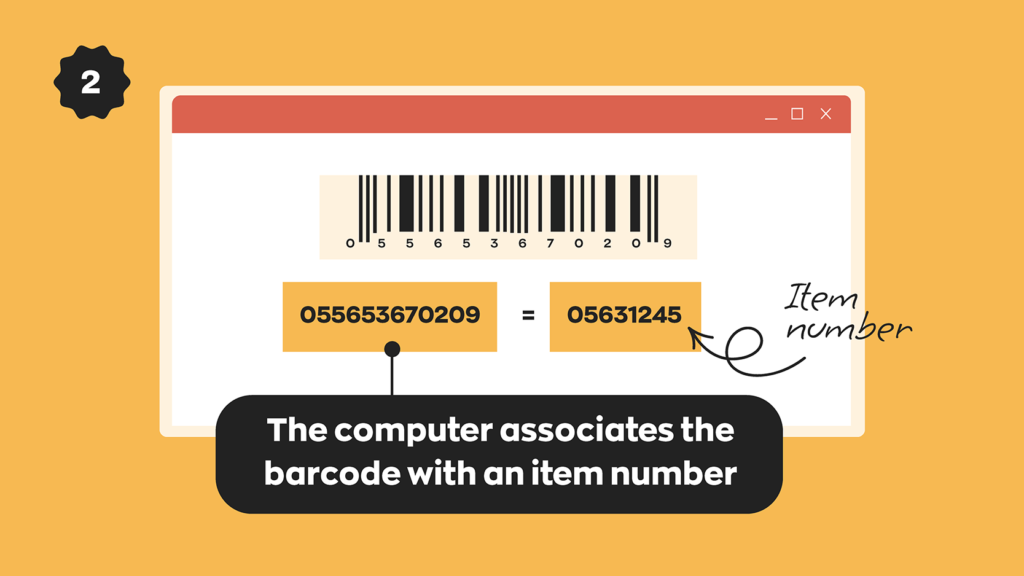
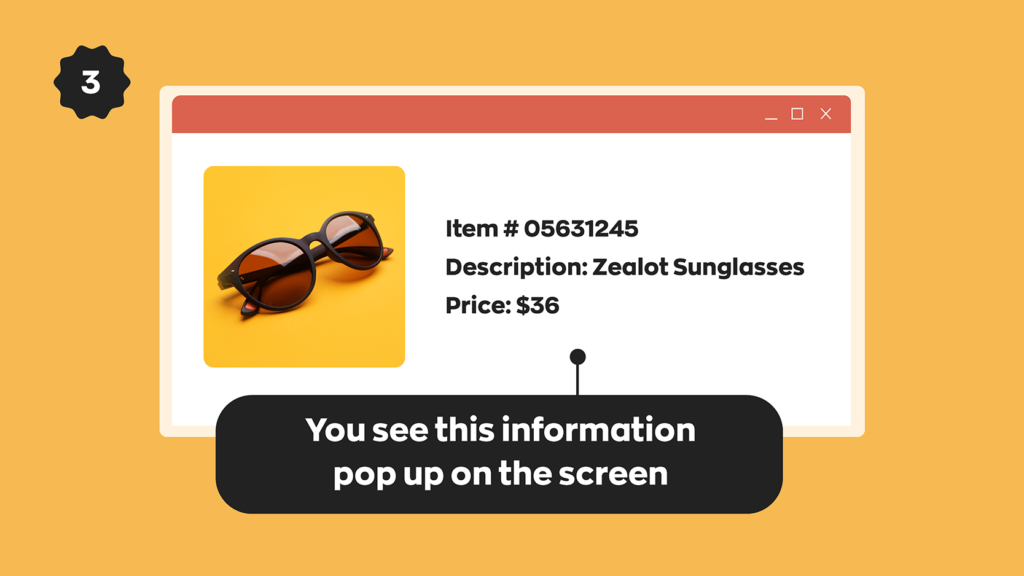
You must establish the relationship between the barcode and that item beforehand. The barcodes you create and use can be generated by your business or with the help of an organization known as GS1, which licenses barcodes to companies worldwide.
Types of barcodes
The types of barcodes you’ll see are all different. Different barcodes will use different symbology. That symbology will determine the number of characters it can include and what specific set of characters it can display. Retailers use codes like UPC-A (12 digits) or EAN-13 (13 digits), and you’ll often see Code 128 (which can display all 128 ASCII characters) represent the tracking codes on packages.
We put together this handy guide for anyone starting out in barcoding. It covers some of the most widely used barcoding acronyms, so be sure to check it out.
Generate barcodes in-house (internal use)
Creating your own barcodes for your products or inventory is easier than you think. It’s also a great option if you need barcodes for internal use, such as small-business inventory tracking or asset tracking. Before we get into how to generate your barcodes, let’s quickly go over how to structure the data you’ll be encoding.
It’s up to you how to break down the actual barcodes, but you’ll probably want to build in a hierarchy so that you can see, at a glance, what kind of product a barcode is for. The UPC-A symbology gives you 12 total digits, but only the first 11 contain message data. The 12th digit is called the “check digit.” Its function is to verify the barcode has been read correctly. If you’re generating your codes manually, you can create a check digit with a bit of math.
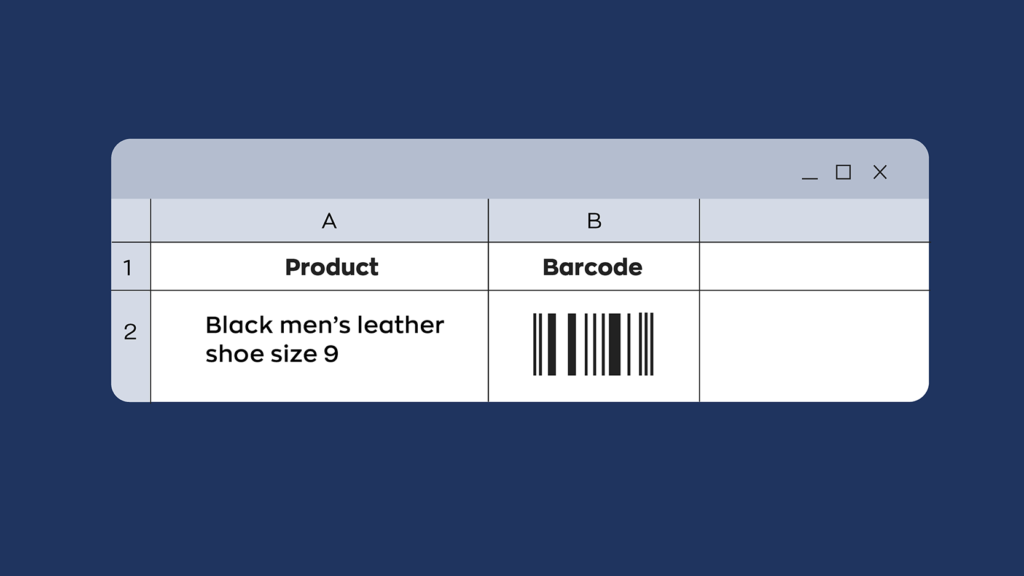
That’s the most basic breakdown of a UPC-A barcode, but you can also do more advanced stuff by breaking down the other 11 digits into sub-categories. That way, you can glean more information about a product, even if you only have the 12-digit code. Here’s a quick example of what an Archon Optical barcode for Ghost glasses could look like:
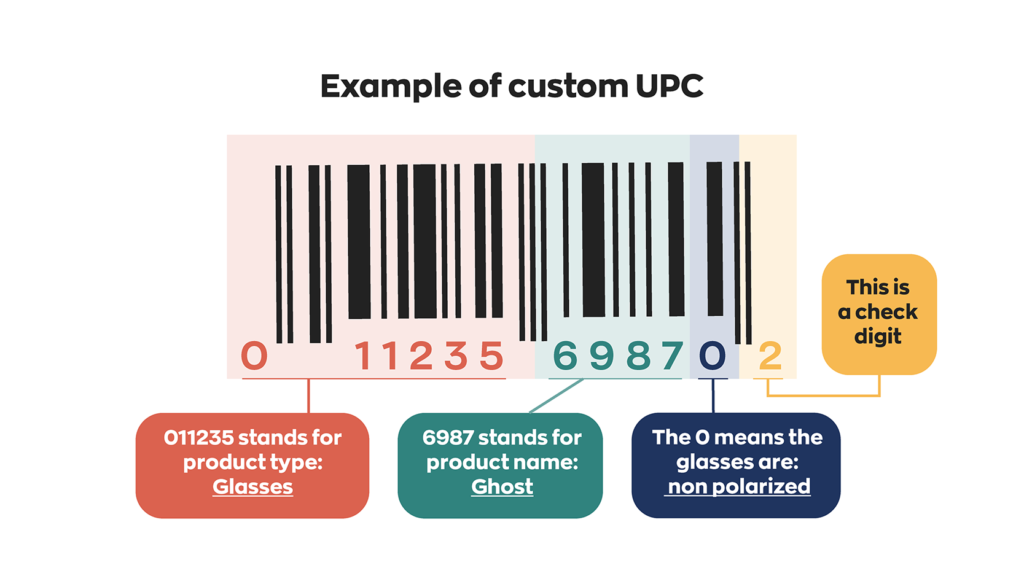
In the above example, we used numbers only, but it’s important to remember that you can create barcodes with other characters, and not all barcodes need check digits. The check digit is an error-checking feature of certain barcode symbologies such as UPCs. Other symbologies, such as CODE39 or CODE128, don’t use them.
This option is perfect if you want to create barcodes for internal inventory management or product labeling in your small business. If you need to create barcodes that other organizations will recognize, you’ll need to register them through GS1.
Once you’ve settled on a product hierarchy and have your data ready to encode, you have a couple of different potential avenues.
Free online barcode generator
Most free online barcode generators are easy to use and feature a straightforward interface for inputting the product or inventory data you need.
- Select the type of barcode that you would like to generate, such as Code 39 or Code 128, for example.
- In the input field, enter the data you want to encode into the barcode. The data can be numbers, text, or both.
- Configure settings, such as the barcode size, resolution, and color.
Which characters you can use will depend on the characters that are supported in your chosen barcode type, so keep this in mind. How much or how little you can customize your barcodes will depend on the generator you’re using.
Free barcode font
A great alternative to using a barcode generator would be a free barcode font, like our handy dandy inFlow Code 39 font. This font allows you to write your own barcodes in a program like Microsoft Word. It works just like any other true-type font.
- Download the font to your computer
- Open the font file and click “Install”
- Choose the font in any program that supports true-type fonts (ex. Word, or Excell)
Free barcode fonts are the easiest and most straightforward approach to creating your own barcodes.
Purchase official GS1 barcodes (external use)
Registered GS1 barcodes are necessary for anyone looking to sell products at large retailers or on platforms like Amazon. Amazon now requires all listed products without the Amazon GTIN exemption to have a GS1-registered barcode.
Registering barcodes with GS1
GS1 offers different tiers for registering barcodes based on how many you need. The most cost-effective tier for a GS1 US GTIN is $30 for one barcode, with no renewal fee. This is a good option for businesses with just a handful of products. However, a few categories of products aren’t eligible, so make sure to read the GS1 US GTIN page in full before purchasing.
If you need more than nine barcodes, you’re better off purchasing a company prefix. Company prefixes start at $ 250 USD for ten barcodes (as of 2024) and scale to 100,000 or more. In addition, you’ll need to pay an annual renewal fee. For the complete list of prices, head to the GS1 US Company Prefix page. But for now, here’s a breakdown of what barcodes look like at different tiers:
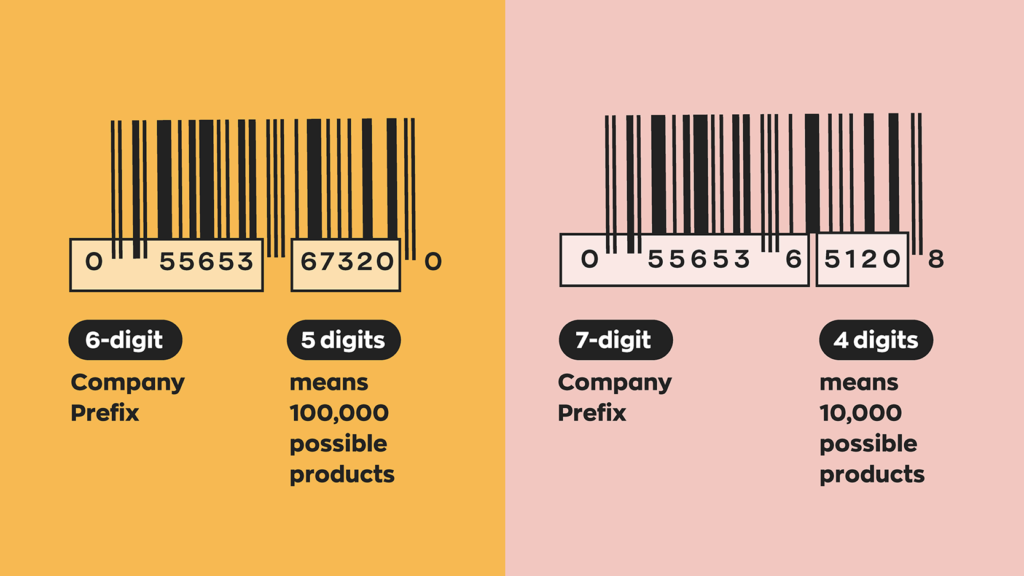
Once you’ve registered a prefix with GS1, you’ll have access to the GS1 US Data Hub | Product (yes, the name is a mouthful). That online tool will help you to generate and track all of the barcodes in your business. When you create barcodes with that tool, they will all be registered, making them eligible to be used at other businesses.
Depending on your location, you’ll need to register a specific barcode type with GS1. For example, India uses GSTIN, North America uses UPC, and Europe uses EAN. Labels can be exported from the Data Hub for printing. However, you can also work with a registered GS1 service provider. They help design and print custom barcode labels for packaging or boxes.
Barcode hardware and software essentials
A barcode is only as useful as the hardware and software it’s paired with. So with that in mind, here are some essentials you should consider in order to get the most out of your barcode system.
Barcode labels and printers
After you create your barcodes, you’ll need to design your product labels. If you’re an inFlow user, you can take advantage of our label designer. We wanted to make it easy for our customers to customize their labels however they want. The label designer also has a built-in barcode generator for those not using registered GTINs.
Once you have your label designs ready, you’ll want to print them using a label printer and attach them to your products for inventory tracking. We recommend the inFlow Portable Printer, a compact printer designed specifically for use in warehouses and inventory management. It prints wirelessly, works seamlessly with inFlow, and comes with a built-in battery that lasts all day.
Barcode scanners
You’ll also want to choose a barcode scanner. You can find wired scanners for under $200 and wireless versions for under $300. These are useful if you scan at a fixed location and don’t want to worry about battery life. However, the best choice for warehouse workers on the go is a wireless scanner that offers mobility to travel down different aisles.
Barcode software
Once you’ve created barcodes and stuck them on products, it’s time to tie those barcodes to product names in the inventory or point-of-sale (POS) system you’re using. Inventory software like inFlow will have specific fields where you can scan barcodes. Instead of typing a name or item number into the computer, you can scan the barcode instead.
With our inventory barcode system, you can fill in the barcode fields yourself or have inFlow automatically generate unique barcodes for your products. Also, you have choices about how to print the barcodes. You can print directly to the inFlow portable printer or a myriad of other compatible printers. The choice is yours.
If you’d like to learn more about how inFlow can create barcodes and labels, check out this video:

Conclusion: Choosing between internal and GS1 barcodes
Are you still deciding whether to create your own barcodes or use GS1-registered ones? It really comes down to whether you want to sell your product at stores other than your own.
For internal inventory management in a small business, creating your own barcodes is simple and cheap. All you need is a computer, some software or font packs, a scanner, and a label printer. Once you have your setup, the costs are about the same whether you create 100 barcodes or 1000. It just becomes more of a time investment on your part. This is an excellent option for smaller shops or if you just need DIY barcodes to help manage inventory.
However, if you want to enable other businesses (especially larger big box stores) to stock your product, you must create barcodes with GS1. That means you’ll have to pay GS1 for the registration and annual renewal fees. Remember, you could always go the single GTIN route and avoid the renewal fee if you just need to create a single barcode.
Recently, we decided to partner with GS1 to set up our Official GTIN Barcode Shop. This will make it easy for people to purchase individual barcodes. We take zero commission on the barcodes you purchase, so you’ll pay the same whether you buy them from us or directly from GS1.
The links in this article point at US-specific resources, but you’ll be glad to hear there are GS1 offices all over the world. So if you’re looking to start barcoding your business and prepare for growth, your local GS1 office is a great place to start.
FAQ
What is the difference between creating your own barcodes and GS1 barcodes?
Creating your own barcodes is free, and they are perfect for internal inventory management, but they can’t be used at other retailers. GS1 barcodes come at a cost but are globally recognized and required for selling on Amazon or in retail stores.
How much does it cost to create barcodes for a small business?
Creating your own barcodes is essentially free using online generators or barcode fonts. GS1 barcodes start at $30 for a single barcode with no renewal fee, or $250 for a company prefix that includes 10 barcodes with annual renewal fees.
Can I use free barcode generators for my inventory?
Yes, free online barcode generators and barcode fonts work great. You can use symbologies like Code 39 or Code 128 to create scannable barcodes for tracking products, assets, or inventory within your business operations.
Do I need special software to scan and manage barcodes?
You’ll need barcode scanning software or inventory management software like inFlow to connect your barcodes to product information. You can use a barcode scanner in Excel; however, it really just works as a high-speed keyboard input.
What barcode format should I use for Amazon FBA products?
Amazon requires GS1-registered UPC barcodes for most products. You cannot use self-generated barcodes for Amazon listings unless you have a GTIN exemption.
How do I print barcode labels for my products?
You can print barcode labels using a standard printer with label sheets, or invest in a dedicated label printer for higher volume. Design your labels in software like Microsoft Word (using barcode fonts) or barcoding software like inFlow, which has a built-in label designer.
Thanks for the interesting article.
Can the barcode include letters? Our SKU numbers are something like EC281. Or is a better to associate a diget only code that would specify the SKU number.
Hi Cal, your barcode can include letters if you use something like our Archon Code39 barcode: https://www.inflowinventory.com/blog/code-39-font-archon-free-barcode/.
The choice of including letters or numbers is really up to your particular business, as the letters and numbers are all the same to the scanner (it reads them as a total number of characters).
Hi I have a question. If I am selling the consignment products from other store, can I put my own 12digits barcode on the product beside UPC also?
I run a small online antiquarian book store. I want a bar code system for internal use only to keep track of sold and unsold titles. There are almost no multiples so I’d need circa 3500 individual barcodes. My sales orders arrive through Amazon and two other bookselling sites and my inventory is held in a tab-delineated database. How would this work with Inflow?
Hi Christie,
inFlow Cloud doesn’t currently sync with e-commerce platforms, but you can import comma delineated spreadsheets for setting up customers/orders/product lists. We’ve got a great set of instructions on how to do any import here: https://www.inflowinventory.com/support/cloud/how-do-i-import-data-to-inflow/
It should be a pretty simple switch to change an tab de-lineated sheet to a comma separated value (CSV) spreadsheet, but our support team would be happy to help if you have any questions: https://www.inflowinventory.com/software-contact-info
If you just need your own barcodes for internal use, then you could generate them with Excel and make sure they’re in the spreadsheet before importing your product list into inFlow. Once inFlow has the barcodes it’s as simple as scanning the barcode on the sales order screen, and the book will appear on the order.
Hi Thomas,
Thanks for the article.
We are a small business that is trying to sell products through a retail store. Would the retail store POS be able to read our internally generated barcodes or do we have to get a UPC generated barcode?
Thanks
Hi Kush,
When selling your own wares elsewhere, you’ll generally want to have a GS1 registered barcode. That ensures that your barcodes won’t clash with any existing ones in the retailer’s system (since GS1’s registration would not allow duplicates).
i want own bar code so guide me
Good info. I have a question about supermarket barcodes.
How are they created? There are multiple items on it and if we did a refund, they scan it and they can see the list of items in it and not just for one item. How did they create that?
Thanks
This is an educated guess, but if you’re talking about a receipt that has a barcode on it, that barcode probably represents the receipt number. Scanning it with their inventory system would then bring up that receipt in their database, which would have all of the items.
Or if you’re talking about the supermarket scanning just ONE item and seeing a list of other items you bought, then that item might have a unique serial or lot number on it. They could use that to bring up the date/time you bought that item, and possibly show any other items you bought on that same transaction.
Hi Thomas,
Thank you for the succinctly written informative article on how to create bar codes. I have a query which i hope you will be able to resolve.
I have a data base of Customer account numbers. For bar code purposes my sequence will include few digits in addition to the Customer account numbers to identify product scheme, brand etc. How do i go about getting my bar code data to correspond one to one with the existing Customer account numbers so that on scanning the bar codes, I will be able to get the associated Customer account number.
I need a barcode only for office inventory (about 60 employees). Is this is a right product for me?
Hi Monica, yes I believe so. We already have a lot of customers using inFlow for asset tracking specifically. We’ve got another article on that here: https://www.inflowinventory.com/blog/asset-tracking-for-small-business/
This article was a great help. We have been approached by a large company to carry our products. Looks like GS1 it is.
Hi,
Want to ask! how can I make a unique barcode for each and every item? for unlimited number of items. can that be done?
Hello Magdi, yes, you can create unique barcodes for each item, and inFlow can actually help you do this automatically. It’s one of the features we have in our web and Windows apps, so that each time you create a new product in inFlow, it can create a unique barcode for it. We even have a special tool to help you print those barcodes out on a regular printer.
If you’d like to try it out, I’d recommend starting a trial from our main site: https://www.inflowinventory.com/
It gives useful information..
Thank you for the guidance.. It does work.
This was very helpful! I wanted to ask you more about this effort and discuss a possible large project/business opportunity involving your bar code and scanner service. Where are you located? I am in Dallas and would love to jump on a 5 minute call if you have a moment.
Hi, Thanks for the knowledge on barcode setup and usage. I want to understand some more details on setup of barcode through GS1. Can you please connect back with me on email id – sharad.contact@gmail.com
First off, this is a great article, very clear and helpful – thanks.
As I work in book publishing, in which we assign ISBNs to books, which are then converted to 13-digit barcodes, I’m familiar with those stripy things. ISBNs are standardised, of course, to the GS1 standard, and there are websites that allow you to generate the barcodes from ISBNs.
However, where I work we also use a different type of code and system for identifying individual copies of security-sensitive logbooks. These were set up before any of us can remember and no one in the organisation now knows the principle behind them! We produce a series of 11-character combinations of letters and numerals and the printer creates barcodes from them. It’s in the form, eg:
20BC0000001
in which ’20’ is the year/edition (2020), ‘BC’ is the two-letter code for the product (Ballast Control Operator’s Logbook, in this case) and ‘0000001’ is the number for an individual copy of the BCO Logbook. There’s no check digit. Somehow, the printer is able to generate the barcodes and they can be scanned at the (third-party-operated) warehouse.
Nevertheless, I’m puzzled how this can work because you only give all-numeral examples and ours contain letters. Plus they are 11 characters long, which also seems non-standard.
Would it make a difference if we had three letters instead of two, or only four numerals at the end instead of seven? And is there a way we can produce and read the barcodes ourselves, or perhaps add information? However they work, we clearly can’t retrospectively change the existing numbers and barcodes because most of them still relate to active logbooks.
I’d really welcome your ideas and expertise on this. Thanks very much.
Hi Stephen, thanks for the feedback.
Good points about the numbers-only barcode examples and the check digits. You can have barcodes with other characters, and not all barcodes need check digits. I’ll update the post in a little while to clarify that.
For now, quick answers are:
You don’t need to have a check digit in all barcodes. They’re an error-checking feature of barcode symbologies like UPC, but they aren’t used in other types like CODE39.
Incidentally, CODE39 does support letters and numbers. I’m not sure which barcode your system is using, but it *could* be something like a CODE39 font. It sounds like you’re using proprietary software right now to generate and print the barcodes right now; if you wanted to try a different way you could try using a barcode font.
We offer a completely free CODE39 font on this blog post:
https://www.inflowinventory.com/blog/code-39-font-archon-free-barcode/
The font works in apps like Microsoft Word so you can type out new barcodes to generate your own. You’d just have to be careful to make the barcodes sequential, so you’d probably want to create some sort of Excel spreadsheet to track all of them if you chose to use the font.
Our software can also create barcodes and automatically sequence them with prefixes, and if you’d like to give it a try, you can book a free demo here: https://www.inflowinventory.com/bookdemo
– Thomas
How can I generate and attach barcode on an identification card?
Hi Mark, our software is meant more for barcoding products. If you wanted to make an ID card, something like DYMO’s software would work well for you. Their software comes free with their printers, and we use the LabelWriter 450 ourselves at our office.
Or you could use our free barcode font, create the ID card template in something like Microsoft Word, and then print and laminate the results.
You can find our free barcode font here: https://www.inflowinventory.com/blog/free-barcode-font-code-39-3-of-9/
GS1 or Homemade that is the question
I need barcodes to ship inventory to Amazon and Walmart among others.
Which way should I safely go ?
Hi Bob,
If you’re sending your barcodes for use elsewhere — basically outside of your own offices, then it’s wiser to use GS1. It’s more expensive, but it ensures that you have a unique barcode that won’t conflict with any of the other products in Amazon’s (gigantic) database.
There are also resellers of existing GS1 barcodes, but if you register directly through GS1, you have the guarantee that your barcodes are legitimate and aren’t registered to some other product.
Hi sir, I want to create barcode scanner, where it reads and displays all the details, can you guide me.
Thanks
Difference between GSTIN and UPC
Hi Javed, GSTIN stands for Goods and Services Tax Identification Number, and it looks like it’s specific to India. It’s 15 digits long.
The UPC is a Universal Product Code and it’s usually assigned to goods for sale in North America, and it’s 12 digits long. Europe usually deals with the EAN, which is a modified UPC)
Hi I work at an large airport car park in the uk . We can have up to 17000 cars here at any one time . Our programme starts when we create a booking . This will give us a ref number example.
YBMSB010000
All refs are YB
Customer initials. MSB
Number automatically increases every time a new booking gets created then creates a one off barcode for this customer . We create other adhoc labels to show were key or car is moved to.
To amend details on a booking is accessed via F5
To create a booking access via F4
To scan key or car to a new location or driver access via F7
To audit key or car use F8
Our programme is written and looked after by a computer company but they only add things or remove things when we ask them to as we can not access there hardware.
I,m not looking to work on my own place of work . But my wife works in a care home
And there are 200 residents who take medication . The staff who hand out the meds do occasionally make errors. So I have said to my wife I would look into getting the best software that can update meds info as and when needed by for any resident. Description below
Steve Smith Jones
Date of birth
Date entered a certain unit
Medication 1
Medication 2
Medication 3
Medication 4
Date started dd/mm/yyyy
Date ending did/mm/yyy
All the above info would be amendable as and when by senior staff qualified to issue meds. But bar code would be unique to one person for life in care home.
Do you think this could created on Microsoft 10. Or 365
Cheers
Colin Walker
Hi my name is Emma I have created my barcode ,I want to fix it on my product infor on web /interment so that if it is scanned it brings the product infor or name and company , how do I do it?
Hi Emma, that use case that you described is why we made software like inFlow. You need software that will take a barcode and associate it with a specific product record when scanned. inFlow can do that for you, and more. You can start a free trial here to try it for yourself: https://www.inflowinventory.com/
I want to list product on Amazon .Which is barcode is best for that ,gs1 or self-made?
Hi Sherry, you’ll need GS1 barcodes for listing on Amazon.
Hi ! I m PK. i hope you can answer my problem is, everytime i scan my barcode and got the result with addtional alphabet in front of my barcode number . what should i do to removed that alphabet ?
Scanning barcode is 63025033 but the result after scanning is A63025033
We have purchased barcodes , now we want to generate labels and want to put data of product .
how we can put data on bar codes and where we can register bar codes ,
we need if some one scans bar code the proeuct data should pop up
please advise
thanks
upender
I need bar codes for my products to sell in amazon. can i print this and stcik them to the products ?
Hi Colin,
You could handle something like that with Excel, but it’s harder to track when records were changed.
Something like this could be handled by inFLow, although it wasn’t specifically designed for the medical industry.
You could create each patient as a customer in the program, and then “sell” to them each time they’re given medicine.
On each sales order you could include the medications provided, and the date of the sales order would show when they were given the medicine.
The sales records could also show when they started taking each medicine, although you’d have to generate a report to see that.
That’s my advice for an inFlow-related solution, but there is of course a world of software specialized for the medical/pharmaceutical industry, and I’m afraid I don’t have experience to share there. Sites like Capterra might be able to help you with that.
Hi Maria: you would need to register some official barcodes with GS1 in order for them to work on Amazon.
Can I create QR codes?
Hi Shawn, certain barcode generators can also create QR codes as well. Our other posts highlights three of the best barcode generators: https://www.inflowinventory.com/blog/top-free-barcode-generator/
I have a bar code number and I need to generate the barcode itself. Can I generate the Barcode from the number
I’m setting up a convenience store that will be selling both commercial products and our own items, in the store only. We won’t be selling our items other than through this convenience store. Is there a way that I can generate internal UPC codes that would not be used outside of our store, and guarantee that I would never have to worry about getting in a product from some manufacturer that would duplicate that number? I don’t need to register our codes because they would not be used outside of our system, but don’t want to risk using a code and then someday we start selling a new product that uses a barcode we’ve been using internally.
Good question, Tony.
If you’re in North America then the products you stock will use UPCs. If you’d like to just use barcodes internally then the safest bet would be to use a different symbology for your own internal product barcodes. That way you can pretty much guarantee that any outside product wouldn’t replicate them. CODE-128 is a popular symbology you could use for this.
Very helpful! Super pleased
Info for make barcode
How do I create a bar code, o purchase a Bar Code? How does it work.?
Hi,
Thank you for the very helpful topic and explanation. I have question and would appreciate your answer. I am a bit wounder how does the ean dode works with the gift cards. The same code is used for a particular gift card. How the used gift card is marked as used one. How the store knows that that specific gift card is used while all the cards have the same code number?
Thanks,
Hasina
Hi Hasina, good question. In those cases it’s likely that the systems use two codes: a SKU to recognize the general type of gift card (ex. $50 gift card) and then each gift card would also have its own unique serial number. It’s the serial numbers that would differentiate one $50 gift card from another.
Hi we are a manufacturing company (food industry). I wanted to know if the data is stored and then the barcode is generated or if we generate the barcode and then save the data. I wanted to save a lot of data like batch number, production date, expiry date, product name, and size in a single code.
Hi alisha,
Thanks for reading! To answer your question you would generate a barcode, then once the barcode is generated you would connect that barcode number to your product in your database. We’ll use inFlow as an example. First I would create a new product and fill out all the information within inFlow. Then I would generate a barcode and put that number in the appropriate field in the product information. Now once I scan the barcode all of my product information can be pulled up automatically.
Hope this helps,
Jared
Thank you for all this information. Now, I have a question.
How barcodes determine the return value of a can? Here I am talking about the “Refund $0.05” at Reverse Vending Machine.
Would it be possible to create a barcodes to have a return value of $1.00 for a can? If so, how would you proceed?
Thank you,
Hi Bob,
Thanks for reading! Barcodes on cans have registered GS1 barcodes so when a reverse vending machine scans those barcodes they know exactly what they’ve scanned. There would be no way of changing that information with a new barcode. Hope this helps.
Cheers,
Jared
I’m wanting to set inventory tracking on job sites to build a cost for installation of pieces. Also , to track vehicles and warehouse items.
Inflow sounds like it would be a better option to create this ourselves vice buying a program . Am I correct.?
Hi Velvajean,
Thanks for stopping by! From what you’re saying inFlow would be a perfect fit for you. A massive chunk of our customers work on job sites and use inFlow to do the very thing you’re describing. I would encourage you to reach out to one of our sales representatives. You can walk them through your workflow and needs, and they’ll be able to tell you whether or not inFlow would be a good fit for you!
Cheers,
Jared
Can you create your own barcode as a distributor for products that already have a manufacturers barcode?
And could you use these barcodes instead of the manufacturers barcode to put the products in to Amazon or other selling platforms?
Hey Rob,
Thanks for stopping by! If you want to sell your products on Amazon, you will need to purchase UPC barcodes for the products you’re selling, but only if they don’t already have one. So, for example, let’s say I was buying Ninja Blenders in bulk with the intention of reselling them through Amazon. Since these products already have UPC barcodes, you would use those barcodes. Now let’s say I was buying blenders from an ODM manufacturer and were branding them with my own brand. In this case, you need to buy UPC barcodes for these products in order to have them listed on Amazon.
I hope this helps.
Cheers,
Jared
I would love to talk to someone about it more over the phone!
Hey Ashley,
Thanks for reading. I’m not sure how you’ll be using barcodes, but if you want to talk to our sales, they can walk you through how inFlow integrates with barcodes. I hope this helps.
Cheers,
Jared
I want to be able to scan barcodes when we are at consumer shows and then have a report at the end of it so I can adjust stock levels and use it to reorder stock.
Works this system work for this?
Hi Zarina,
It sounds like inFlow might be a good fit for you. We have a built-in barcode system, ability to generate reports, adjust stock levels and set reorder points.
If you want to know for sure whether or not inFlow would be a good choice reach out to our sales team, and walk them through your workflow. From there they’ll let you know for sure whether or inFlow would work for you.
Cheers,
Jared
We are a small winery and would like to sell our wines to a few local retail stores. Only need about 10 barcodes—is it necessary to use GS1 codes?
Hey Janice,
Thanks for reading! That’s a great question. The short answer is it depends. Technically, it’s not necessary to have GS1 barcodes to sell your wine to local retailers, but a lot of retailers might require them. You would have to check with the stores you’re looking to supply. Smaller mom-and-pop shops would probably be more open to purchasing your wine without a barcode and then just generating their own barcodes for their own inventory management. I hope this helps!
Cheers,
Jared