




Key takeaways
- A bonded warehouse lets businesses store imported goods without paying duties upfront.
- Businesses that use bonded storage improve cash flow by deferring customs costs until they sell, export, or release the goods domestically.
- Public and 3PL bonded warehouses are typically the most practical options for SMBs, while private bonded facilities usually only make sense at very high volumes.
- Although bonded storage costs more per square foot, the ability to defer duties often outweighs the higher warehousing fees.
- Bonded warehouses allow limited operational activities like sorting, repackaging, and relabeling, while free trade zones (FTZs) support light manufacturing and assembly.
When an expensive shipment arrives, the last thing most businesses need is a massive customs bill to pay. What if I told you there was a way to defer these payments until absolutely necessary? Bonded warehouses and free trade zones offer this flexibility, allowing you to store goods without paying duties upfront, giving you more control over when those costs hit your books.
For growing businesses, this isn’t just about delaying payments; it’s about gaining control over your cash flow and supply chain timing. Let’s explore how bonded warehouses and free trade zones work and whether they make sense for your operations.
What is a bonded warehouse, and why do businesses use it?
A bonded warehouse is a secure, customs-supervised facility where you can store imported goods as bonded inventory without paying duties and taxes immediately. Here’s how it works. When your goods enter a bonded warehouse, they’re technically still considered “in transit” from a customs perspective, even while they’re stored within the facility.
This setup not only enables better control of cash flows but also lets you perform operations such as sorting, repackaging, and relabeling while keeping your operation agile. You can release goods for domestic sale (paying duties then), export them to other markets (typically duty-free), or even return them to the country of origin if your needs change.
Bonded warehouses become particularly valuable when you’re testing new markets, dealing with seasonal demand, or managing cash flow constraints that make it challenging for small- to medium-sized businesses to absorb large upfront duty payments.
Types of bonded warehouses and choosing the right one
There are several options to consider if you’re shopping for a bonded warehouse, each with its own advantages.
- Public bonded warehouses offer shared space and are typically the most affordable option for SMBs. Since you share the facility with other importers, costs remain manageable.
- Private bonded warehouses provide exclusive use but require a significant investment. These solutions are geared more toward large companies that can justify the overhead with large inventory volumes. Most SMBs find these impractical unless they have substantial, consistent imports.
- 3PL bonded warehouses are a one-stop shop for all your logistics needs. These providers handle not just storage and duty deferment but also inventory management, order fulfillment, and customs documentation. ideal for businesses wanting to outsource complex logistics operations.
- Government-owned facilities exist in some locations but are less common and may have limited availability or services.
Key factors to consider when evaluating bonded warehouses
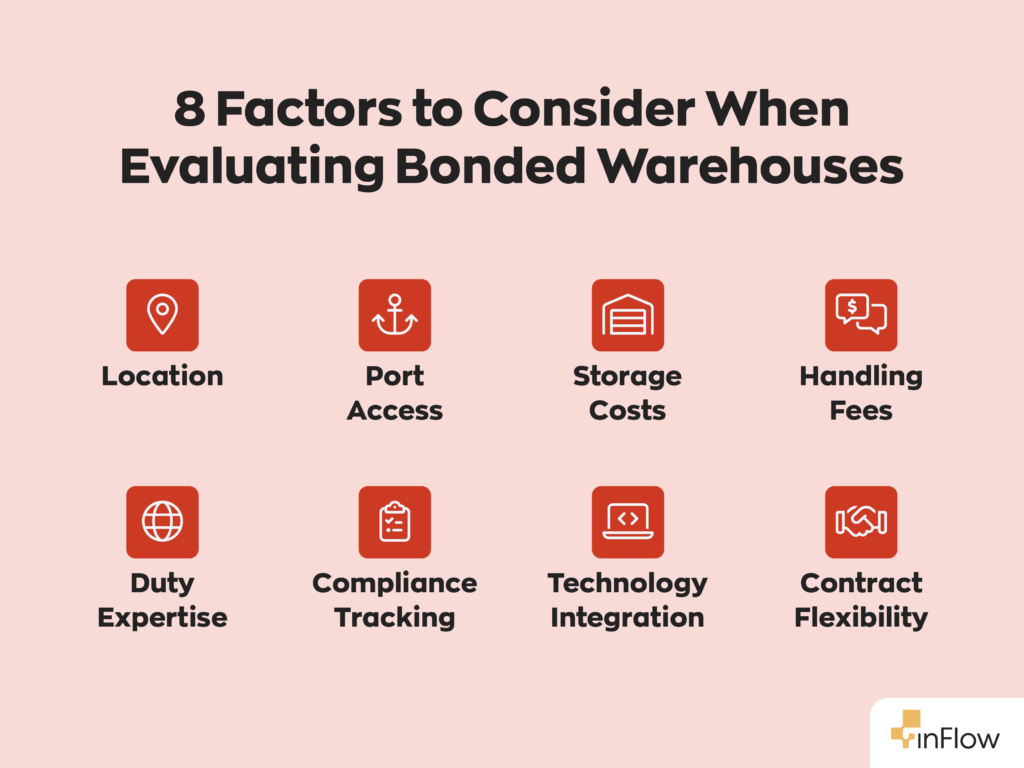
When evaluating your options, you need to consider every aspect of your business’s inventory management process. This will determine what will influence your decision. Here are some key factors to consider.
- Location matters: Choose facilities near major ports or logistics hubs to minimize logistics costs. Consider both your inbound supply chain and outbound distribution when evaluating locations.
- Cost structure extends beyond storage fees: Factor in handling charges, customs documentation fees, insurance, and any value-added services. While bonded storage costs more per square foot than regular warehousing, the duty deferral benefits often justify the premium.
- Compliance capabilities are non-negotiable: Ensure your chosen facility maintains proper certifications, follows required documentation procedures, and has experience with your specific product categories and regulations. Bonded storage is only helpful if it’s compliant, otherwise it becomes a liability.
Cost comparison: bonded vs non-bonded storage
Here’s where the math gets interesting. Let’s say regular warehouse storage costs $5-8 per square foot annually, while bonded storage can run $12-20 per square foot. That seems expensive until you consider the alternative.
With non-bonded storage, you pay duties immediately. For instance, let’s say you’re paying between 10% and 25% on a $100,000 shipment. That could mean $15,000- $25,000 in upfront duties. Even at premium bonded storage rates, you’d need to store goods for years before the storage costs exceed those immediate duty payments.
While you may not be saving that money forever, the real advantage comes from deploying the money from the deferred duty elsewhere for activities such as marketing campaigns, inventory expansion, or growth opportunities that could generate returns exceeding your storage costs.
Best practices for managing bonded warehouse inventory
Utilizing bonded warehouses offers significant benefits, but they also pose challenges when managing inventory effectively. Here are some best practices for managing bonded inventory.
- Implement barcode automation to ensure accurate tracking of inventory duty status and location. Manual tracking in bonded environments exposes you to costly errors.
- Maintain meticulous documentation for customs authorities that require precise records of all movements and transformations. Establish regular audit procedures to catch discrepancies early, before they affect your operations.
- Monitor duty payment timing strategically by tracking market conditions, cash flow, and inventory turnover to optimize when you release goods from bonded status. Timing is everything when releasing bonded inventory.
- Plan for compliance changes as regulations evolve. Staying current helps avoid penalties and operational disruptions.
Bonded warehouses vs free trade zones
Many businesses mistakenly assume bonded warehouses and free trade zones are the same. However, this is not the case. While both offer duty deferral, bonded warehouses and free trade zones (FTZs) serve different purposes. Bonded warehouses follow standard customs processes with deferred payment and typically offer storage terms of 1 to 5 years in the US and indefinite storage options in the EU/UK.
It’s important to note that bonded warehouses are “inside” customs territory, which limits you to basic operations such as sorting, repackaging, and relabeling. FTZs, on the other hand, operate as areas outside normal customs territory, permitting more extensive manufacturing & assembly.
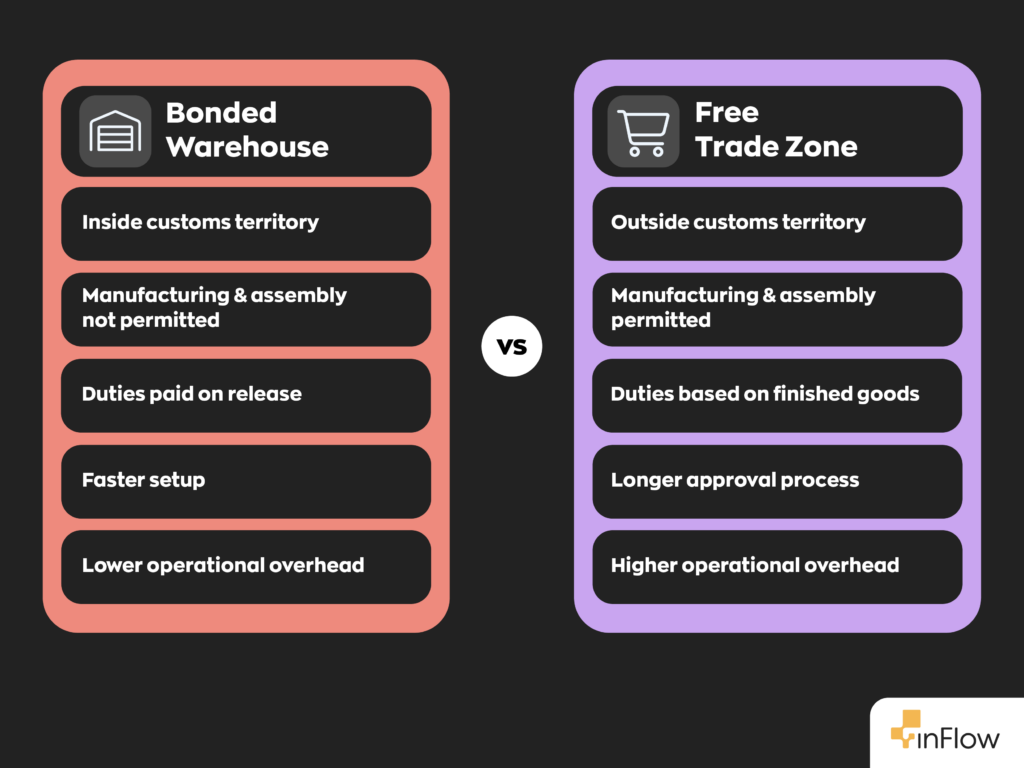
If you need complex assembly or manufacturing operations, FTZs would be a better option. For straightforward storage with basic handling, bonded warehouses are often simpler and more cost-effective.
Industries that benefit most from bonded storage
There are a ton of different industries that can benefit from bonded warehouses. For example, electronics companies use bonded warehouses to store components and finished products, enabling rapid responses to shifts in market demand. This versatility helps these companies combat long manufacturer lead times while keeping upfront expenses low.
Fashion retailers, on the other hand, leverage bonded storage for seasonal inventory. They can safely store winter coats in summer and release them when demand peaks.
Automotive parts suppliers benefit from positioning inventory close to assembly plants without immediate duty commitments, while luxury goods importers use bonded storage to manage high-value inventory without the substantial upfront tax burden.
There are numerous ways businesses can utilize bonded warehouses, and this applies to large corporations and small to medium-sized businesses alike.
Streamlining bonded storage with inventory management software
Modern warehouse management software, such as inFlow, is crucial for bonded operations. Our system can track inventory status (bonded vs. duty-paid), manage multiple locations, and record various duty amounts so you can track the true landed costs for all your inventory.
Our software also integrates with other solutions, such as accounting platforms and logistics providers. These integrations reduce manual data entry, minimize compliance errors, and ensure that all stakeholders have real-time inventory information.
For businesses managing complex bonded warehouse workflows, inventory management software is a must-have.
Making bonded warehouses work for your business
The secret to bonded warehousing is viewing it not as an additional cost but as a strategic tool to optimize cash flow and enhance supply chain flexibility. Whether you’re a wholesaler or distributor looking to optimize inventory costs or a manufacturer seeking more flexibility in your supply chain, bonded warehouses could provide the competitive advantage you need to scale your business globally.
FAQ
What is a bonded warehouse and how does it work?
A bonded warehouse is a customs-supervised facility where you can store imported goods without paying duties upfront. Your goods remain “in transit” from a customs perspective, allowing you to defer duty payments until you release them for domestic sale, export them duty-free, or return them to the origin country.
What are the main benefits of using a bonded warehouse for international trade?
Bonded warehouses improve cash flow by deferring customs duties, provide inventory flexibility for market testing, and allow basic operations like sorting and repackaging. You only pay duties when goods enter the domestic market, giving you better control over timing and costs while maintaining supply chain agility.
What’s the difference between a bonded warehouse and a free trade zone?
Bonded warehouses operate within the customs territory with limited operations (storage, sorting, repackaging), while free trade zones exist outside the normal customs territory and permit manufacturing and assembly. Bonded warehouses are faster to set up and more cost-effective for basic storage needs.
How much does bonded warehouse storage cost compared to regular warehousing?
Bonded storage typically costs $12-20 per square foot annually, compared with $5-8 for regular warehousing. However, this premium is often justified by duty deferral benefits. For a $100,000 shipment with 15% duties, you’d save $15,000 upfront, which far exceeds storage cost differences.
Which businesses benefit most from bonded warehouse storage?
Electronics companies managing component inventory, fashion retailers with seasonal goods, automotive parts suppliers, and luxury goods importers benefit most. Any business dealing with high-value imports, seasonal demand, or cash flow constraints can leverage bonded storage for a competitive advantage.
What should I look for when choosing a bonded warehouse provider?
Consider location near ports or logistics hubs, comprehensive cost structure (storage, handling, documentation fees), compliance certifications, and technology integration capabilities. For SMBs, public or 3PL bonded warehouses typically offer the best balance of cost and service.
0 Comments